
AWS AgentCore Cost Optimization: Keep Your Agent Bills Under Control
Agentic systems have emergent costs — every reasoning step adds tokens, every tool call adds latency and Gateway ops, every memory event adds a line to your bill. Here's how to architect 100 agents without a surprise invoice at month-end.
Table of Contents
- The Problem with Agentic Costs
- AgentCore Pricing Layers
- Layer 1 — Token Optimization (Prompt Caching, Distillation, Batch)
- Layer 2 — Model Tiering for 100 Agents
- Layer 3 — Step Budget & Tool-Call Governance
- Layer 4 — Memory Optimization
- Layer 5 — Observability Sampling
- Layer 6 — Session Lifecycle & Network
- Real-World Cost Scenarios
- Top 5 Pitfalls
- Summary
The Problem with Agentic Costs
Classic serverless pricing is predictable. You know your Lambda invocations, your API Gateway calls, your DynamoDB reads. You can budget to within 10% before going live.
Agentic systems break that predictability. Agent costs are emergent — they depend on how many reasoning steps the agent decides to take, how long the context window grows across a session, which tools it invokes and how many times, and how often it backtracks when a tool call fails. A task you estimated at 3 LLM calls might take 11 in production when a tool returns an unexpected response and the agent retries.
The worst part: you are not paying a single meter. With Amazon Bedrock AgentCore you are paying across five to eight separate billing dimensions simultaneously — Runtime vCPU-seconds, Gateway operations, Policy authorization requests, Memory events, Observability CloudWatch ingestion, and LLM inference tokens on top of all of that.
⚠ Key Insight
The cost of your agent is not simply input tokens + output tokens. A 3,000-token user query that triggers 6 tool calls, writes 4 memory events, and runs for 18 seconds of CPU time will cost dramatically more than the token price alone suggests.
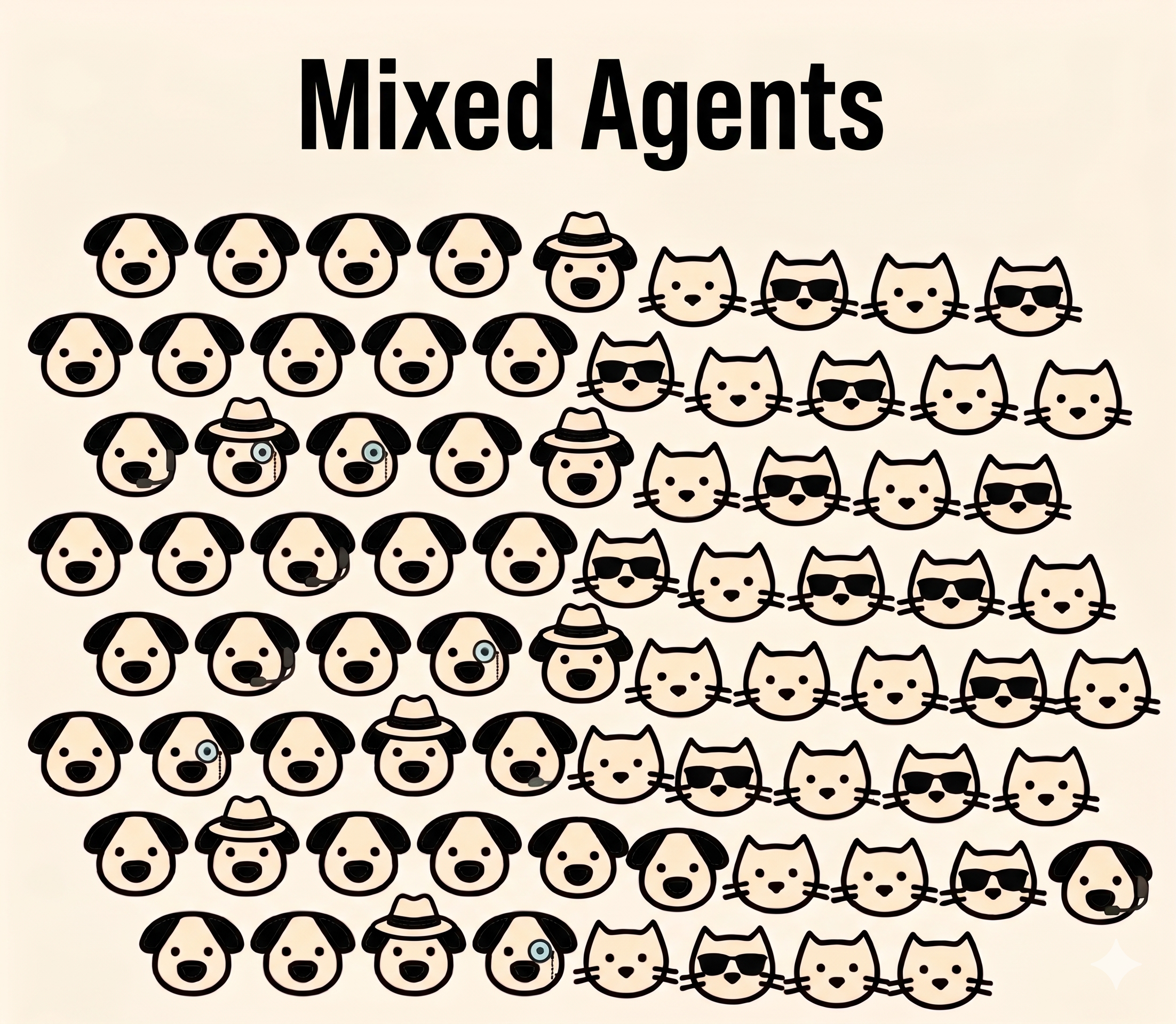
Mixed Agents — 100 agents without model tiering strategy. Every agent runs the same model, every agent costs the same — regardless of task complexity.
AgentCore Pricing Layers
Before optimizing anything, you need to understand what you are actually paying for. AgentCore offers consumption-based, modular pricing — you only activate and pay for the components you use. Here is a quick reference:
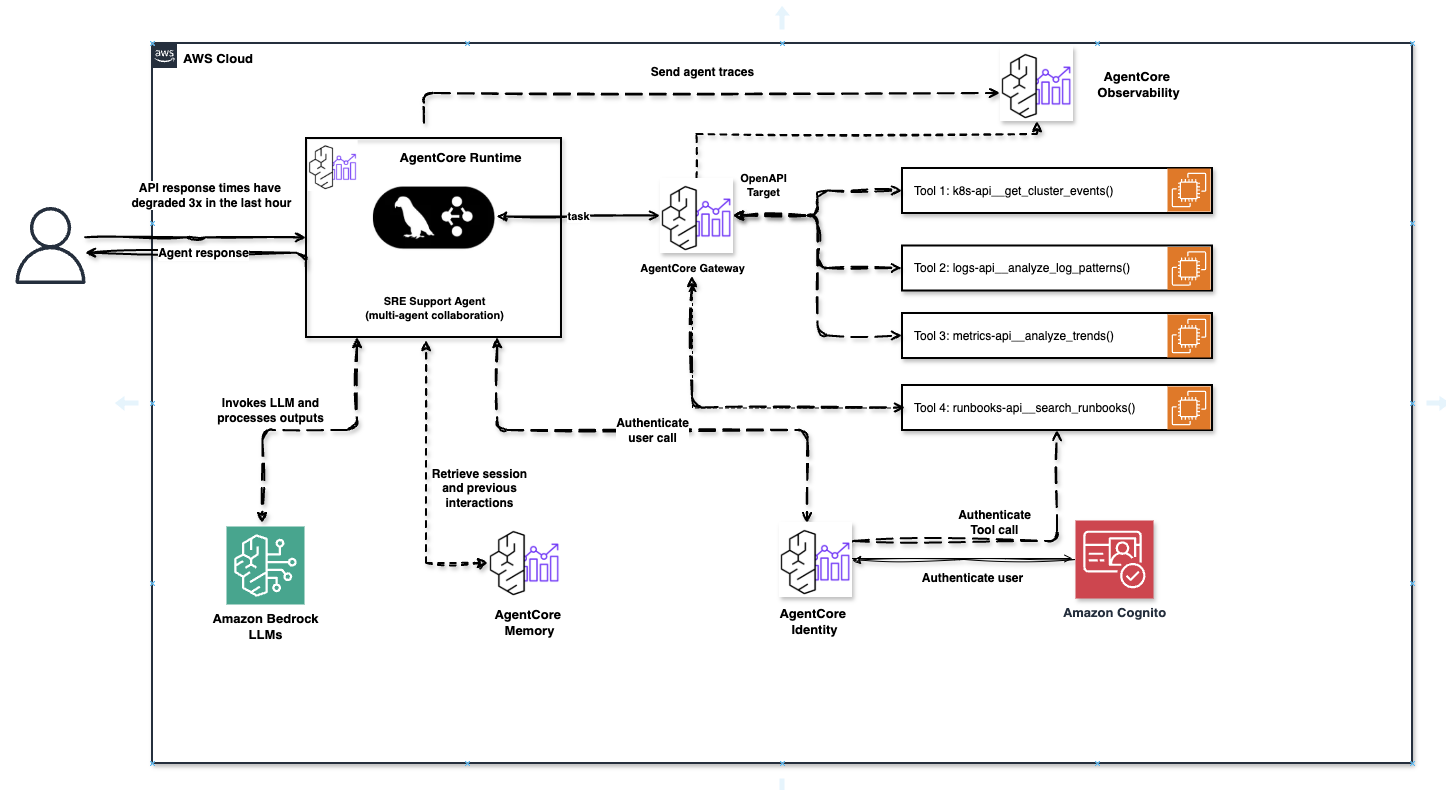
AgentCore SRE Support Agent — Full production architecture with Runtime, Gateway (OpenAPI Target + 4 tools), Memory, Identity (Cognito), and Observability. Every dashed arrow represents a potential billing event.
ℹ Runtime pricing is genuinely different
AgentCore Runtime charges only for active CPU consumption. If your agent is waiting for an LLM response or a tool to return, you are not charged for CPU during that I/O wait. AWS estimates agents spend 30–70% of session time in I/O wait — meaning the effective Runtime bill is dramatically lower than a traditional always-on compute comparison would suggest.
Layer 1 — Token Optimization
LLM inference is typically the single largest cost driver in any agentic system. Every agent invocation sends a full context window to the model — system prompt, conversation history, tool schemas, previous tool results, and the user message. This compounds fast.
Prompt Caching
Anthropic's Claude models on Bedrock support prompt caching — a mechanism that stores a prefix of your prompt and serves it from cache on repeated calls. Cache read tokens are dramatically cheaper than full input token pricing. For agents with a stable, long system prompt (tool schemas, business rules, persona), caching can reduce input token costs by over 90% on repeated calls.
Enable it with the cache_control block on the system prompt:
# Python — enabling prompt caching on a Strands agent system prompt
import boto3
import json

bedrock = boto3.client("bedrock-runtime", region_name="eu-west-1")

# System prompt is large — tool schemas, business rules, 2000+ tokens
system_prompt = """
You are a FinOps specialist agent responsible for analyzing AWS cost anomalies.
You have access to the following tools: [... long tool schema ...]
Always respond with structured JSON.
"""

response = bedrock.invoke_model(
    modelId="anthropic.claude-sonnet-4-5",
    body=json.dumps({
        "anthropic_version": "bedrock-2023-05-31",
        "max_tokens": 1024,
        "system": [
            {
                "type": "text",
                "text": system_prompt,
                "cache_control": {"type": "ephemeral"}  # ← cache this prefix
            }
        ],
        "messages": [{"role": "user", "content": user_message}]
    })
)

# Track cache usage in CloudWatch
result = json.loads(response["body"].read())
usage = result["usage"]
cache_read  = usage.get("cache_read_input_tokens", 0)
cache_write = usage.get("cache_creation_input_tokens", 0)
print(f"Cache read: {cache_read} | Cache write: {cache_write}")
Shorten Context with Rolling Summaries
In multi-turn agent sessions, the context window grows with every exchange. Instead of passing the full conversation history, summarize older turns and keep only recent raw messages. A well-implemented rolling summary can cut context size by 60–70% in long sessions.
# Python — rolling summary pattern for agent memory
def compress_history(messages: list, keep_last: int = 4) -> list:
    """Summarize old messages, keep only the most recent N turns raw."""
    if len(messages) <= keep_last:
        return messages

    old_turns = messages[:-keep_last]
    recent    = messages[-keep_last:]

    # Summarize old turns with a cheap utility model (e.g. Nova Micro)
    summary_text = call_model(
        model="amazon.nova-micro-v1:0",
        prompt=f"Summarize this agent conversation history in 3 sentences:\n{old_turns}"
    )

    summary_msg = {
        "role": "user",
        "content": f"[CONVERSATION SUMMARY]: {summary_text}"
    }
    return [summary_msg] + recent
Model Distillation — Train a Cheap Model on an Expensive One
Model distillation is a technique where a large frontier model (teacher) trains a smaller, cheaper model (student) on your specific data. The result is a specialized model with comparable accuracy for your use case — but at a fraction of the inference cost.
For agentic workloads, this means: instead of every Tier 3 utility agent calling Nova Micro or Haiku, you can distill your own custom model via AWS Bedrock Model Distillation, trained precisely on your invoice validations, JSON extractions, or routing decisions. One-time training cost vs. permanent inference savings.
ℹ Four Bedrock cost levers — most teams use zero
According to AWS in Plain English: Amazon Bedrock has four built-in cost-optimization mechanisms — Model Distillation, Prompt Caching, Intelligent Prompt Routing, and Batch Inference. Most teams use none of them and pay on-demand prices for frontier models on every request.
Batch Inference — Move Off-Peak Workloads to Night
Not every agent needs to respond in real-time. Reporting agents, nightly cost anomaly scans, batch document classifications — all these workloads can run via Bedrock Batch Inference, which is cheaper than on-demand calls and runs without time pressure.
Identify agents in each tier that have an asynchronous nature — results don't need to be ready within 500ms. Move those to batch. Keep the rest on-demand. The combination of tier routing + batch for async agents is the most complex but also the highest-yield optimization strategy.
Cap max_tokens per Agent Tier
Always set max_tokens explicitly per agent type. An orchestrator deciding between 5 next steps does not need 4096 output tokens. A classification utility agent needs at most 50. Uncapped output is money left on the table — and it slows down your agent loop.
Layer 2 — Model Tiering for 100 Agents
This is the highest-leverage optimization available for teams running multiple agents at scale. The core insight is simple: not all agents need the same model. A supervisor making complex multi-step planning decisions has fundamentally different requirements from a utility agent doing JSON extraction or a simple routing check.
Running all 100 agents on Claude Sonnet is the equivalent of hiring senior architects to do data entry. It works — but it costs 10× more than it has to.
The Three-Tier Model
The foundation is to divide 100 agents into three tiers based on decision complexity — not on "business importance". Real prices are from Vellum LLM Leaderboard (updated April 16, 2026):
| Tier | Model | Input / 1M tokens | Output / 1M tokens | Latency | Use Case |
|---|---|---|---|---|---|
| Tier 1 — Orchestrator | Claude Sonnet 4.6 | $3.00 | $15.00 | 0.73s | Multi-step planning, cross-agent coordination, ambiguous queries |
| Tier 1 — alt. | Claude Opus 4.6 | $5.00 | $25.00 | 1.6s | High-stakes decisions, complex code, reasoning |
| Tier 2 — Specialist | Claude Haiku 4.5 | $0.25 | $1.25 | ~0.4s | Domain-specific tasks, structured output, API interactions |
| Tier 3 — Utility | Nova Micro | $0.04 | $0.14 | 0.3s | Routing, classification, JSON formatting, yes/no checks |
Source: vellum.ai/llm-leaderboard — updated April 16, 2026
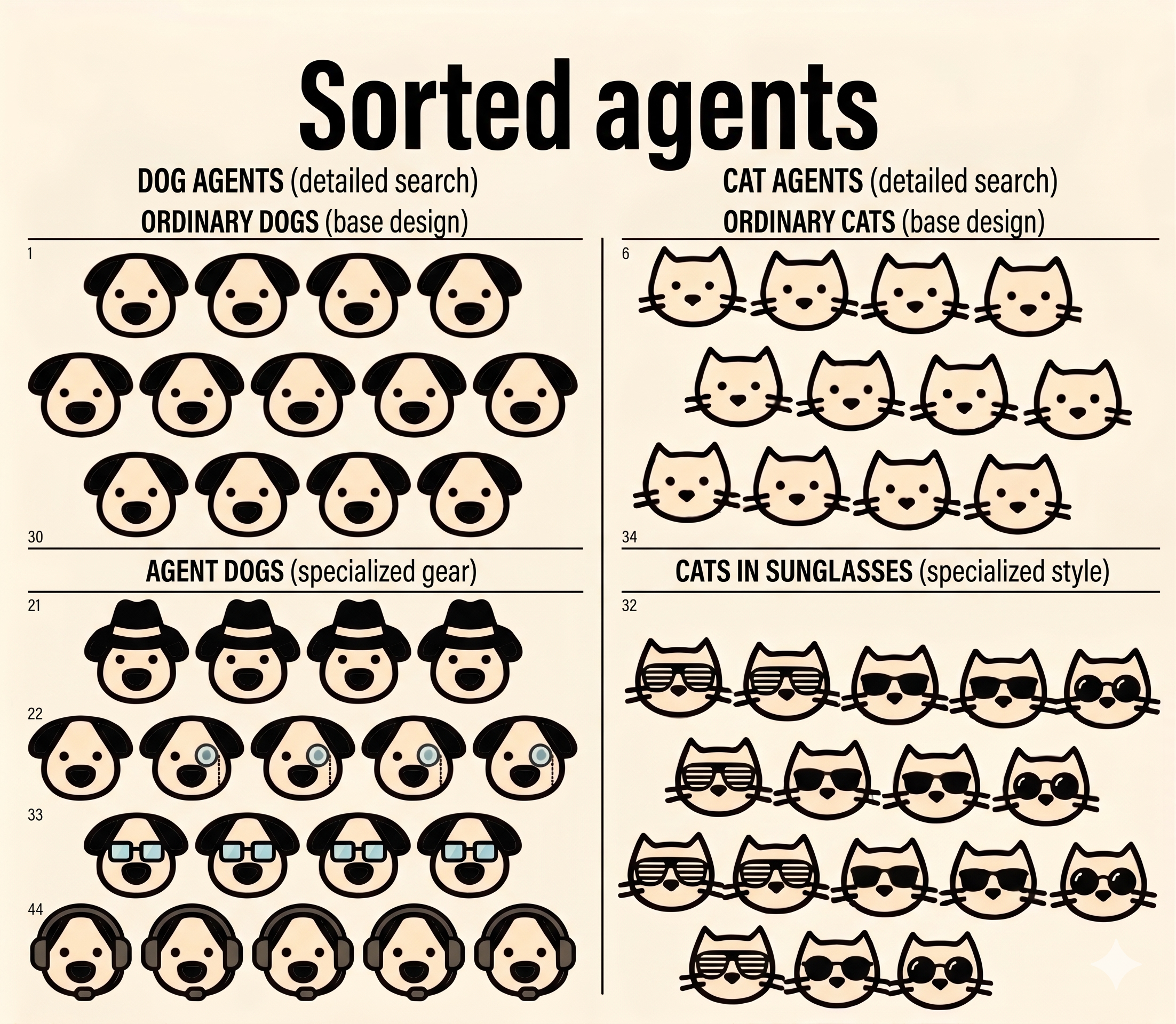
Sorted Agents — Organized by tier and complexity. DOG AGENTS (left): base design for simple tasks, specialized gear for complex operations. CAT AGENTS (right): base design for standard work, sunglasses for premium features. Each agent type gets the model it needs — not the most expensive one available.
✓ Rule of Thumb
Start categorization by decision tree complexity, not by "importance". A critical invoice validation agent that always follows 3 fixed steps is a Tier 3 agent — key for business, but trivial for the model.
Bedrock Intelligent Prompt Routing
If you cannot cleanly pre-classify every request — for example, a general-purpose specialist agent that sometimes receives complex edge cases — use Bedrock Intelligent Prompt Routing. It automatically routes each request between a fast/cheap model and a capable/expensive model based on predicted complexity. AWS reports up to 30% cost reduction with no accuracy degradation for mixed workloads.
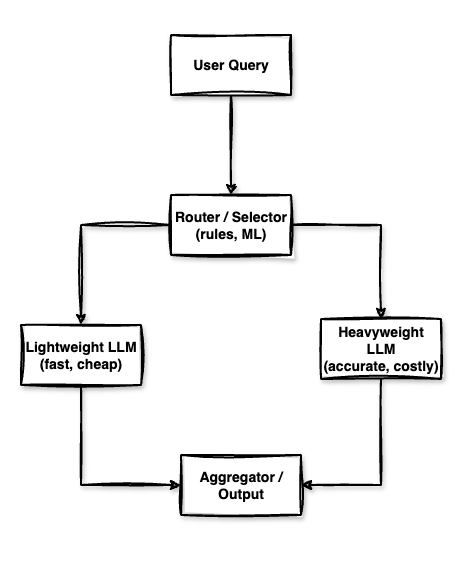
Multi-LLM Routing Architecture — Router decides between Lightweight (fast, cheap) and Heavyweight (accurate, costly) model based on query complexity.
# Python — Intelligent Prompt Routing between Sonnet and Haiku
import boto3, json

bedrock = boto3.client("bedrock-runtime", region_name="eu-west-1")

# Use the prompt router ARN — configured in Bedrock console
ROUTER_ARN = "arn:aws:bedrock:eu-west-1::foundation-model/anthropic.claude-router-v1"

def invoke_specialist_agent(user_message: str, system: str) -> str:
    response = bedrock.invoke_model(
        modelId=ROUTER_ARN,
        body=json.dumps({
            "anthropic_version": "bedrock-2023-05-31",
            "max_tokens": 512,
            "system": system,
            "messages": [{"role": "user", "content": user_message}]
        })
    )
    result = json.loads(response["body"].read())

    # The router tells you which model was actually used
    routed_model = result.get("model", "unknown")
    print(f"Routed to: {routed_model}")

    return result["content"][0]["text"]
Cost Impact: Flat Sonnet vs Tiered Architecture
Assumption: 100 agents, 1,000 sessions/month each, 10 LLM calls per session, average 2,000 input + 300 output tokens per call. Real prices from Vellum Leaderboard (April 2026).
All 100 agents on Claude Sonnet 4.6
| Input: 2B tokens × $3.00/1M | $6,000 |
| Output: 300M tokens × $15.00/1M | $4,500 |
| LLM inference / month | $10,500 |
Tiered: 10 Sonnet / 40 Haiku / 50 Nova Micro
| Tier 1 — Sonnet 4.6 (10 agents) | $645 |
| Tier 2 — Haiku 4.5 (40 agents) | $650 |
| Tier 3 — Nova Micro (50 agents) | $87 |
| LLM inference / month | $1,382 |
✓ Result
Tiered architecture = $1,382 vs $10,500 monthly — saving 87% on LLM inference with the same result. That's a difference of ~$109,000 annually for the same workload. Prices according to vellum.ai/llm-leaderboard.
✓ Implementation tip
Store the model ID per agent in a DynamoDB config table or AWS AppConfig. This lets you switch tiers without redeployment — useful when you discover at runtime that a Tier 3 agent actually needs Tier 2 for certain document types.
# Terraform — agent config table
resource "aws_dynamodb_table" "agent_config" {
  name         = "agentcore-agent-config"
  billing_mode = "PAY_PER_REQUEST"
  hash_key     = "agent_id"

  attribute {
    name = "agent_id"
    type = "S"
  }

  tags = {
    Project = "agentcore-finops"
    Tier    = "config"
  }
}

# Example record (put via CLI):
# {
#   "agent_id":    "invoice-validator",
#   "model_id":    "amazon.nova-micro-v1:0",
#   "tier":        "3",
#   "max_tokens":  64,
#   "step_budget": 3
# }
Layer 3 — Step Budget & Tool-Call Governance
Every tool call through AgentCore Gateway costs money on two dimensions: the Gateway operation itself, and the tokens added to the next LLM context (tool result goes back into the prompt). Unbounded tool use can triple your per-request cost when an agent decides to verify the same data source three times or retries a failed API call in an uncontrolled loop.
Enforce a Step Budget
Define a maximum number of tool calls per agent turn and enforce it in your agent loop. When the budget is exhausted, the agent must return its best answer with current information rather than making additional calls.
# Python — step budget enforcer for a Strands agent
from strands import Agent
from strands.hooks import AfterToolUse

class StepBudgetGuard:
    def __init__(self, max_steps: int):
        self.max_steps  = max_steps
        self.step_count = 0

    def on_tool_use(self, event: AfterToolUse):
        self.step_count += 1
        if self.step_count >= self.max_steps:
            # Signal agent to stop and return current state
            event.agent.set_stop_reason(
                f"Step budget of {self.max_steps} tool calls reached. "
                "Returning best answer with available information."
            )

# Per-tier budgets
STEP_BUDGETS = {
    "tier_1": 15,   # orchestrators — more room to explore
    "tier_2": 6,    # specialists — focused task, limited hops
    "tier_3": 3,    # utilities — strict limit, known task
}

def create_agent(agent_id: str, config: dict) -> Agent:
    tier   = config["tier"]
    budget = STEP_BUDGETS[f"tier_{tier}"]
    guard  = StepBudgetGuard(budget)

    return Agent(
        model   = config["model_id"],
        tools   = config["tools"],
        hooks   = [guard.on_tool_use],
        system  = config["system_prompt"],
    )
Avoid Tool Discovery on Every Call
AgentCore Gateway charges per MCP operation — including ListTools. If your agent calls ListTools on every session start to discover available tools, you are paying for a discovery operation on every single interaction. Cache the tool schema at agent initialization and refresh it only when your MCP server deployment changes (e.g., triggered by a webhook or version bump in AppConfig).
Pre-filter Tool Schemas per Agent
Don't send a 50-tool schema to a specialist agent that only needs 3 tools. Every tool schema in the system prompt costs input tokens. Pass only the tools the agent tier actually requires.
Layer 4 — Memory Optimization
AgentCore Memory has two separate billing meters: short-term memory charged per raw event created, and long-term memory charged per stored record per day plus per retrieval call. Both can grow surprisingly fast in high-volume agentic deployments.
Short-Term Memory: Batch Events
Every time you write a message exchange as a raw event, you incur a charge. If your agent writes user message, tool call, tool result, and assistant response as four separate events, you pay 4× the rate you would pay for a single batched event. Combine related events within a single turn into one write.
Long-Term Memory: Be Selective about What You Persist
Not every session needs to generate long-term memories. Utility agents (Tier 3) executing deterministic tasks on fresh inputs almost never need LTM — they have no cross-session learning to do. Reserve LTM for Tier 1 orchestrators that genuinely benefit from remembering past decisions, user preferences, or recurring patterns.
# Python — conditional LTM write based on agent tier
import boto3

agentcore_memory = boto3.client("bedrock-agentcore", region_name="eu-west-1")

def maybe_persist_memory(
    session_id: str,
    agent_config: dict,
    summary: str,
    importance_score: float
):
    """Only write LTM for Tier 1 agents with high-importance sessions."""
    tier = agent_config["tier"]
    ltm_threshold = {1: 0.4, 2: 0.75, 3: 999.0}  # Tier 3 never writes LTM

    if importance_score < ltm_threshold[tier]:
        print(f"Skipping LTM write for {session_id} (score: {importance_score:.2f})")
        return

    agentcore_memory.create_memory_record(
        memoryId=agent_config["memory_id"],
        content=summary,
        sessionId=session_id,
    )
    print(f"LTM written for {session_id}")
Use Built-in Summarization Strategies
AgentCore Memory offers built-in memory strategies that automatically extract long-term memories from raw events using a model running in AWS's account — you pay only for the processed records, not for the model inference. This is almost always cheaper than running your own summarization Lambda unless you need highly custom extraction logic.
Layer 5 — Observability Sampling
AgentCore Observability routes telemetry into CloudWatch, and CloudWatch charges for data ingestion, storage, and queries. In production with 100 agents and thousands of sessions per day, full tracing of every single interaction is both expensive and unnecessary.
ccusage — Track Your Claude Code Development Costs
During agent development and testing in Claude Code, you quickly lose track of how many tokens you're consuming locally — even before production deployment. ccusage is an open-source CLI tool that analyzes Claude Code usage directly from local JSONL files and generates detailed reports.
🔧 ccusage — Claude Code Usage Analysis
ccusage.com gives you:
- Daily / Weekly / Monthly reports — token usage and costs aggregated by days, weeks, months
- Session reports — breakdown per conversation, ideal for identifying expensive agent sessions
- 5-Hour Blocks — tracking within Claude billing windows
- Model Tracking — see exactly which model (Opus, Sonnet, Haiku) was used and how much
- Cache tracking — separately tracks cache creation vs. cache read tokens — ideal for validating prompt caching optimization
- MCP Integration — built-in MCP server for direct integration with your agent tooling
Installation: npx ccusage@latest or npm install -g ccusage
ccusage is an excellent complement to AgentCore Observability — while AgentCore Observability covers production telemetry in CloudWatch, ccusage gives you a clear picture of costs during the development and testing phase, when you can still cheaply optimize system prompts, step budgets, and memory strategies before the first production deployment.
Sample Traces in Production
Enable full traces only for a percentage of production traffic. A 10% sampling rate captures sufficient data for performance analysis and anomaly detection while cutting your CloudWatch ingestion cost by 90%. For debugging-specific investigations, temporarily flip the sample rate to 100% via AppConfig without redeployment.
# Python — dynamic trace sampling with AWS AppConfig
import boto3, json, os

appconfig = boto3.client("appconfigdata", region_name="eu-west-1")

def get_trace_sample_rate(agent_tier: int) -> float:
    """Read sampling rate from AppConfig — no redeploy needed to adjust."""
    try:
        session = appconfig.start_configuration_session(
            ApplicationIdentifier  = "agentcore-finops",
            EnvironmentIdentifier  = os.environ["ENV"],
            ConfigurationProfileIdentifier = "observability-config",
        )
        response = appconfig.get_latest_configuration(
            ConfigurationToken=session["InitialConfigurationToken"]
        )
        config = json.loads(response["Configuration"].read())
        return config["sampling_rates"][f"tier_{agent_tier}"]
    except:
        return 0.1  # safe default: 10%

# AppConfig document example:
# {
#   "sampling_rates": {
#     "tier_1": 0.25,   ← orchestrators: 25% (higher value, worth watching)
#     "tier_2": 0.10,   ← specialists: 10%
#     "tier_3": 0.03    ← utilities: 3% (high volume, mostly deterministic)
#   }
# }
Set CloudWatch Log Retention
By default, CloudWatch log groups have no expiry — logs accumulate indefinitely. Set a retention policy on every AgentCore log group. For most production workloads, 30 days is sufficient for debugging. Compliance requirements might push you to 90 days — but you should not be paying for indefinite retention unless you explicitly need it.
# Terraform — CloudWatch log retention for AgentCore
resource "aws_cloudwatch_log_group" "agentcore_runtime" {
  name              = "/agentcore/runtime"
  retention_in_days = 30

  tags = {
    Project = "agentcore-finops"
    ManagedBy = "terraform"
  }
}

resource "aws_cloudwatch_log_group" "agentcore_gateway" {
  name              = "/agentcore/gateway"
  retention_in_days = 30

  tags = {
    Project = "agentcore-finops"
  }
}
Layer 6 — Session Lifecycle & Network
Terminate Sessions Promptly
AgentCore Runtime microVMs run until the session is explicitly terminated or times out. Even with the active-CPU-only billing model, background processes and memory allocation continue until shutdown. Implement explicit session termination as soon as the agent task completes — do not rely on timeout defaults. Set aggressive timeout values for Tier 3 utility agents where sessions should never run more than a few seconds.
Same-AZ Placement
Keep your AgentCore Runtime, Gateway, Knowledge Bases, and application endpoints in the same Availability Zone. Cross-AZ data transfer within a region is billed at EC2 rates. For high-volume agent traffic, this seemingly small cost compounds quickly.
Use PrivateLink Instead of NAT Gateway
If your AgentCore Runtime needs to call AWS services (DynamoDB, S3, Secrets Manager), route that traffic through VPC Endpoints (PrivateLink) rather than a NAT Gateway. NAT Gateway charges both per-hour and per-GB of data processed — PrivateLink charges per-hour only, and at a lower rate for comparable throughput. For agents making frequent AWS API calls, this is a meaningful monthly saving.
# Terraform — VPC endpoint for Bedrock (avoids NAT Gateway cost)
resource "aws_vpc_endpoint" "bedrock_runtime" {
  vpc_id            = aws_vpc.main.id
  service_name      = "com.amazonaws.eu-west-1.bedrock-runtime"
  vpc_endpoint_type = "Interface"

  subnet_ids         = aws_subnet.private[*].id
  security_group_ids = [aws_security_group.vpc_endpoints.id]

  private_dns_enabled = true

  tags = {
    Name    = "bedrock-runtime-endpoint"
    Project = "agentcore-finops"
  }
}

resource "aws_vpc_endpoint" "agentcore" {
  vpc_id            = aws_vpc.main.id
  service_name      = "com.amazonaws.eu-west-1.bedrock-agentcore"
  vpc_endpoint_type = "Interface"

  subnet_ids         = aws_subnet.private[*].id
  security_group_ids = [aws_security_group.vpc_endpoints.id]

  private_dns_enabled = true

  tags = {
    Name    = "agentcore-endpoint"
    Project = "agentcore-finops"
  }
}
Real-World Cost Scenarios
Worked comparison for 100 agents, 10,000 sessions/month, 6 tool calls per session. LLM inference prices according to Vellum Leaderboard (April 2026). For precise Runtime/Gateway/Memory calculation, use AWS Pricing Calculator.
📊 Optimized Architecture — Monthly Estimate
| LLM inference — tiered (Sonnet $3 / Haiku $0.25 / Nova Micro $0.04) | ~$1,382 |
| AgentCore Runtime — active vCPU/memory (I/O wait free) | ~$280 |
| Gateway ops — 60K tool calls (cached ListTools) | ~$45 |
| Policy — 60K authorization requests | ~$1.50 |
| Memory — STM events (batched) + selective LTM | ~$90 |
| Observability — 10% sampling + 30-day retention | ~$55 |
| Network — PrivateLink, same-AZ, prompt caching | ~$30 |
| Total Estimated Monthly | ~$1,883 |
📊 Unoptimized Architecture — Same Workload
| LLM inference — everyone on Sonnet 4.6, no caching | ~$10,500 |
| AgentCore Runtime — no session termination, debug logging | ~$620 |
| Gateway ops — ListTools on every call, no batching | ~$180 |
| Policy — same | ~$1.50 |
| Memory — every event individual, LTM for all tiers | ~$380 |
| Observability — 100% traces, no retention policy | ~$520 |
| Network — NAT Gateway, cross-AZ calls | ~$195 |
| Total Estimated Monthly | ~$12,396 |
The delta between optimized and unoptimized architecture is ~$10,500/month — meaning ~$126,000/year for the same business result. The dominant cost item is always LLM inference — which is why model tiering is the most important single optimization.
Top 5 Pitfalls
Tool-Call Storms
An agent without a step budget can retry a failed tool call repeatedly, especially if the tool returns ambiguous errors. 10 retries on a 6-tool-call task becomes 60 Gateway operations and 60 policy checks. Always set a step budget and implement exponential backoff with a circuit breaker at the tool level.
Unbounded Long-Term Memory Growth
LTM is billed per stored record per day. An agent that writes a memory record on every session without a retention policy accumulates an ever-growing bill. Set a TTL on memory records and periodically consolidate or prune low-signal memories. AgentCore Memory supports configurable retention through built-in strategies.
100% Trace Logging in Production
Full OpenTelemetry traces for every agent interaction at scale is the single easiest way to generate a large CloudWatch bill. Development habits transfer to production without anyone noticing until month-end. Default your production tracing to sampling from day one and require an explicit opt-in to increase it.
Running All Agents on the Flagship Model
This is the most expensive single decision you can make in a multi-agent deployment. The instinct to use the "best" model everywhere is understandable — you want quality. But Tier 3 utility agents running on Nova Micro or Haiku produce identical business outcomes for structured tasks at 10–20% of the inference cost.
No CloudWatch Log Retention Policy
CloudWatch log groups created by AgentCore have no default retention. Logs accumulate indefinitely. In a 100-agent fleet generating verbose traces, this becomes a significant and invisible storage cost. Set retention on every log group via Terraform or AWS Config and audit for unmanaged groups monthly.
Summary
AWS AgentCore's consumption-based pricing is genuinely fair — you pay for what you use, and I/O wait is free. But the number of independent billing meters means costs can compound quickly if you treat the platform as a black box rather than a system to architect deliberately.
Key Optimization Levers
- Enable prompt caching on all system prompts with stable, large prefixes — cuts input token cost by up to 90% on repeated calls.
- Tier your models — 10 orchestrators on Sonnet ($3/1M), 40 specialists on Haiku ($0.25/1M), 50 utilities on Nova Micro ($0.04/1M). Real savings: $10,500 → $1,382/month on LLM inference (source: Vellum Leaderboard).
- Use Intelligent Prompt Routing for specialist agents with mixed query complexity — saves ~30% without code changes.
- Set a step budget per agent tier — Tier 3 agents should never make more than 3 tool calls. Enforce it in code, not guidelines.
- Cache tool schemas — call ListTools once at initialization, not on every session start.
- Be selective with LTM — only Tier 1 orchestrators need cross-session memory. Use importance scoring to gate writes.
- During development, use ccusage — CLI tool for analyzing Claude Code usage from local JSONL files. See cache hit rate, model breakdown, and session costs before production.
- Sample observability traces — 10% in production is enough. Use AppConfig to flip to 100% on demand for debugging.
- Set log retention policies on every CloudWatch log group. 30 days is sufficient for most workloads.
- Use PrivateLink for AWS service calls from AgentCore Runtime to avoid NAT Gateway data processing charges.
- Terminate sessions promptly — don't rely on timeout defaults, especially for Tier 3 utility agents.
The full Terraform module, Strands agent examples, and DynamoDB config schema for the tiered agent architecture are available in the GitHub repository linked at the top of this article.
Complete Terraform Project on GitHub
All Terraform modules, Strands agent configurations, DynamoDB schemas, and cost optimization examples are available in one repository.
View on GitHub →