
AWS AgentCore Memory Deep Dive: Build Agents That Actually Remember
Most AI agents suffer from goldfish memory — every conversation starts from zero. Here's how to build a production-grade 3-layer memory system using Bedrock Agents, SESSION_SUMMARY, and Aurora pgvector, with a live cross-session retrieval demo in 310ms.
TL;DR — What You'll Build
- Layer 1 In-context memory — last N turns in the prompt window. Zero latency, zero cost, resets between sessions.
- Layer 2 SESSION_SUMMARY — Bedrock auto-generates a rolling summary, injected on every subsequent turn. 30-day retention, zero code required.
- Layer 3 Knowledge Base (Aurora pgvector) — facts saved by the agent persist across all sessions. Semantic search retrieves them in 310ms.
Table of Contents
- The Goldfish Memory Problem
- The Three Memory Layers Explained
- Infrastructure Overview (Terraform)
- Layer 3 Deep Dive: Aurora pgvector as Long-Term Store
- Agent Configuration & Instruction Design
- Observability: CloudWatch Dashboard & Alarms
- Live Demo Results — All 3 Layers
- Cost Considerations
- Deployment Steps
- Key Takeaways
1. The Goldfish Memory Problem
Most AI agents suffer from goldfish memory — every conversation starts from zero. A user tells the agent their preferred AWS region, their tech stack, their deployment conventions. The next session? All of it is gone.
This is not a model limitation. It is an architecture problem, and Amazon Bedrock gives you the tools to solve it properly.
In this article I will show you exactly how to build a production-grade memory system for Bedrock Agents using three distinct layers: in-context memory, session summary memory, and long-term knowledge base memory. Everything is deployed with Terraform, and at the end you will see a live demo where a fact saved in Session A is retrieved correctly in a completely separate Session B — with Aurora pgvector as the backing store.
Memory Layer Comparison at a Glance
Each layer solves a different timescale problem. Layer 1 is instantaneous but ephemeral; Layer 3 is permanent but has a ~30s ingestion pipeline. The chart compares three key dimensions: retrieval latency (lower = better), retention window, and cross-session durability.
2. The Three Memory Layers Explained
Before touching any code it is worth being precise about what each layer does, because they solve different problems and have very different cost and latency profiles.
Layer 1 — In-Context Memory
Layer 1 is the model's prompt window. The agent sees the last N turns of the current conversation directly in its input tokens. It is fast and zero-configuration, but it resets between Lambda invocations if you are not careful about session IDs, and it cannot survive a session ending.
Layer 2 — SESSION_SUMMARY
Layer 2 is a native Bedrock feature. When you enable it on an agent, Bedrock automatically generates a rolling summary of the conversation and injects it into subsequent turns of the same session. You get cross-invocation memory within a session without writing any summarisation code. The summary persists for storage_days days — I use 30.
Layer 3 — Long-Term Knowledge Base
Layer 3 is what makes agents genuinely useful across sessions. When the agent learns something worth keeping — a user preference, a project decision, a tech stack fact — it calls an action group that writes the fact to S3 as a markdown document, triggers a Bedrock KB ingestion job, and the fact becomes searchable via Aurora pgvector in every future session. This layer persists across session boundaries, device boundaries, and time.
The architecture looks like this:
User message
     │
     ▼
Bedrock Agent (claude-3-5-sonnet)
     │
     ├─── Layer 1: Last N turns in prompt context
     │
     ├─── Layer 2: SESSION_SUMMARY injected automatically by Bedrock
     │
     └─── Layer 3: Knowledge Base (Aurora pgvector)
               │
               └─── Action Group → Lambda → S3 → KB Ingestion → pgvector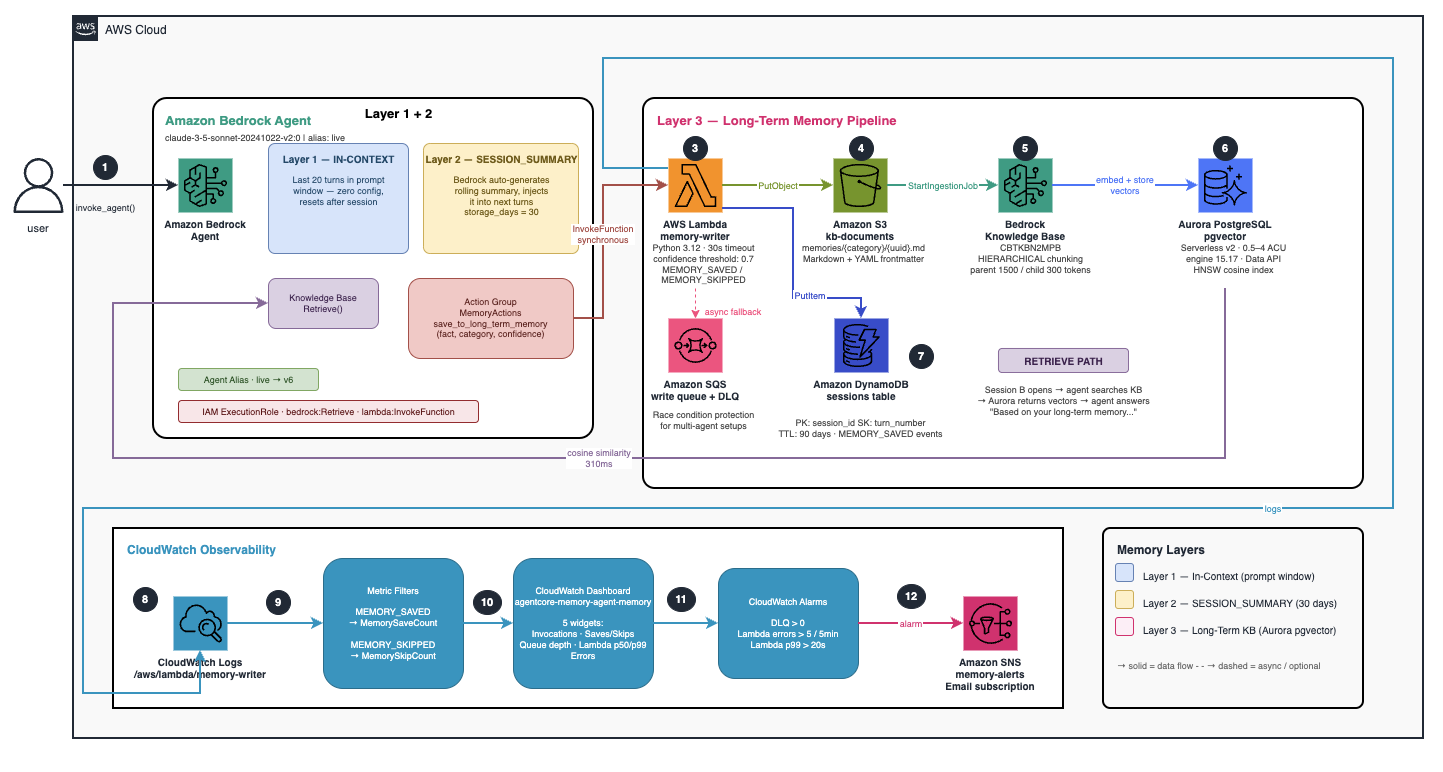
Figure 1 — High-level 3-layer architecture. The agent handles Layer 1 and Layer 2 natively; Layer 3 flows through an action group → Lambda → S3 → Bedrock KB ingestion → Aurora pgvector.
3. Infrastructure Overview (Terraform)
The Terraform project is organised into five modules:
terraform/
├── bootstrap/          # S3 state bucket + DynamoDB lock table
└── main/
    ├── main.tf         # Root module wiring
    └── modules/
        ├── aurora-pgvector/    # Aurora Serverless v2 + pgvector extension
        ├── knowledge-base/     # Bedrock KB backed by Aurora
        ├── agent/              # Bedrock Agent + action group + alias
        ├── session-memory/     # Lambda memory writer + DynamoDB + SQS
        └── observability/      # CloudWatch dashboard + alarms + metric filters
The backend uses S3 with DynamoDB locking:
terraform {
  backend "s3" {
    bucket         = "agentcore-memory-tfstate-<account_id>"
    key            = "agentcore-memory/terraform.tfstate"
    region         = "eu-west-1"
    dynamodb_table = "agentcore-memory-tfstate-lock"
    encrypt        = true
  }
}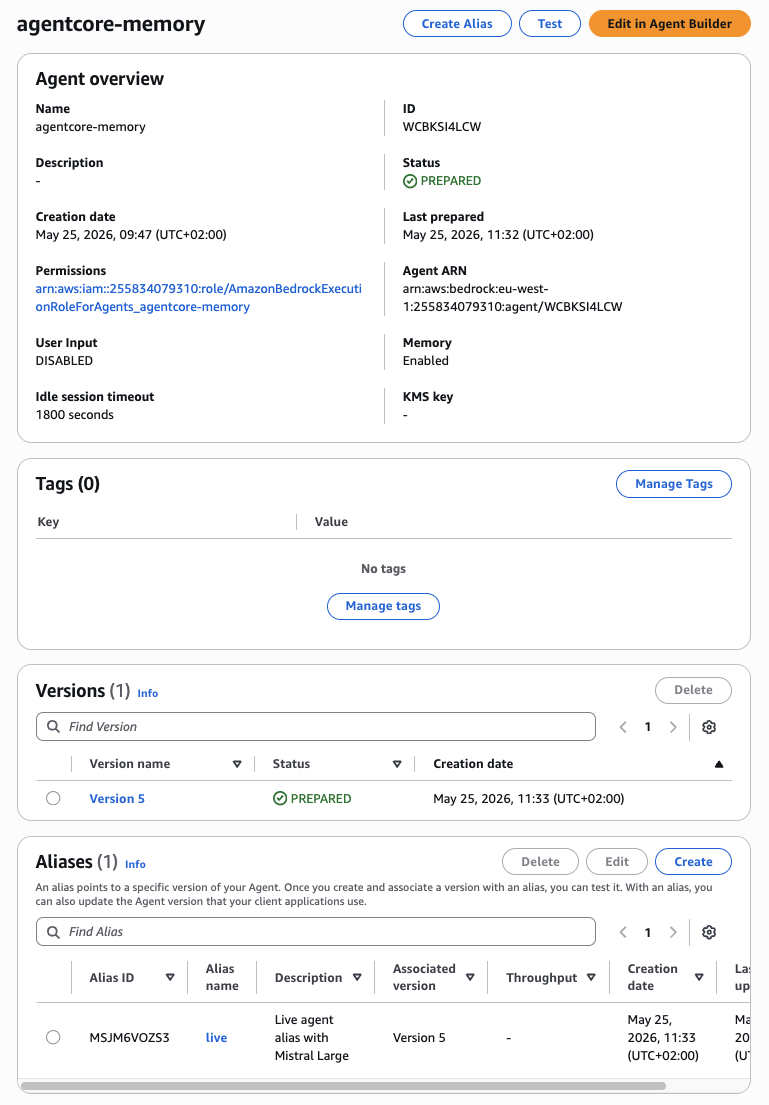
Figure 2 — The Bedrock Agent console showing the deployed agent with SESSION_SUMMARY memory enabled and the MemoryActions action group configured.
4. Layer 3 Deep Dive: Aurora pgvector as Long-Term Store
The most interesting part of the architecture is how long-term memory works. When the agent decides a fact is worth persisting, it calls the save_to_long_term_memory action group function. That function invokes a Lambda synchronously (Bedrock waits for the response), and the Lambda does three things:
- Writes the fact as a structured markdown document to S3
- Triggers a
start_ingestion_jobon the Bedrock Knowledge Base - Records the event in DynamoDB for observability
Aurora Serverless v2 Configuration
The vector store runs on Aurora Serverless v2 with the pgvector extension. Key decisions:
resource "aws_rds_cluster" "this" {
  cluster_identifier   = "agentcore-memory"
  engine               = "aurora-postgresql"
  engine_version       = "15.17"
  engine_mode          = "provisioned"
  enable_http_endpoint = true  # Required for Data API

  serverlessv2_scaling_configuration {
    min_capacity = 0.5
    max_capacity = 4
  }
}
Non-Negotiable: enable_http_endpoint = true
enable_http_endpoint = true is required — Bedrock's Knowledge Base uses the RDS Data API to run vector similarity queries without managing a persistent connection pool. Without it, the KB cannot reach Aurora at all.
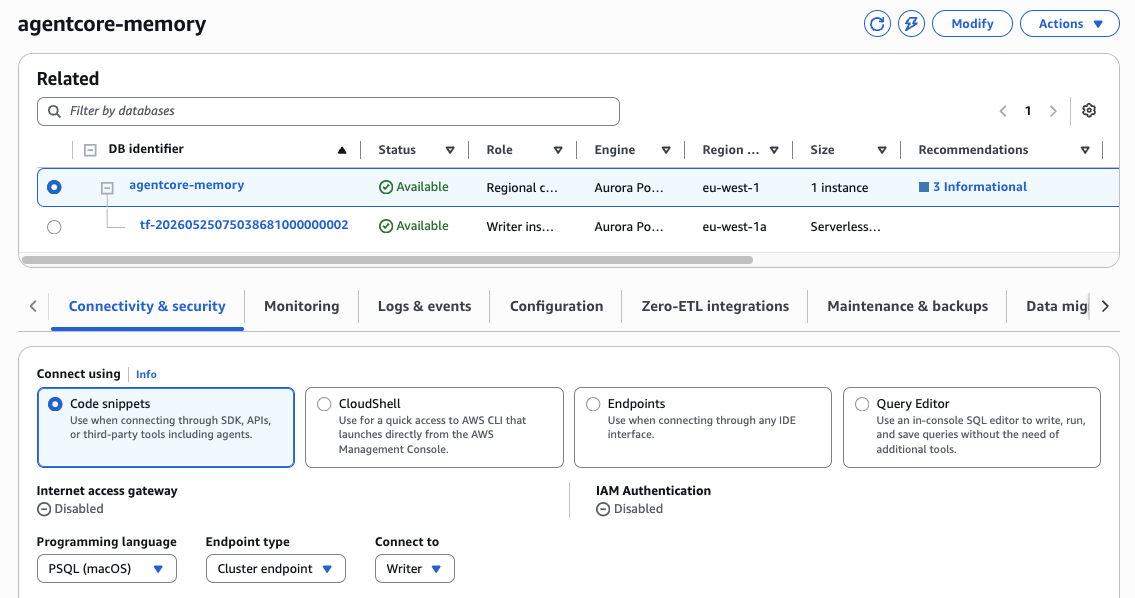
Figure 3 — Aurora Serverless v2 cluster in the RDS console. The pgvector extension is installed and the bedrock_integration.bedrock_kb table holds the vector embeddings.
The db_init Lambda creates the pgvector schema that Bedrock expects:
CREATE EXTENSION IF NOT EXISTS vector;
CREATE SCHEMA IF NOT EXISTS bedrock_integration;

CREATE TABLE IF NOT EXISTS bedrock_integration.bedrock_kb (
    id          uuid PRIMARY KEY,
    embedding   vector(1536),
    chunks      text,
    metadata    json
);

CREATE INDEX IF NOT EXISTS bedrock_kb_embedding_idx
    ON bedrock_integration.bedrock_kb
    USING hnsw (embedding vector_cosine_ops);
Knowledge Base with HIERARCHICAL Chunking
The Bedrock Knowledge Base is configured with hierarchical chunking, which creates both parent and child chunks. The agent searches the smaller child chunks for precision but retrieves the larger parent chunk for context:
vector_ingestion_configuration {
  chunking_configuration {
    chunking_strategy = "HIERARCHICAL"
    hierarchical_chunking_configuration {
      level_configuration {
        max_token_count = 1500  # parent chunk
      }
      level_configuration {
        max_token_count = 300   # child chunk (what gets searched)
      }
      overlap_tokens = 60
    }
  }
}
For memory documents this is slightly over-engineered — the facts are short enough to fit in a single chunk — but for real knowledge bases with large documents this chunking strategy makes a significant difference in retrieval quality.
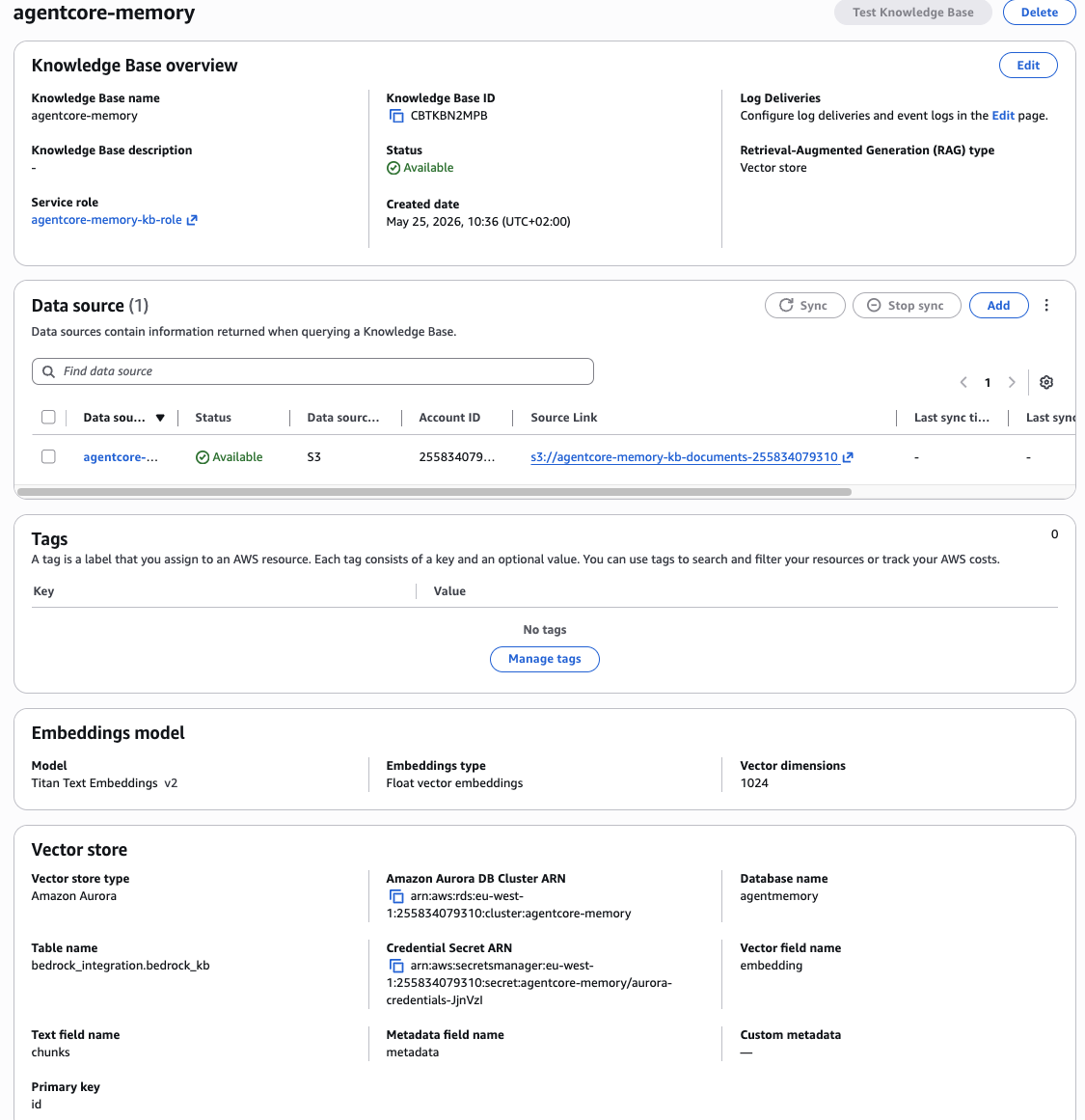
Figure 4 — The Bedrock Knowledge Base backed by Aurora pgvector (KB ID: CBTKBN2MPB). The data source points to the S3 prefix where the memory writer Lambda saves markdown facts.
The Memory Writer Lambda
The Lambda handles Bedrock Agent action group events (not SQS — the agent invokes it synchronously). The response format is specific to function-based action groups — get it wrong and the agent reports an invocation error even though your Lambda ran successfully:
def lambda_handler(event, context):
    function_name = event.get("function", "save_to_long_term_memory")
    session_id = event.get("sessionId", "unknown")
    parameters = {p["name"]: p["value"] for p in event.get("parameters", [])}

    fact = parameters.get("fact")
    category = parameters.get("category")
    confidence = float(parameters.get("confidence", 0))

    result = _process_memory_save(session_id, fact, category, confidence)

    return {
        "messageVersion": "1.0",
        "response": {
            "actionGroup": "MemoryActions",
            "function": function_name,
            "functionResponse": {
                "responseBody": {
                    "TEXT": {"body": json.dumps(result)}
                }
            }
        }
    }
The confidence threshold at 0.7 acts as a quality gate. Facts below the threshold log MEMORY_SKIPPED and return without writing anything to S3. This prevents low-confidence assertions from polluting the knowledge base:
if confidence < CONFIDENCE_THRESHOLD:
    logger.info("MEMORY_SKIPPED session_id=%s confidence=%.2f", session_id, confidence)
    return {"status": "skipped", ...}
Each saved fact is a markdown document with YAML frontmatter. Bedrock ingests this, chunks it, embeds it, and stores the vector in Aurora. From that point forward every new session can retrieve it via semantic search:
---
id: b0b6fc43-9108-4f41-9184-8406acb80fb7
session_id: demo-layer3-a-a831d867
category: preference
confidence: 1.0
saved_at: 2026-05-25T10:28:54+00:00
---

# Memory: preference

I always prefer eu-west-1 as my primary AWS region because my users are in Europe.

_Saved from session demo-layer3-a-a831d867 at 2026-05-25T10:28:54+00:00_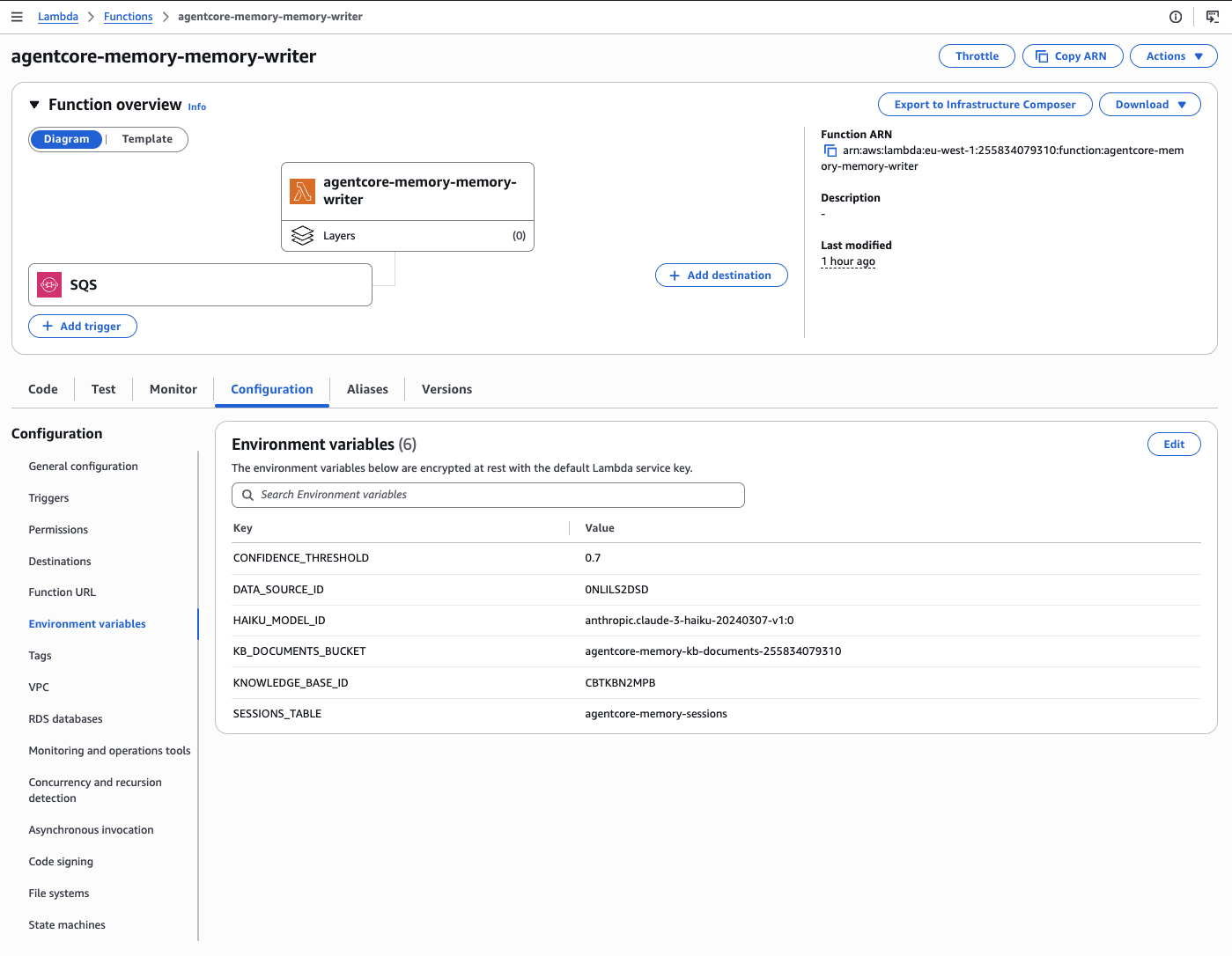
Figure 5 — The memory writer Lambda (Python 3.12, 30s timeout). It handles Bedrock action group events synchronously and writes facts to S3 before triggering a KB ingestion job.
Supporting Infrastructure: DynamoDB & SQS
Every memory write event is also recorded in DynamoDB for auditing and replay. The table uses session_id as the partition key and a millisecond timestamp as the sort key, with a 90-day TTL.
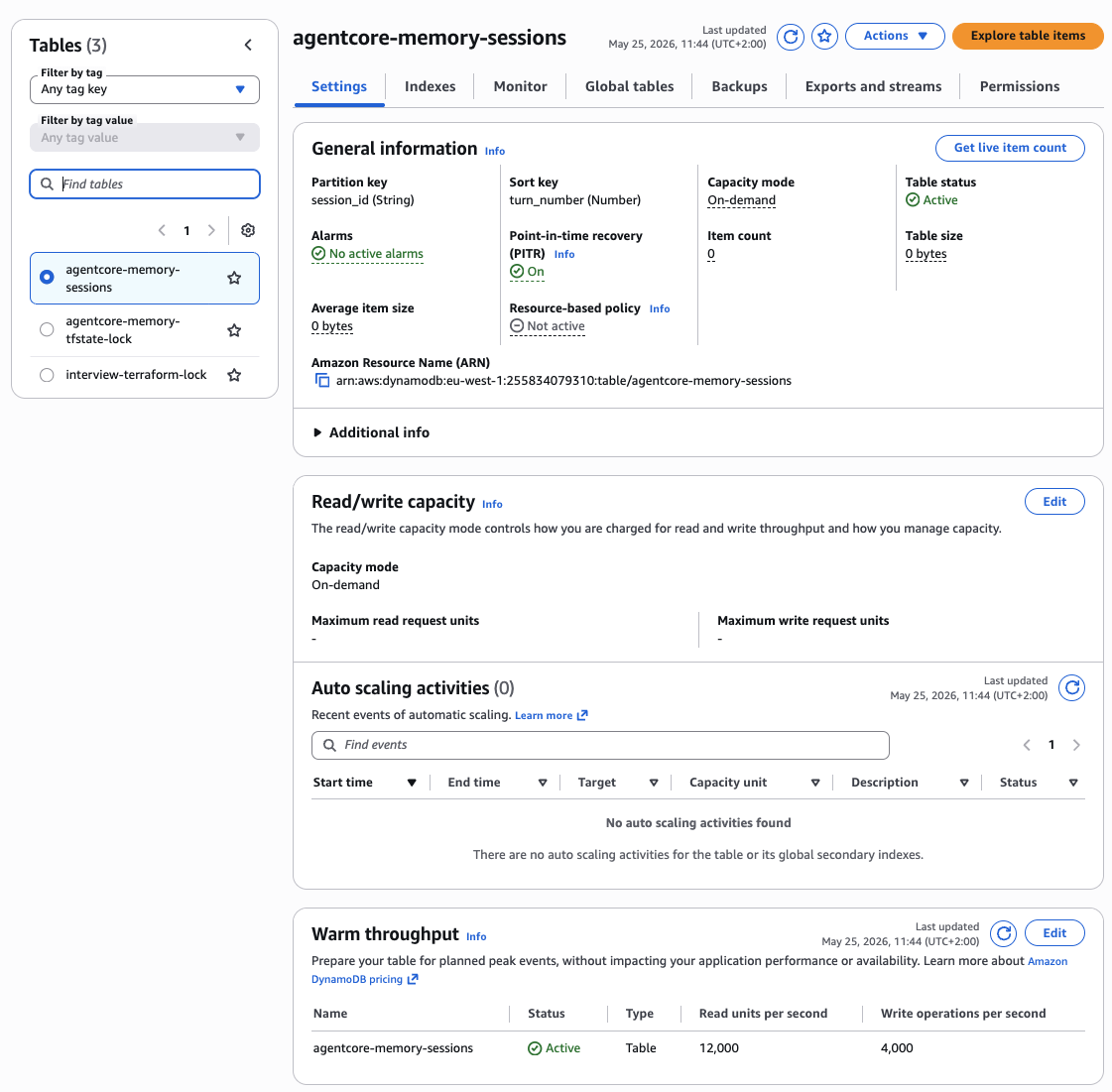
Figure 6 — DynamoDB sessions table recording every memory save event. The PK/SK design enables efficient lookup by session, and the TTL keeps storage costs low.
The SQS queue in front of the Lambda is there as a race-condition buffer for multi-agent setups. If two agents try to save facts simultaneously, the queue serialises the writes and the DLQ catches any failures silently rather than dropping them.
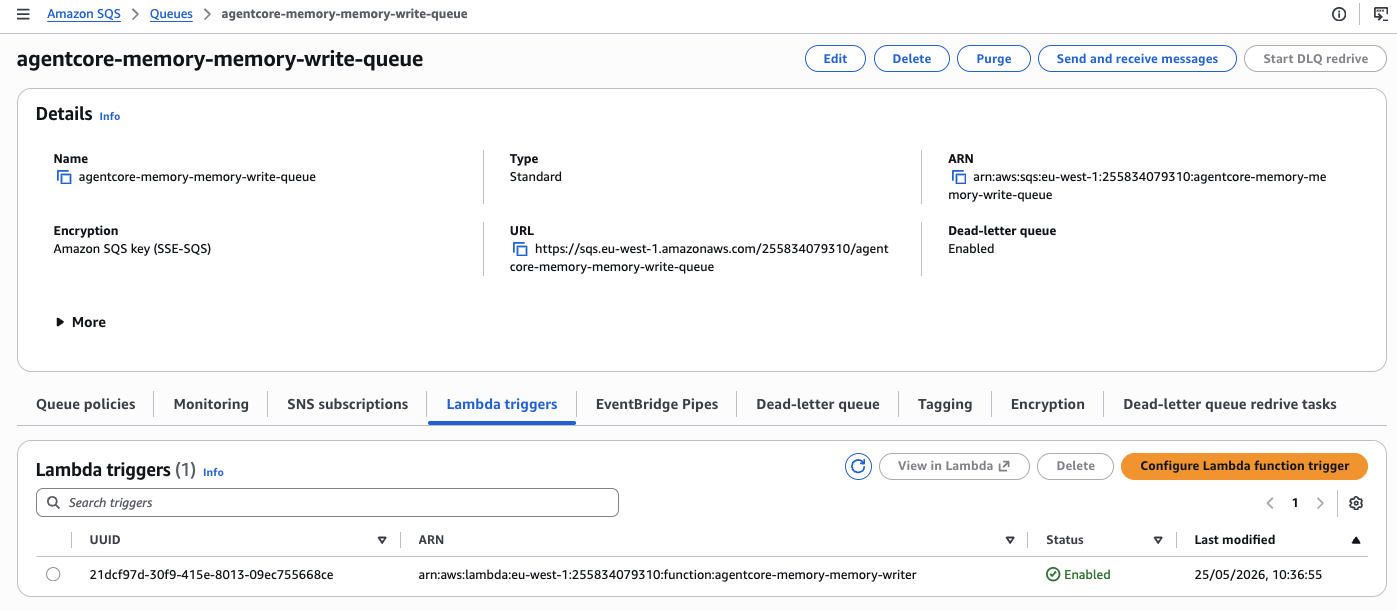
Figure 7 — SQS queue and DLQ for the memory writer. The DLQ CloudWatch alarm fires if any message lands there — a reliable signal that KB writes are failing silently.
5. Agent Configuration & Instruction Design
Model Selection — A Subtle Gotcha
When configuring a Bedrock Agent foundation_model, do not use the cross-region inference prefix. Despite invoking the agent in eu-west-1, the correct value is:
foundation_model = "anthropic.claude-3-5-sonnet-20241022-v2:0"Not eu.anthropic.claude-3-5-sonnet-20241022-v2:0
Using the eu. prefix for a Bedrock Agent (not a direct model invocation) throws a validationException: The provided model identifier is invalid at invocation time. Cross-region inference profiles work for direct Bedrock InvokeModel calls, not for agent foundation model configuration.
SESSION_SUMMARY Memory
Enabling Layer 2 is a single block in the agent resource:
memory_configuration {
  enabled_memory_types = ["SESSION_SUMMARY"]
  storage_days         = 30
}
Bedrock handles everything — generating the summary, storing it, and injecting it into subsequent turns. You do not write any summarisation code.
Agent Instruction Design
The instruction is where Layer 3 retrieval lives or dies. The first version of this agent did not reliably search the knowledge base because the instruction did not tell it when to do so. Without explicit rules, the agent treats the knowledge base as optional. The fix was adding explicit retrieval and save rules:
RETRIEVAL RULES — always search the knowledge base BEFORE answering when:
- The user asks about their preferences, history, or past decisions
- The user asks "what do you know about me" or "from long-term memory"
- The user asks about their AWS region, tech stack, or project context
- Any question that could be answered by previously saved facts

SAVE RULES — call save_to_long_term_memory when:
- User states a preference ("I always prefer X over Y")
- User shares a fact about their project or context
- A decision was made that will affect future sessions

Always confirm saves: "I've saved [fact] to your long-term memory."
Always cite retrievals: "Based on your long-term memory, [fact]."
Action Group Schema
The save_to_long_term_memory function is defined using Bedrock's function schema (not OpenAPI). The category and confidence parameters serve two purposes: they help the Lambda decide whether to persist the fact, and they structure the S3 key path (memories/preference/, memories/decision/, etc.):
function_schema {
  member_functions {
    functions {
      name        = "save_to_long_term_memory"
      description = "Saves an important fact or preference to long-term memory"
      parameters {
        map_block_key = "fact"
        type          = "string"
        description   = "The fact or preference to save"
        required      = true
      }
      parameters {
        map_block_key = "category"
        type          = "string"
        description   = "Category: preference | project_context | decision | user_profile"
        required      = true
      }
      parameters {
        map_block_key = "confidence"
        type          = "number"
        description   = "Confidence score 0.0-1.0 that this fact is worth persisting"
        required      = true
      }
    }
  }
}
Agent Versioning
Bedrock Agent aliases cannot point to the DRAFT version. After every terraform apply that modifies the agent, you need to prepare a new version manually:
# Prepare a new version
aws bedrock-agent prepare-agent --agent-id WCBKSI4LCW

# Update the alias to point to the new version number
aws bedrock-agent update-agent-alias \
  --agent-id WCBKSI4LCW \
  --agent-alias-id 2FESL8UO5D \
  --agent-alias-name live \
  --routing-configuration '[{"agentVersion": "6"}]'
Known Limitation
There is no Terraform resource that automatically prepares a version on change. You must run prepare-agent and update the alias manually after each infrastructure change that modifies the agent definition.
6. Observability: CloudWatch Dashboard & Alarms
The CloudWatch module sets up metric filters that parse structured log markers from the Lambda. One critical lesson learned: use simple substring patterns rather than space-delimited field patterns. Lambda's Python logger outputs tab-separated log lines, so field-position patterns never match.
# Simple substring match — works with Lambda's tab-delimited log format
resource "aws_cloudwatch_log_metric_filter" "memory_saves" {
  name           = "${var.name}-memory-saves"
  log_group_name = "/aws/lambda/${var.memory_writer_function_name}"
  pattern        = "MEMORY_SAVED"

  metric_transformation {
    name      = "MemorySaveCount"
    namespace = "${var.name}/AgentMemory"
    value     = "1"
    unit      = "Count"
  }
}
Three alarms cover the main failure modes: DLQ message count (stuck facts), Lambda error rate (above 5 errors in 2 evaluation periods), and Lambda p99 duration exceeding 20 seconds approaching the 30s timeout.
Memory Quality Gate — Saves vs Skips by Confidence Band
The confidence threshold at 0.7 acts as a filter. Facts asserted with high certainty (e.g. "I always prefer eu-west-1") pass through and get written to Aurora. Casual or low-confidence statements are logged as MEMORY_SKIPPED and never reach S3. This keeps the knowledge base clean and retrieval precision high as the memory grows over time.
One important note about the Agent Invocations widget: AWS Bedrock does not publish a per-agent InvocationCount metric to CloudWatch. Lambda invocations on the memory writer function are a reliable proxy for Layer 3 activity, and session turn counts can be tracked via a custom metric filter on the Lambda logs.
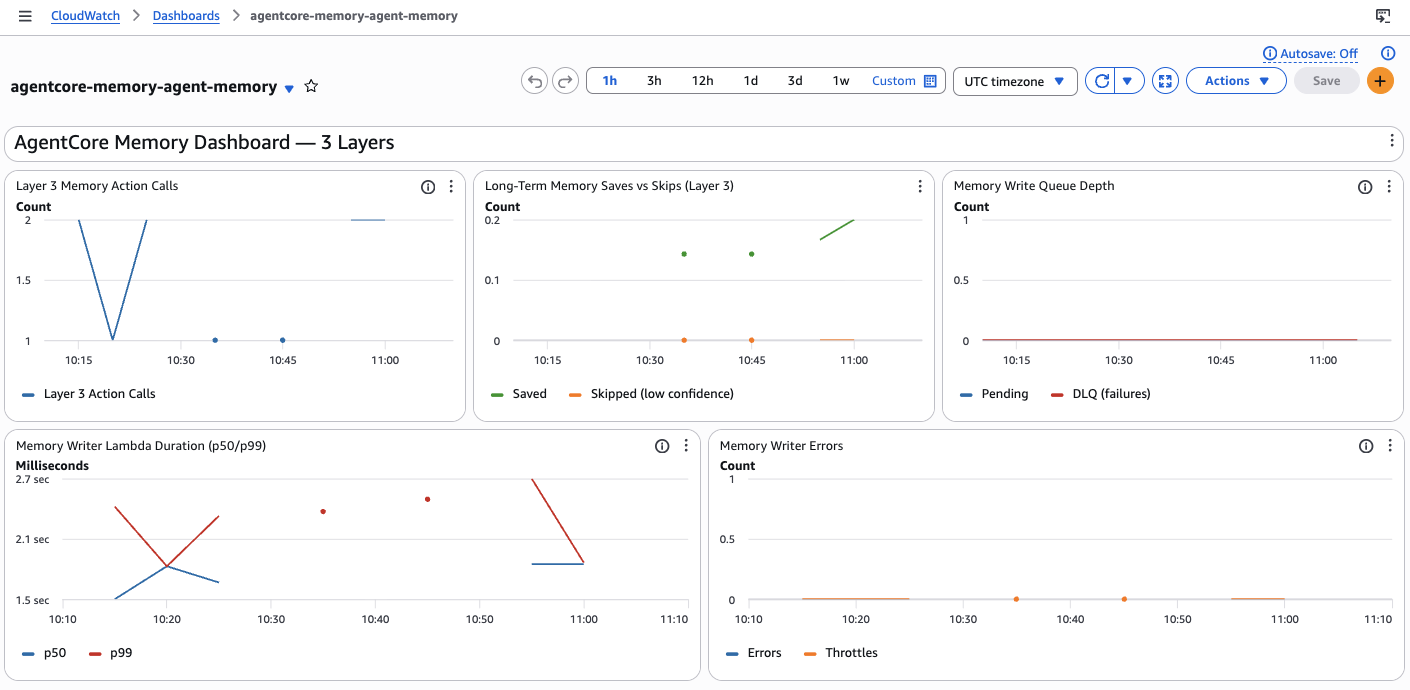
Figure 8 — The AgentCore Memory CloudWatch dashboard. From left to right: Lambda invocations (proxy for agent activity), Memory Saves vs Skips (Layer 3 quality gate metrics), and SQS queue depth including DLQ failures.
7. Live Demo Results — All 3 Layers
Layer 1 — In-Context
Turn 1: "My name is Roman and I'm building AI agents on AWS."
Turn 2: "I mentioned my name earlier — what is it?"
Agent: "Your name is Roman."
The agent recalls from its prompt context. Zero latency, zero additional cost.
Layer 2 — Session Summary
After three turns establishing preferences (Terraform over CDK, Python/Lambda/Bedrock stack, working on an article about agent memory patterns), the session is resumed:
"Summarise what you know about me from this session."
"You prefer Terraform over CDK for infrastructure, your tech stack includes Python, AWS Lambda, and Bedrock, and you are working on an article about agent memory patterns."
This summary was generated by Bedrock automatically — not by any code I wrote.
Layer 3 — Long-Term Cross-Session
Session A saves the fact:
User:  Please save this to my long-term memory: I always prefer eu-west-1
       as my primary AWS region because my users are in Europe. Confidence: high.

Agent: I've saved your preference for the 'eu-west-1' AWS region to your long-term memory.
The agent trace confirms the full pipeline:
ACTION_GROUP → MemoryActions__save_to_long_term_memory
  parameters: fact="I always prefer eu-west-1...", confidence=1, category=preference
  response: {"status": "saved", "document_key": "memories/preference/b0b6fc43...md"}
Session B — a completely new session with a different session_id, no shared context:
User: What do you know about my preferred AWS region from long-term memory?The trace shows the agent immediately querying the KB:
KNOWLEDGE_BASE → knowledgeBaseLookupInput: "What is the users preferred AWS region"
  → 5 documents retrieved from Aurora pgvector (310ms)
"Based on your long-term memory, your preferred AWS region is eu-west-1. This preference is saved across multiple sessions and is attributed to the fact that your users are primarily located in Europe."
End-to-End Working
Session A → S3 → Bedrock KB ingestion → Aurora pgvector → Session B retrieval in 310ms. The KB returned 5 documents — all previous saves of the same preference across earlier test sessions. Aurora pgvector performed the semantic search in 310ms.
8. Cost Considerations
Running this stack continuously costs roughly:
| Service | Config | Monthly Cost | Notes |
|---|---|---|---|
| Aurora Serverless v2 | 0.5 ACU minimum | ~$43 | Dominant cost. Set min_capacity = 0 to pause after inactivity (~25s cold start) |
| Bedrock KB | Per query | ~$0.00025/1K tokens | Charged per embedding query on retrieval |
| Lambda | On-demand | ~$0 | Essentially free at demo/small scale |
| S3 | Memory documents | ~$0 | Negligible for document storage |
| DynamoDB | On-demand | ~$0 | Negligible at this scale |
Monthly Cost Breakdown — Where the Money Goes
Aurora Serverless v2 at 0.5 ACU minimum is the dominant cost at ~$43/month. Everything else — Lambda, S3, DynamoDB, SQS — is effectively free at demo and small production scale. Setting min_capacity = 0 lets Aurora pause after inactivity and can cut this to near zero for dev environments, at the cost of a ~25s cold start on the first query.
For a production agent serving real users the Aurora cost is the dominant factor. Consider sharing the Aurora cluster across multiple knowledge bases if you are running several agents.
9. Deployment Steps
# 1. Bootstrap the Terraform state backend
cd terraform/bootstrap
terraform init && terraform apply

# 2. Deploy the full stack (~15 min — Aurora cluster creation is slow)
cd ../main
terraform init
terraform apply -var='aurora_master_password=<your-password>'

# 3. Grab the outputs
terraform output

# 4. Run the demo
cd ../..
python3 src/demo/agent_demo.py \
  --agent-id $(terraform -chdir=terraform/main output -raw agent_id) \
  --alias-id $(terraform -chdir=terraform/main output -raw agent_alias_id) \
  --layer all
zsh Gotcha: Special Characters in Passwords
If your Aurora password contains ! or #, wrap it in single quotes. zsh interprets ! as a history expansion and # as a comment character in double-quoted strings.
10. Key Takeaways
The three-layer architecture maps cleanly onto different memory timescales:
- In-context (Layer 1): this turn, this conversation — milliseconds, free
- SESSION_SUMMARY (Layer 2): this session, across invocations — automatic, ~30 days retention
- Knowledge Base (Layer 3): across sessions, across time — semantic search, Aurora pgvector backing
The most important implementation detail is the agent instruction. Simply wiring up a Knowledge Base does not mean the agent will use it. You need explicit rules about when to search and when to save, or the agent treats the KB as an optional tool rather than a required memory source.
The confidence threshold at the Lambda layer is equally important for production use. Without it, every casual statement the user makes ends up persisted forever. With it, only high-confidence facts make it into the knowledge base, keeping retrieval quality high as the memory grows.
If you are building agents that users interact with repeatedly — support assistants, coding assistants, operational agents — this architecture gives you the foundation to make them feel like they actually know your users.
Full Source Code on GitHub
Terraform modules, Lambda function, demo script, and draw.io architecture diagram — everything you need to deploy this in your own AWS account.
View on GitHub →