
AWS Bedrock RAG: The Augmentation Layer You're Ignoring
Your retrieval is fine. Your augmentation layer isn't. The hidden step between Bedrock Knowledge Bases and your LLM — and the three AWS-specific quirks that silently kill answer quality.
The Setup
The retrieval worked perfectly. Five chunks returned, relevance scores above 0.85, exactly the policy document your user needed. The answer was right there in chunk three.
But the response missed the key detail. Not a hallucination. The model just skimmed it. You debug the retriever. Tune embeddings. Adjust chunk size. But retrieval was never the issue.
Table of Contents
1. The Layer Nobody Talks About
Every RAG tutorial shows you this pipeline:
User Query → Retrieval → LLM → ResponseThe real pipeline looks like this:
User Query → Retrieval → [AUGMENTATION] → LLM → ResponseThe augmentation layer is everything that happens between your vector store returning chunks and your LLM receiving a prompt. It includes how chunks are ordered in the context window, how much text surrounds each chunk, whether chunks get trimmed or filtered, and how the system prompt is structured around the retrieved content.
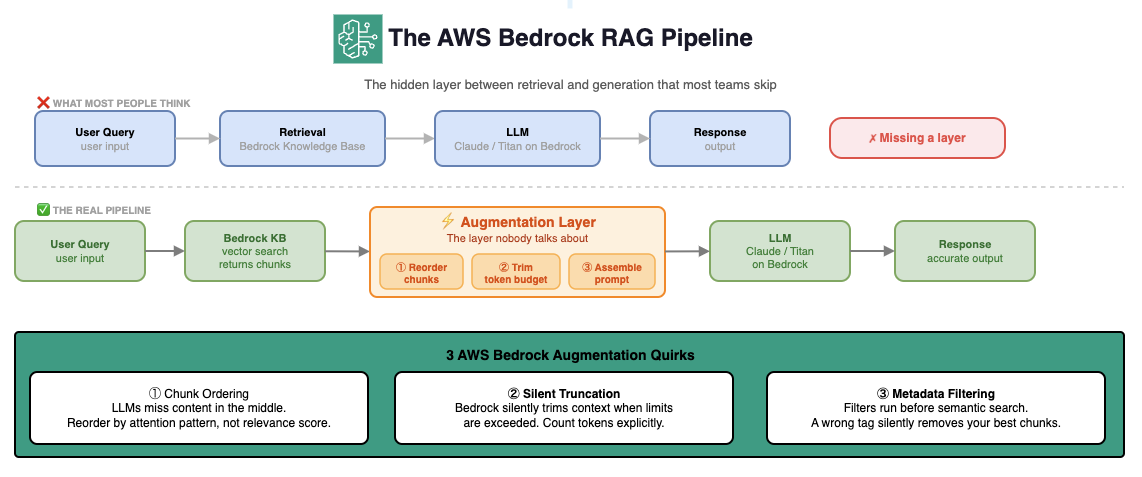
Figure 1 — The complete AWS Bedrock RAG pipeline. Most teams implement only the top row (what they think). The real pipeline has a critical augmentation step between retrieval and generation that Bedrock's Knowledge Bases abstracts away — and abstraction becomes a problem when something breaks.
When you use Bedrock Knowledge Bases out of the box, AWS handles this augmentation step for you. That's convenient until something breaks and you have no idea why. The three most common failure modes are all in this hidden layer — and none of them show up in your retrieval metrics.
LLMs skip middle context
Bedrock trims without warning
Run before search, not after
2. Quirk #1 — Chunk Ordering and the Lost-in-the-Middle Problem
LLMs don't read context uniformly. Stanford and Meta researchers found in 2023 that language models consistently underperform when critical information is positioned in the middle of a long context window. They attend strongly to the beginning and end. The middle gets skimmed.
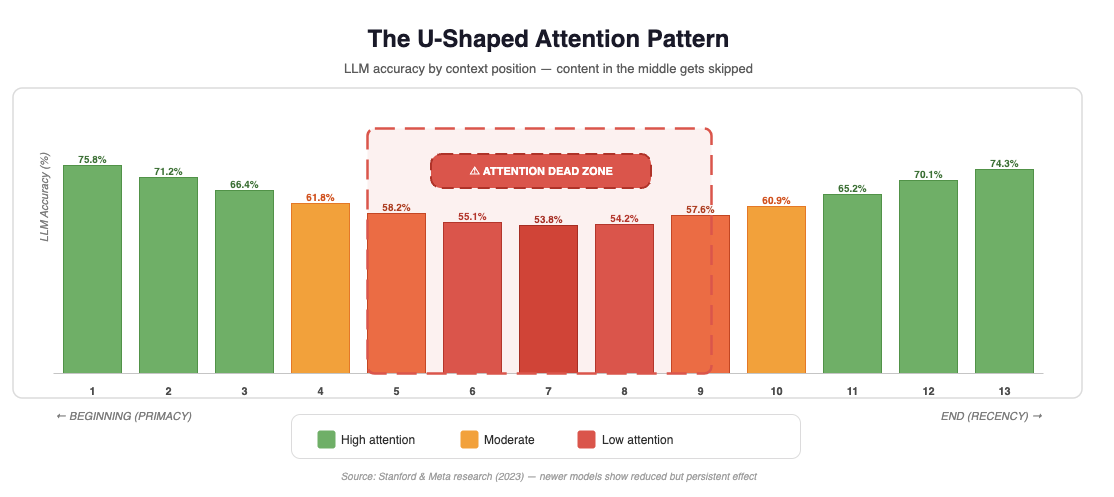
Figure 2 — LLM accuracy by context position (2023 research). Accuracy drops from 75.8% at position 1 to 53.8% at position 7 — the attention dead zone. It recovers to 74.3% at position 13. Newer models show a reduced effect, but the U-shaped pattern persists across all tested architectures.
This is called the "lost in the middle" problem, and it hits Bedrock RAG systems hard. When Bedrock Knowledge Bases returns chunks sorted by relevance score — highest first — your second and third most relevant chunks land exactly in the middle of your context. The model sees them. It just doesn't weight them properly.
The Problem in One Sentence
Sorting chunks by relevance score puts your best content where the LLM pays least attention.
The Fix: Bookend Your Best Chunks
Instead of passing chunks in relevance order, apply a simple reordering: put the most relevant chunk first, the second most relevant chunk last, and fill the middle with everything else.
def reorder_chunks_for_attention(chunks: list[dict]) -> list[dict]:
    """
    Reorder retrieved chunks to avoid the 'lost in the middle' problem.
    Places highest-relevance chunks at start and end of context window.
    """
    if len(chunks) <= 2:
        return chunks

    # Sort by relevance score descending
    sorted_chunks = sorted(chunks, key=lambda x: x['score'], reverse=True)

    reordered = []
    reordered.append(sorted_chunks[0])      # Best chunk → position 0 (strong attention)
    reordered.extend(sorted_chunks[2:])      # Rest → middle
    reordered.append(sorted_chunks[1])       # Second best → last position (strong attention)

    return reordered
This one change can measurably improve answer quality without touching your retrieval setup at all. The research data in Figure 2 shows a 22 percentage point swing between position 1 (75.8%) and position 7 (53.8%). Moving your second-best chunk from position 2 to position 13 isn't free — but the U-shaped curve means the end of context gets nearly as much attention as the beginning.
3. Quirk #2 — Silent Context Truncation in Bedrock
Here's something Bedrock won't tell you: it silently truncates your context when you exceed the model's effective input limit.
Different models on Bedrock have different practical limits. The table below accounts for system prompt overhead, query length, and output buffer:
| Model | Max tokens | Practical RAG limit | Overhead |
|---|---|---|---|
anthropic.claude-3-5-sonnet-20241022-v2:0 |
200K | ~184K | ~16K |
anthropic.claude-3-haiku-20240307-v1:0 |
200K | ~184K | ~16K |
amazon.titan-text-premier-v1:0 |
32K | ~26K | ~6K |
cohere.command-r-plus-v1:0 |
128K | ~116K | ~12K |
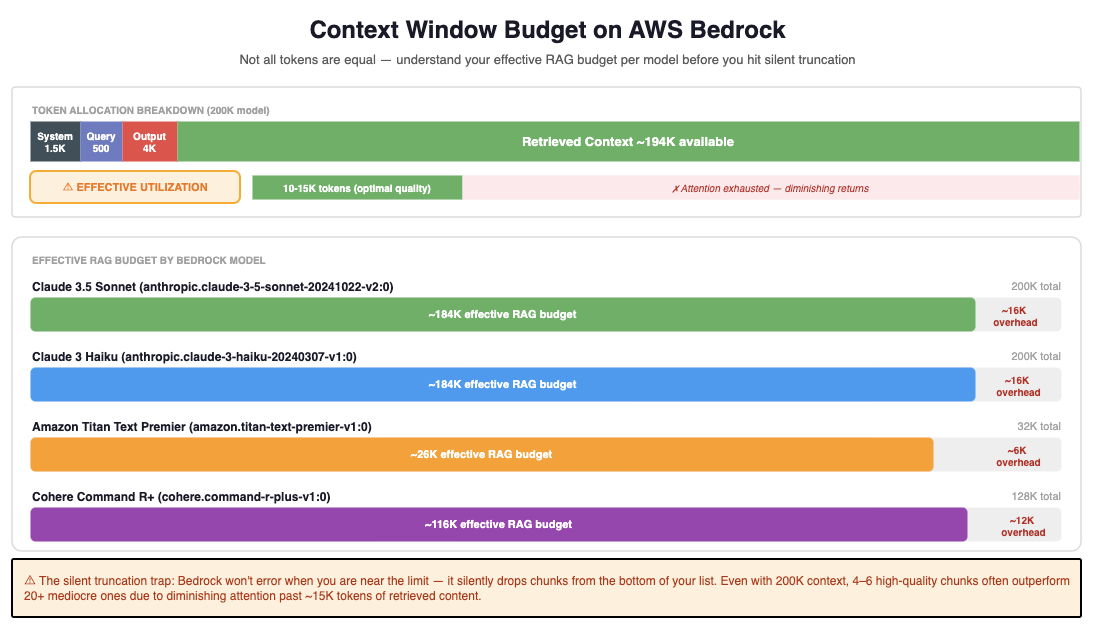
Figure 3 — Context window token allocation on AWS Bedrock. The top bar shows how a 200K model budget is consumed: system prompt (~1.5K), query (~500), output buffer (~4K), leaving ~194K for retrieved context. The key insight: even with 200K context, attention diminishes past ~15K tokens of retrieved content. 4–6 high-quality chunks typically outperform 20+ mediocre ones.
The issue isn't exceeding the hard limit — Bedrock will throw an error on that. The problem is the range just under the limit where your chunks are being quietly trimmed in ways you can't see in your logs. When Bedrock Knowledge Bases hits capacity, it drops chunks from the bottom of the list. With default relevance ordering, those are your least-relevant results — which sounds acceptable. But if you're relying on specific chunks being present (for metadata-filtered queries, for example), this becomes a hidden failure mode.
How to Detect Silent Truncation
import tiktoken

def check_context_safety(
    system_prompt: str,
    chunks: list[str],
    query: str,
    model_limit: int = 180_000,
    output_buffer: int = 4_000
) -> dict:
    """
    Estimate token count before sending to Bedrock.
    Run this in development to catch truncation before it hits production.
    """
    enc = tiktoken.get_encoding("cl100k_base")
    total_text = system_prompt + "\n\n" + "\n\n".join(chunks) + "\n\n" + query
    token_count = len(enc.encode(total_text))
    available = model_limit - output_buffer

    return {
        "token_count": token_count,
        "available": available,
        "is_safe": token_count < available,
        "overflow": max(0, token_count - available)
    }

# Usage
safety = check_context_safety(SYSTEM_PROMPT, chunk_texts, query)
if not safety["is_safe"]:
    print(f"WARNING: Context overflow by {safety['overflow']} tokens")
Run this before every Bedrock call in development. Add a CloudWatch metric for it in production. You'll be surprised how often you're operating in the danger zone — especially when queries are longer than average, or when your document store has grown since you last tuned your chunk count.
4. Quirk #3 — Metadata Filters Run Before Search
Bedrock Knowledge Bases supports metadata filtering — you can attach attributes to your documents (department, date, region, document type) and filter at query time. Most teams set this up, think it's working, and never look at it again.
Here's the silent failure: metadata filters run before semantic search, not after. This means if your filter is even slightly wrong — a stale date range, an incorrect department tag, a region mismatch — it eliminates chunks before the vector search ever sees them.
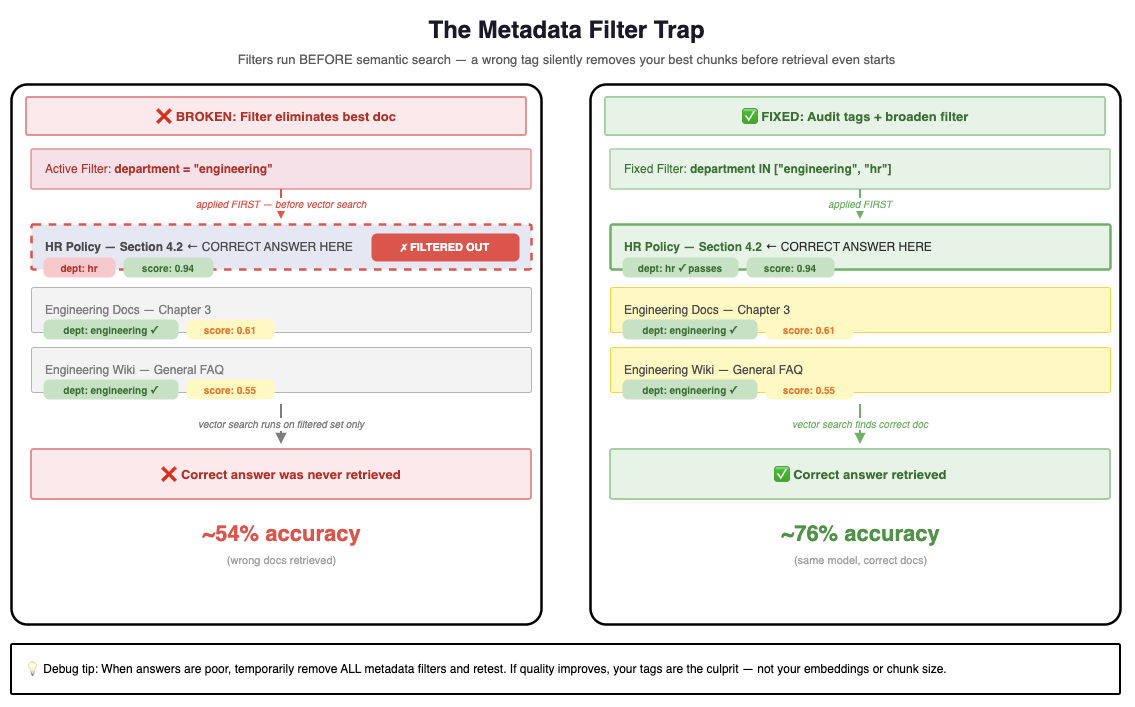
Figure 4 — The metadata filter trap. Left: the active filter department = "engineering" eliminates the HR Policy document (score: 0.94) before vector search — the correct answer is never retrieved. Right: broadening the filter to include both departments lets the best document through, improving accuracy from ~54% to ~76% with no other changes.
Your retrieval scores look great because they're measuring quality within the filtered set. But the best answer may have been in a document the filter already removed.
A Real Example
# This filter looks reasonable...
filter_config = {
    "equals": {
        "key": "department",
        "value": "engineering"
    }
}

# But if your HR policy document was tagged "hr" instead of "engineering",
# it will never appear in results — even if it's the perfect answer.
# Score: 0.94. Status: filtered out before search even runs.
Debug Tip
The One Debug Step That Catches 80% of Filter Issues
When your RAG answers are poor, temporarily remove all metadata filters and retest. If quality improves significantly, your tags are the culprit — not your embeddings or chunk size. Then audit your metadata before re-enabling filters.
import boto3

def audit_knowledge_base_metadata(
    kb_id: str,
    data_source_id: str,
    region: str = "us-east-1"
) -> dict:
    """
    List all documents in your Knowledge Base and check their sync status.
    Run this when filter-based queries return unexpected results.
    """
    client = boto3.client("bedrock-agent", region_name=region)

    response = client.list_knowledge_base_documents(
        knowledgeBaseId=kb_id,
        dataSourceId=data_source_id
    )

    for doc in response.get("documentDetails", []):
        doc_uri = doc["identifier"]["s3"]["uri"]
        status = doc["status"]
        print(f"{status:12} | {doc_uri}")

    return response
5. The Fix: Augmentation as a First-Class Step
The pattern that works treats augmentation as an explicit, measurable step in the pipeline — not an afterthought between retrieval and generation.
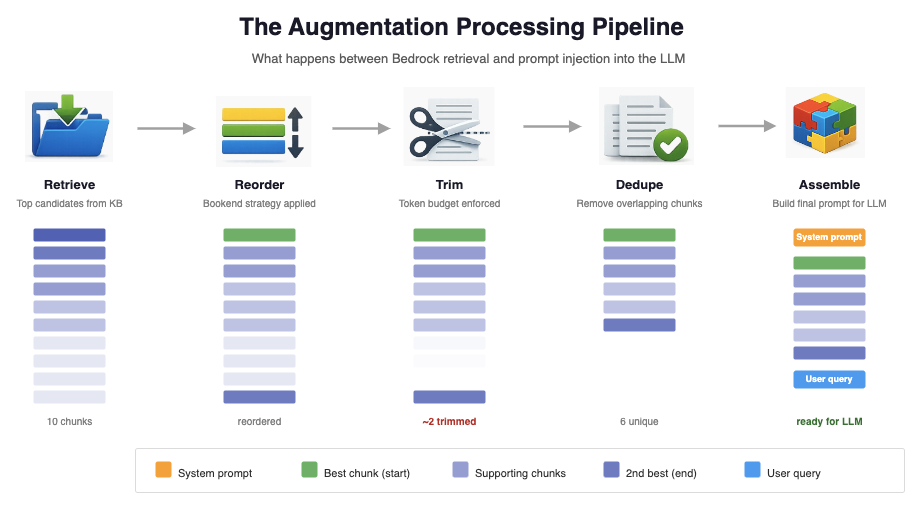
Figure 5 — The complete augmentation pipeline. After retrieval, chunks go through four explicit steps before reaching the LLM: reorder (bookend strategy), trim (token budget enforcement), dedupe (remove overlapping content), and assemble (build the final prompt with system context and user query properly positioned).
Here's the complete production-ready wrapper that implements all three fixes:
import json
import boto3
import tiktoken

SYSTEM_PROMPT = "You are a helpful AWS expert. Answer questions using only the provided context."
MODEL_ID = "anthropic.claude-3-5-sonnet-20241022-v2:0"

def reorder_chunks_for_attention(chunks: list[dict]) -> list[dict]:
    """Bookend strategy: best chunk first, second-best last."""
    if len(chunks) <= 2:
        return chunks
    sorted_chunks = sorted(chunks, key=lambda x: x['score'], reverse=True)
    return [sorted_chunks[0]] + sorted_chunks[2:] + [sorted_chunks[1]]

def check_token_budget(texts: list[str], limit: int = 170_000) -> list[str]:
    """Trim from middle to stay within safe token budget."""
    enc = tiktoken.get_encoding("cl100k_base")
    result, total = [], 0
    for text in texts:
        count = len(enc.encode(text))
        if total + count > limit:
            break
        result.append(text)
        total += count
    return result

def rag_with_augmentation(
    query: str,
    kb_id: str,
    num_results: int = 10,
    region: str = "us-east-1"
) -> str:
    bedrock_agent = boto3.client("bedrock-agent-runtime", region_name=region)
    bedrock = boto3.client("bedrock-runtime", region_name=region)

    # ── Step 1: Retrieve ──────────────────────────────────────────────────
    retrieval_response = bedrock_agent.retrieve(
        knowledgeBaseId=kb_id,
        retrievalQuery={"text": query},
        retrievalConfiguration={
            "vectorSearchConfiguration": {"numberOfResults": num_results}
        }
    )
    chunks = retrieval_response["retrievalResults"]

    # ── Step 2: Augment (the layer nobody talks about) ────────────────────
    # 2a. Reorder for attention — bookend best chunks
    chunks = reorder_chunks_for_attention(chunks)

    # 2b. Enforce token budget — trim from middle, not the end
    chunk_texts = [c["content"]["text"] for c in chunks]
    chunk_texts = check_token_budget(chunk_texts)

    # 2c. Dedupe — remove chunks with >80% overlap
    seen, unique_texts = set(), []
    for text in chunk_texts:
        words = frozenset(text.lower().split())
        if not any(len(words & s) / max(len(words), 1) > 0.8 for s in seen):
            unique_texts.append(text)
            seen.add(words)

    # 2d. Assemble prompt — structure matters
    context = "\n\n---\n\n".join(
        f"[Source {i+1}]: {text}" for i, text in enumerate(unique_texts)
    )
    prompt = f"""Here is the relevant context:\n\n{context}\n\nBased only on the context above, answer this question: {query}"""

    # ── Step 3: Generate ──────────────────────────────────────────────────
    response = bedrock.invoke_model(
        modelId=MODEL_ID,
        body=json.dumps({
            "anthropic_version": "bedrock-2023-05-31",
            "max_tokens": 1024,
            "system": SYSTEM_PROMPT,
            "messages": [{"role": "user", "content": prompt}]
        })
    )
    return json.loads(response["body"].read())["content"][0]["text"]
Three extra steps. The retrieval code is identical. The LLM call is identical. Only the middle changes — and that middle is where your answer quality actually lives.
6. What to Measure Instead of Retrieval Scores
Most teams track retrieval recall and relevance scores. Almost nobody measures augmentation quality. Here are three metrics you can add to your CloudWatch dashboard today, without a complex eval framework:
Context Utilization Rate
What percentage of retrieved chunks does the model actually reference in its answer? Low utilization often means ordering or truncation issues. Implement a simple check by asking your LLM to cite which sources it used:
citation_prompt = f"""
Answer the question, then on a new line write:
SOURCES USED: [list the source numbers you referenced, e.g. 1,3,5]

Context:
{context}

Question: {query}
"""
# Parse "SOURCES USED: 1,3" from response
# utilization = len(cited_sources) / len(total_chunks)
Answer-to-Source Coverage
Do key facts in the answer trace back to retrieved chunks? This catches cases where the model ignored your context and generated from training data instead. A basic version: extract key noun phrases from the answer and check what percentage appear in your chunk texts.
Effective Context Length
Track the actual token count of your assembled prompt over time. Unexpected growth often surfaces data quality issues — documents getting longer, more chunks being retrieved, metadata filters failing — before they affect answer quality.
import boto3

cloudwatch = boto3.client("cloudwatch", region_name="us-east-1")

def emit_augmentation_metrics(
    token_count: int,
    chunk_count: int,
    utilization_rate: float
) -> None:
    cloudwatch.put_metric_data(
        Namespace="RAG/Augmentation",
        MetricData=[
            {"MetricName": "EffectiveContextTokens", "Value": token_count, "Unit": "Count"},
            {"MetricName": "ChunkCount",             "Value": chunk_count, "Unit": "Count"},
            {"MetricName": "ContextUtilizationRate", "Value": utilization_rate, "Unit": "Percent"},
        ]
    )
You don't need a dedicated eval framework to get started. These three signals — utilization, coverage, effective length — will surface 80% of augmentation problems in production within the first week of tracking.
7. TL;DR
Your AWS Bedrock RAG system has a hidden layer between retrieval and generation that quietly determines whether your answers are good or mediocre. The three biggest AWS-specific issues, and their fixes:
| Quirk | What Breaks | Fix | Effort |
|---|---|---|---|
| ① Ordering | LLM skips your best chunks in the middle | Bookend: best chunk first, 2nd-best last | ~10 lines |
| ② Truncation | Bedrock silently drops chunks near token limit | Count tokens before every Bedrock call | ~15 lines |
| ③ Filters | Wrong metadata tag removes best document | Audit tags; test without filters when debugging | ~20 lines |
The complete rag_with_augmentation() wrapper above handles all three. Your retrieval scores will stay the same. Your answers will get noticeably better.
Next Step: The Terraform Setup
The next article covers deploying a full Bedrock Knowledge Base that implements this augmentation pattern — with IAM roles, S3 data source, Bedrock Rerank API integration, and a CloudWatch dashboard for augmentation metrics. All provisioned with Terraform in under 15 minutes.
Key Takeaways
- Retrieval metrics lie. High relevance scores don't guarantee good answers if the augmentation layer is broken. Measure context utilization rate, not just retrieval recall.
- Order your chunks like a lawyer, not a search engine. Put your strongest evidence first and last, where LLMs pay the most attention.
- Bedrock won't warn you about truncation. Token counting before every API call is non-optional in production — especially for dynamic query lengths.
- Metadata filters are a footgun. They run before search, so a wrong tag silently eliminates your best documents. Always test without filters first when debugging poor results.
- Treat augmentation as a named step. Teams that give it an explicit name in their architecture diagrams and codebase catch problems faster. Teams that let it live in a 3-line helper function find bugs in production.