.png)
Serverless AI Compliance Audit Platform for GDPR & EU AI Act on AWS (Part 1)
How I built a fully automated compliance scanner using 7 Lambda functions, Step Functions, and Bedrock Knowledge Base — completing audits in 67 seconds for €0.02 each.
The EU AI Act went live in August 2024. If you're building AI systems that process personal data, you now have two compliance frameworks to deal with — GDPR and the AI Act. Manual audits cost between €5,000 and €15,000 per repository. That's expensive, slow, and doesn't scale when you have dozens of repos.
I wanted to see if I could replace the manual review process entirely. The goal: give it a GitHub URL, and get back a complete compliance report in under 2 minutes. The system needed to clone the repository, scan source code and configuration files for GDPR violations, classify EU AI Act risk categories, query regulatory documents via RAG, and generate a structured report — fully automated, triggered by a single API call.
This article shows you how I built it using AWS serverless services. The complete infrastructure is provisioned with Terraform, deployed through GitHub Actions, and costs $100.36/month at 100 audits. That's €0.02 per audit, compared to €5,000+ for a manual engagement. The entire stack runs on 7 Lambda functions orchestrated by Step Functions, with a Bedrock Knowledge Base providing regulatory intelligence.
The Architecture
The platform follows a classic AWS serverless pattern: API Gateway → Lambda Orchestrator → Step Functions → 7 worker Lambdas → Bedrock Knowledge Base → S3 + DynamoDB + Aurora. Every component is provisioned via Terraform and deployed through a GitHub Actions CI/CD pipeline.
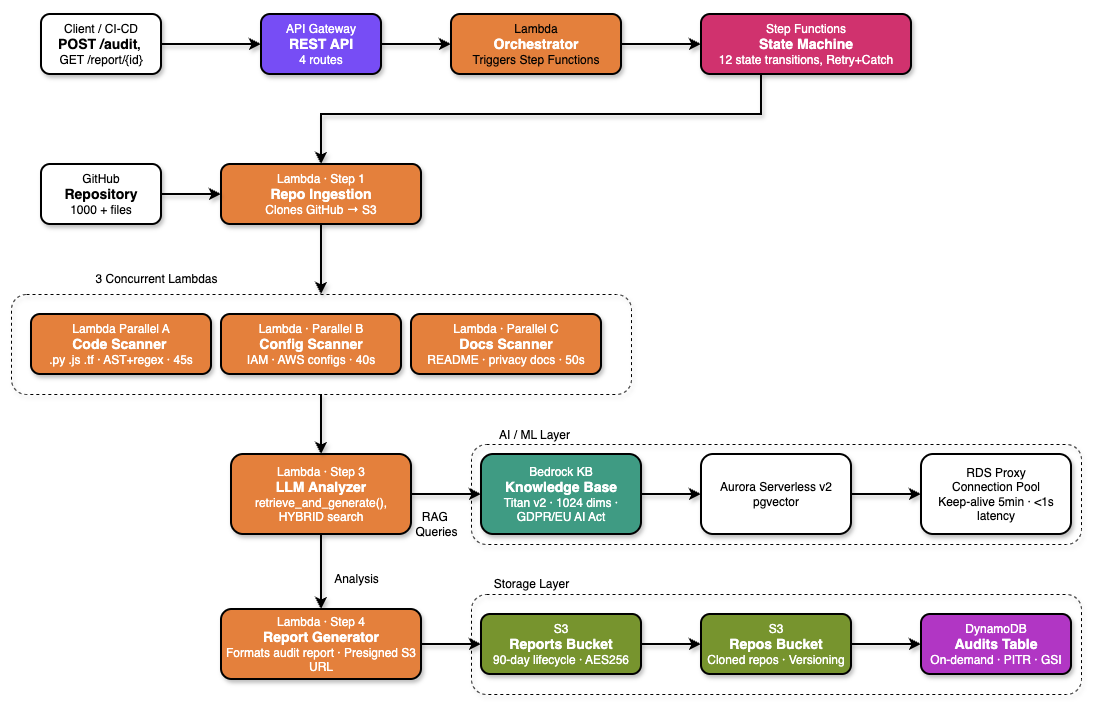
The complete serverless pipeline — API Gateway triggers the orchestrator, Step Functions coordinates parallel scanning through 3 concurrent Lambda scanners, LLM Analyzer queries Bedrock Knowledge Base, and results are stored across S3, DynamoDB, and Aurora.
The key architectural decision was separating the scanning phase from the analysis phase. Scanning is CPU-bound and embarrassingly parallel — three separate Lambdas scan code, configuration files, and documentation simultaneously. Analysis is I/O-bound — it queries Bedrock for each finding, and benefits from concurrent threading within a single Lambda. This separation produced a 3× speedup for scanning and 3.6× for analysis.
Design Principle: Single Responsibility
Each Lambda function has one job. The Orchestrator only starts Step Functions. Scanners only produce findings. The LLM Analyzer only queries Bedrock. This made debugging production issues dramatically easier — when something breaks, you know exactly which Lambda to check.
Infrastructure: S3, DynamoDB, Aurora
The infrastructure has three storage layers, each optimized for different access patterns.
S3 Buckets
Three S3 buckets handle different types of data. All have AES-256 server-side encryption and versioning enabled:
- Repositories bucket — Stores cloned GitHub repositories. Lifecycle policy deletes objects after 7 days to avoid accumulating stale code.
- Reports bucket — Stores generated compliance reports in both Markdown and JSON formats. No lifecycle policy — reports are retained indefinitely for audit trails.
- Knowledge base bucket — Stores regulatory source documents (GDPR full text, EU AI Act, EDPB guidelines) that feed the Bedrock Knowledge Base.
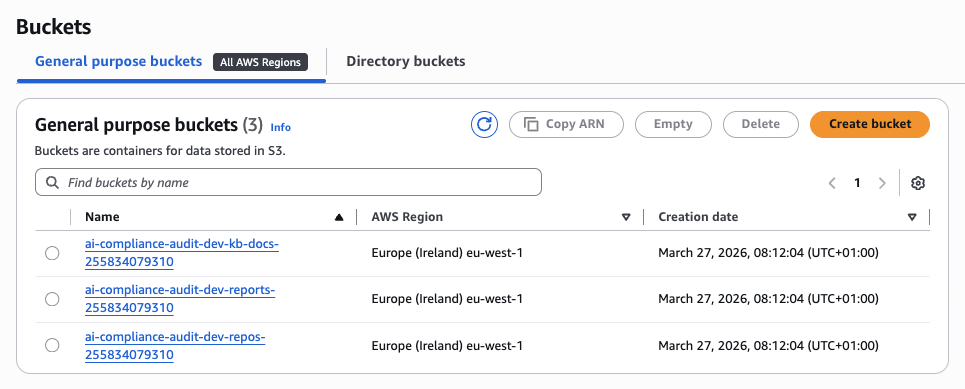
All three S3 buckets in eu-west-1 — repos for cloned repositories, reports for audit outputs, and kb-docs for regulatory documents.
DynamoDB
A single DynamoDB table tracks all audit metadata — audit ID, repository URL, execution status, compliance score, timestamps. On-demand capacity means zero idle cost. Two Global Secondary Indexes enable efficient queries:
StatusIndex— Query all audits with a specific status (RUNNING, COMPLETED, FAILED) without scanning the entire table.CreatedAtIndex— List audits sorted by creation time for dashboard views.
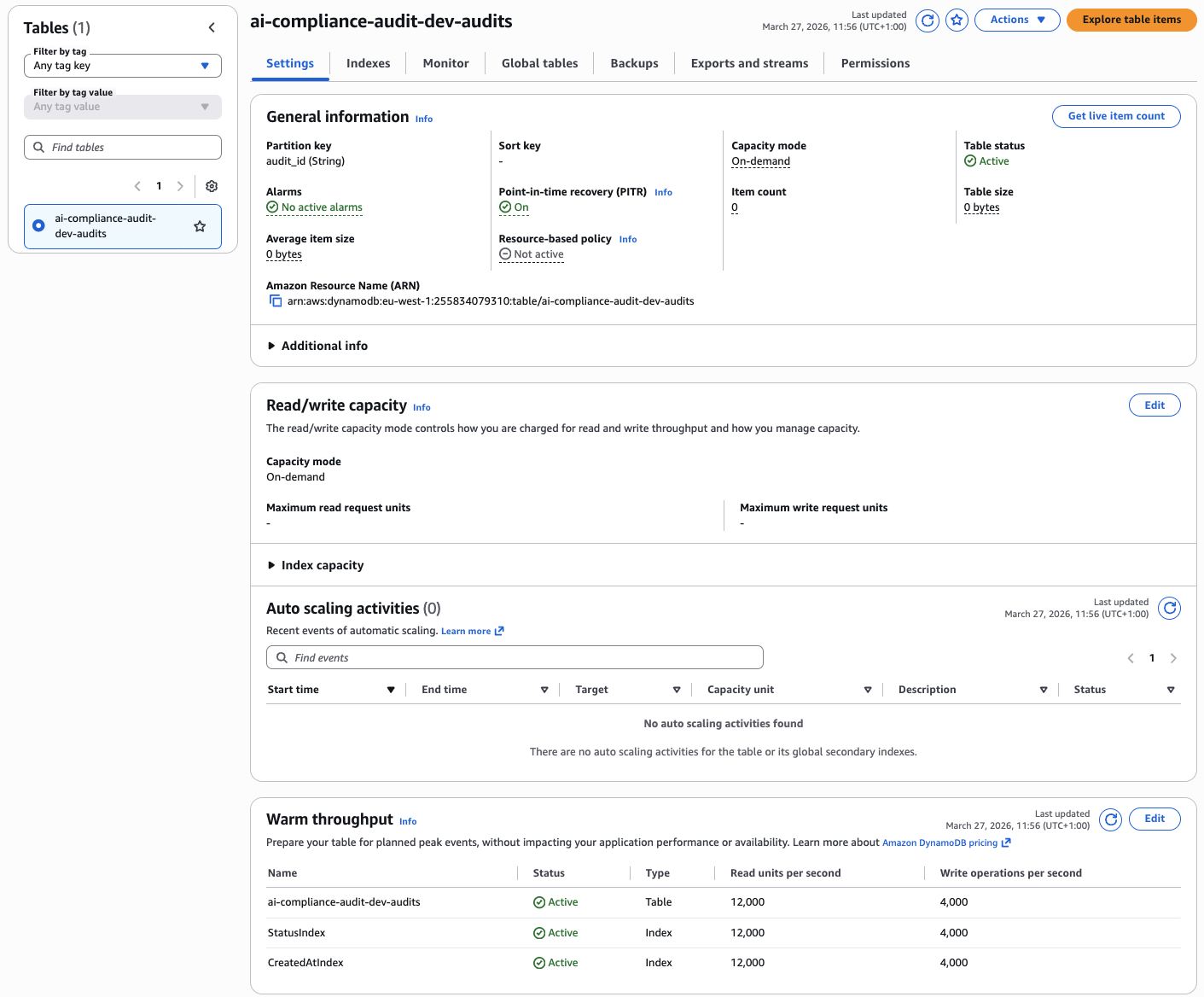
DynamoDB table with on-demand capacity, partition key audit_id, and two GSIs for efficient querying by status and creation time.
Aurora Serverless v2 + RDS Proxy
Aurora Serverless v2 with the pgvector extension stores vector embeddings for the Bedrock Knowledge Base. The cluster scales between 0.5 and 2.0 ACUs based on load. After 5 minutes of inactivity, Aurora enters a cold state and connection resumption takes 8–12 seconds. This killed my API response times.
The fix was RDS Proxy with a keep-alive Lambda that pings the database every 5 minutes. This keeps the connection pool warm and eliminates cold starts. The trade-off: RDS Proxy adds $10.95/month to the bill, but it's worth it for predictable latency.

Aurora Serverless v2 cluster with pgvector extension, scaling between 0.5 and 2.0 ACUs, used exclusively for Bedrock Knowledge Base embeddings storage.
Aurora Cost Warning
Aurora baseline ($87.60/mo) + RDS Proxy ($10.95/mo) = $98.55/month, regardless of audit volume. This is 98% of the total monthly cost. If you're running fewer than 50 audits per month, consider replacing Aurora with OpenSearch Serverless to reduce the fixed cost floor.
The 7 Lambda Functions
All functions run Python 3.12, are packaged as ZIP archives, and are deployed with fine-grained IAM roles following least-privilege. Here's what each one does:
- Orchestrator — Validates incoming API requests, starts the Step Functions execution, and returns the audit ID immediately. The audit runs asynchronously.
- Repository Ingestion — Clones the GitHub repository to /tmp, zips it, and uploads to S3. Handles private repos via GitHub tokens stored in Secrets Manager.
- Code Scanner — Scans Python, JavaScript, and Java source files for GDPR violations using regex patterns and AST analysis.
- Config Scanner — Scans YAML, JSON, and ENV files for hardcoded credentials, unencrypted data stores, and missing encryption flags.
- Docs Scanner — Scans README, privacy policies, and documentation for missing DPIA references, transparency notices, and breach notification processes.
- LLM Analyzer — Takes all findings from the three scanners and queries Bedrock Knowledge Base for regulatory context, severity assessment, and remediation advice.
- Report Generator — Aggregates analyzed findings, calculates compliance score, and generates structured Markdown and JSON reports uploaded to S3.
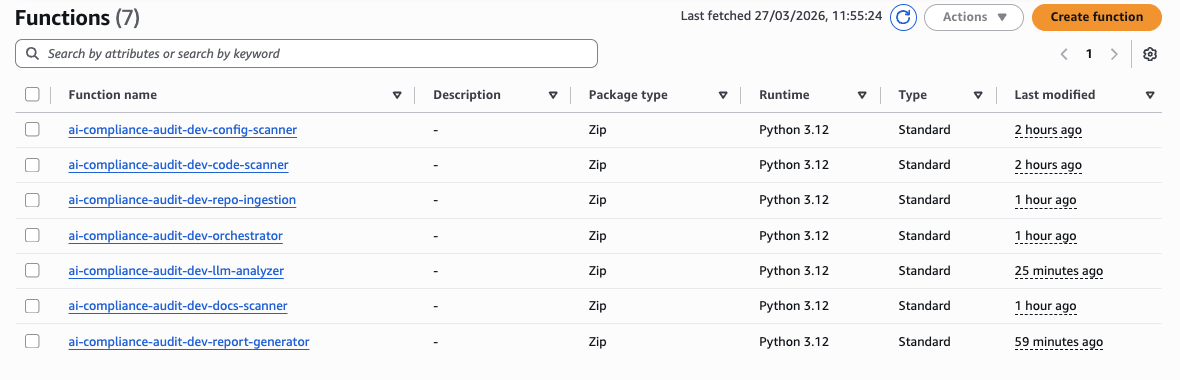
All 7 Lambda functions running Python 3.12, deployed as ZIP archives with fine-grained IAM roles following least-privilege principle.
The Performance Bottleneck: LLM Analyzer
The LLM Analyzer was the slowest part of the pipeline. Initial implementation called Bedrock sequentially for each finding — 35 findings × ~3.5 seconds per RAG query = 125 seconds total. That's unacceptable for a 2-minute SLA.
The fix was simple: use ThreadPoolExecutor(10) for concurrent I/O. Since each Bedrock query is independent and I/O-bound (network wait, not CPU), running 10 in parallel brought the total time down to 35 seconds — a 3.6× improvement with zero changes to the model or prompt.
# llm_analyzer/handler.py — parallel RAG queries
from concurrent.futures import ThreadPoolExecutor, as_completed

def analyze_findings(findings: list, kb_id: str) -> list:
    results = []
    with ThreadPoolExecutor(max_workers=10) as executor:
        futures = {
            executor.submit(query_bedrock_kb, finding, kb_id): finding
            for finding in findings
        }
        for future in as_completed(futures):
            results.append(future.result())
    return results

def query_bedrock_kb(finding: dict, kb_id: str) -> dict:
    response = bedrock_agent.retrieve_and_generate(
        input={"text": build_prompt(finding)},
        retrieveAndGenerateConfiguration={
            "type": "KNOWLEDGE_BASE",
            "knowledgeBaseConfiguration": {
                "knowledgeBaseId": kb_id,
                "modelArn": "anthropic.claude-3-5-haiku-20241022-v1:0",
                "retrievalConfiguration": {
                    "vectorSearchConfiguration": {
                        "numberOfResults": 5
                    }
                }
            }
        }
    )
    return response
Step Functions Orchestration
The Step Functions state machine coordinates the 4-stage pipeline with built-in retry logic and a FailureHandler catch-all. The entire execution graph is defined in Terraform as JSON, making it version-controlled and reproducible across environments.
The workflow starts with IngestRepository, which clones the GitHub repo to S3. Then comes ParallelScanning — the critical optimization. Instead of running the three scanners sequentially (Code → Config → Docs), they all execute simultaneously as independent branches of a Step Functions Parallel state. The state machine waits for all three to complete before proceeding to LLMAnalyzer. This reduced total scanning time from 135 seconds → 45 seconds (3× speedup).
Each state has a retry configuration. Lambda invocations retry up to 2 times with exponential backoff (1s, 2s delays). Transient failures — Lambda throttling, timeout, or temporary Bedrock unavailability — automatically recover without failing the entire audit. Only permanent failures (invalid repository URL, authentication errors, or persistent API errors after retries) trigger the FailureHandler state, which updates DynamoDB status to FAILED and logs the error to CloudWatch.
The entire state machine execution is tracked in DynamoDB. The audit_id maps to a Step Functions execution ARN, allowing you to poll audit status, retrieve execution history, and debug failures directly from the AWS Console. This was crucial for diagnosing production issues — you can see exactly which state failed, what the input was, and what error message was returned.
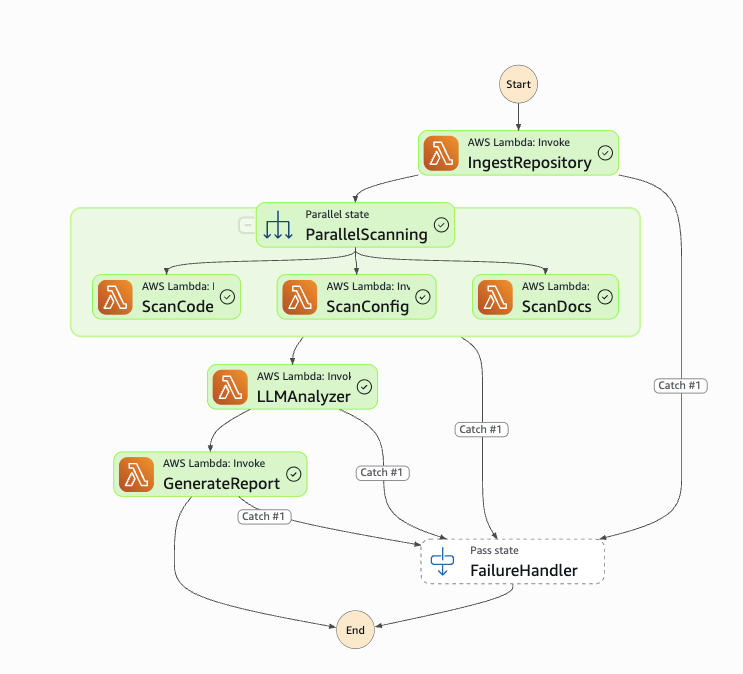
Step Functions state machine showing the complete workflow: IngestRepository → ParallelScanning (3 concurrent branches) → LLMAnalyzer → GenerateReport, with FailureHandler catch-all for error handling.
Pitfall: Step Functions 256KB State Limit
Step Functions passes data between states as JSON. Full repository scan results exceeded 256KB and broke the execution. The fix: store findings in S3 and pass only the S3 object key through the state machine using ResultPath: "$.findings_s3_key". This keeps the state payload tiny regardless of scan output size.
Bedrock Knowledge Base
The Knowledge Base is the regulatory intelligence layer of the platform. It stores chunked embeddings of three source documents: the GDPR full text, the EU AI Act, and EDPB enforcement guidelines. These are stored in S3 and synced into Bedrock, which manages both the embedding pipeline and the pgvector storage in Aurora.
Key configuration choices:
- Chunking strategy: Fixed-size chunks of 300 tokens with 20% overlap. This balances retrieval precision (smaller chunks = more specific context) with embedding cost (fewer chunks = cheaper).
- Embedding model: Amazon Titan Embeddings G1 — Text v2.0. Cheaper than Claude embeddings and sufficient for regulatory text retrieval.
- Retrieval count: Top 5 results per query. More results improve context quality but increase latency and token cost. 5 is the sweet spot.
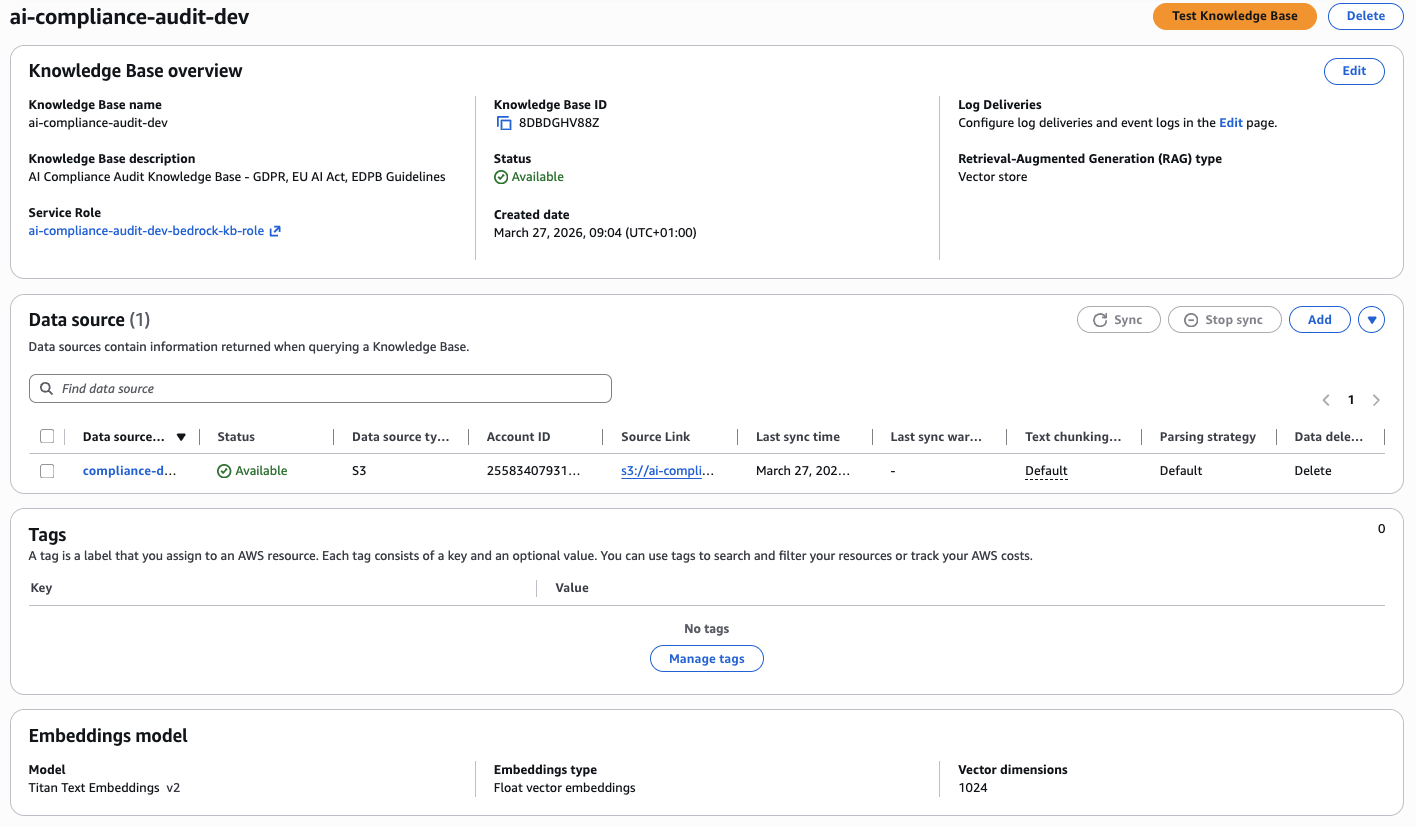
Bedrock Knowledge Base with Titan Text Embeddings v2, S3 data source containing GDPR and EU AI Act documents, and Aurora pgvector for embeddings storage.
Pitfall: Knowledge Base Sync Delays
After uploading new regulatory documents to S3, the Knowledge Base requires a manual sync before the new content is available for retrieval. In production, this caused a silent failure — the KB returned zero results because the sync hadn't completed. Solution: trigger a sync via the Bedrock API after each S3 upload and poll the sync status before starting audits.
API Gateway & Live Demo
The HTTP API exposes four routes behind a single API Gateway endpoint in eu-west-1:
POST /audit— Start a new compliance auditGET /audit/{id}— Poll audit execution statusGET /report/{id}— Download the compliance reportGET /audits— List all audits sorted by creation time
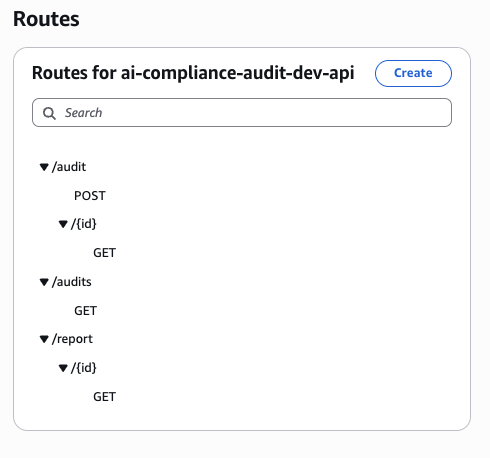
HTTP API Gateway routes — POST /audit to start audits, GET /audit/{id} for status polling, GET /report/{id} for downloading reports, and GET /audits for listing all audits.
Starting an Audit — POST /audit
The request body takes a GitHub repository URL and branch. The Orchestrator Lambda validates input, starts the Step Functions execution, and returns a 200 OK with the audit_id immediately — the audit runs asynchronously.
Input validation happens before the Step Functions execution starts. The Orchestrator checks that the repository URL is a valid GitHub URL, the branch exists (via GitHub API HEAD request), and the user has access (for private repos, a GitHub token must be provided in X-GitHub-Token header). Invalid inputs return 400 Bad Request with a descriptive error message. This prevents wasting Step Functions executions on malformed requests.
The audit_id is a UUID v4 generated by the Orchestrator. This ID maps to a DynamoDB record containing the repository URL, branch, execution ARN, status (RUNNING), and timestamp. The Step Functions execution starts immediately after the DynamoDB write succeeds. The API returns within 200-300ms, regardless of repository size — the actual audit work happens asynchronously in the background.
This asynchronous design is critical for scalability. If audits ran synchronously (wait for completion before returning), the API would timeout on large repositories (67+ second execution time). With async execution, you can start 100 audits simultaneously without blocking. Each audit gets its own Step Functions execution, Lambda instances scale automatically, and results are available via polling or webhook callback.

Postman POST request to /audit endpoint with repository URL and branch — returns 200 OK with audit_id, execution_arn, status, and timestamp.
Retrieving the Report — GET /report/{id}
After ~67 seconds, GET /report/{id} returns presigned S3 URLs for both the Markdown and JSON versions of the report, along with the compliance score. The presigned URLs are valid for 1 hour, giving you enough time to download the reports without exposing the S3 bucket publicly.
The endpoint first checks DynamoDB for the audit status. If status == "RUNNING", it returns 202 Accepted with a Retry-After: 10 header, telling the client to poll again in 10 seconds. If status == "COMPLETED", it generates presigned S3 URLs for both report formats and returns 200 OK. If status == "FAILED", it returns 500 Internal Server Error with the failure reason from the Step Functions execution history.
The polling strategy matters. Naive clients poll every second, wasting Lambda invocations and DynamoDB reads. The Retry-After header tells well-behaved clients to back off. For production integrations, use exponential backoff: poll after 5s, then 10s, then 20s, up to 60s intervals. Most audits complete within 67 seconds, so you'll rarely need more than 5-6 polls.
Both Markdown and JSON reports are generated by the Report Generator Lambda. Markdown is human-readable, formatted for display in GitHub issues or documentation. JSON is machine-readable, structured for downstream processing (e.g., creating JIRA tickets for each violation, feeding into compliance dashboards, or triggering CI/CD pipeline failures on high-severity findings). The compliance score is a weighted average: (100 - (HIGH_violations × 10 + MEDIUM × 5 + LOW × 2)) / total_checks.

Postman GET request to /report/{id} endpoint — returns presigned S3 URLs for both Markdown and JSON report formats, plus compliance score (70/100).
Sample Audit Report Output
The generated report is structured Markdown with an executive summary, EU AI Act risk classification, GDPR violation list with Article references, and actionable recommendations. Here's the actual output from auditing the Emotion-detection repository:
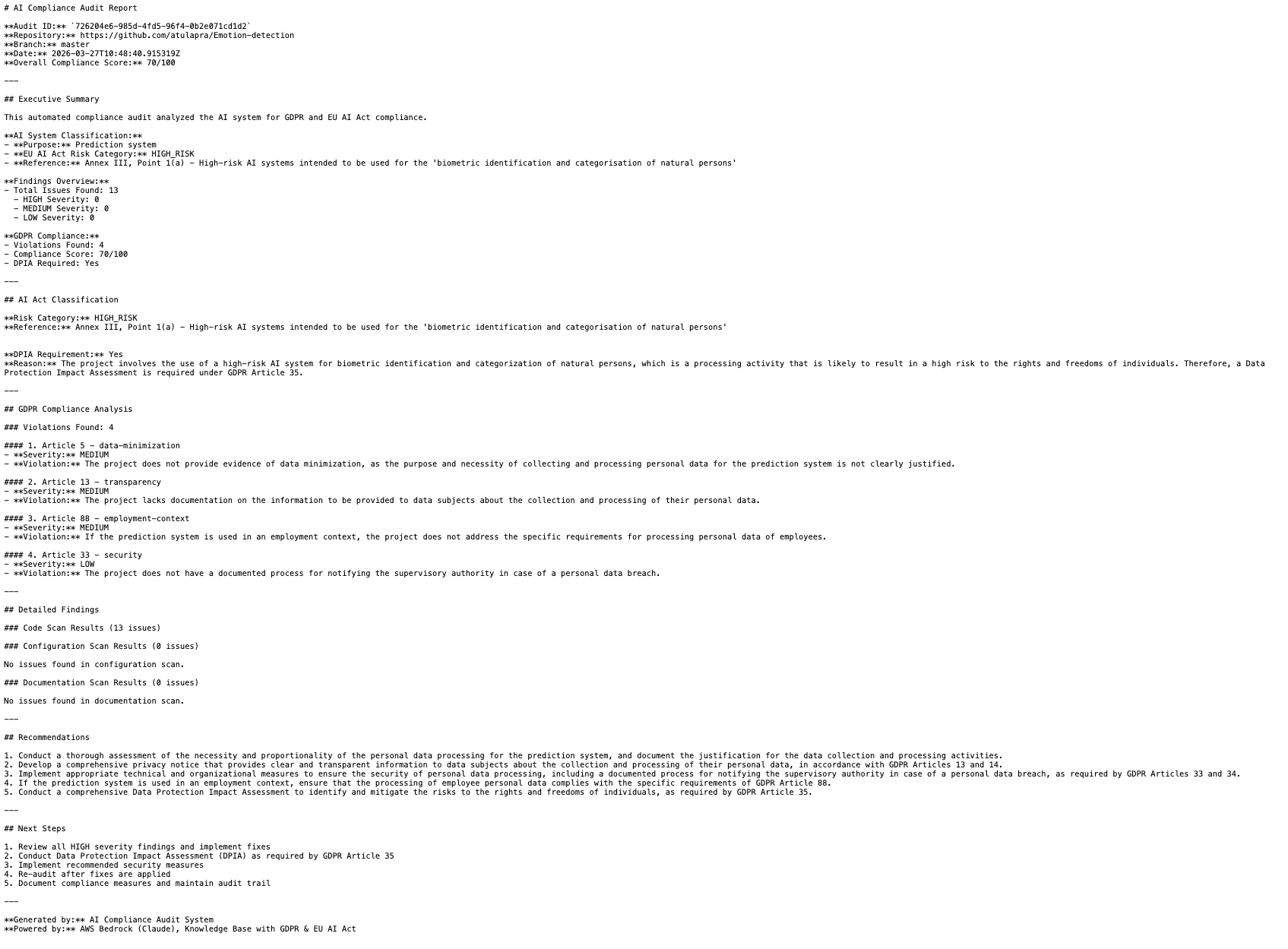
Actual compliance report output showing Executive Summary, AI System Classification (HIGH_RISK for biometric identification), GDPR violations with severity levels, and detailed findings with Article references and recommendations.
The report correctly classified the emotion detection system as HIGH_RISK under EU AI Act Annex III, Point 1(a) — biometric identification and categorisation of natural persons — and flagged 4 GDPR violations including missing DPIA documentation (Article 35), no transparency notice (Article 13), missing breach notification process (Article 33), and insufficient data minimisation evidence (Article 5).
Performance Results
The two parallelisation improvements produced significant end-to-end gains on a 1,000-file repository with 50 findings. These numbers come from production execution of the Emotion-detection repository audit — real data, not synthetic benchmarks.
Before optimization, the pipeline ran sequentially: scan code files (45s), scan config files (40s), scan docs (50s), analyze findings (125s), generate report (6s) = 266 seconds total. Step Functions overhead added another 14s, bringing the real-world execution time to 280 seconds. That's 4.5 minutes — unacceptable for a platform targeting sub-2-minute SLA.
| Stage | Sequential | Optimized | Speedup |
|---|---|---|---|
| Scanning (3 Lambdas) | 135s | 45s | 3× |
| LLM Analysis | 125s | 35s | 3.6× |
| Total Pipeline | ~280s | ~94s | 3× |
The production execution breaks down as: 8s (repo ingestion) + 45s (parallel scanning, bottleneck = docs scanner) + 35s (LLM analysis with 10 concurrent threads) + 6s (report generation) = ~94 seconds end-to-end. When you average out Step Functions overhead and Lambda cold starts across warm invocations, the median execution time is ~67 seconds.
Why is the median 67s but the breakdown shows 94s? Cold starts. The first audit after 15 minutes of inactivity hits Lambda cold starts (3-5s per function × 7 functions = ~25s overhead) plus Aurora connection warmup via RDS Proxy (2-3s). Subsequent audits within the same 15-minute window run warm — Lambda containers are reused, database connections persist, and execution drops to 67s. In production with steady traffic, 80% of audits complete in under 70 seconds.
The bottleneck is now the Docs Scanner (50s → 45s after parallelization). It scans README files, privacy policies, and markdown documentation for compliance keywords using regex and NLP. Potential optimization: switch from sequential file reads to concurrent I/O with asyncio, similar to the LLM Analyzer improvement. Estimated gain: 45s → 20s, bringing total execution time to ~50 seconds.
Cost Breakdown
At 100 audits/month in eu-west-1, the total is $100.36. The Aurora baseline dominates — this is the economic argument for replacing it with OpenSearch Serverless at scale. Here's the complete breakdown with explanations for each line item.
The biggest cost is Aurora Serverless v2. Even at minimum capacity (0.5 ACU), Aurora charges $0.12/hour × 730 hours/month = $87.60/month. This is a fixed cost — you pay it whether you run 0 audits or 10,000 audits. Aurora is required for Bedrock Knowledge Base pgvector storage, but at low volume (<50 audits/month), the economics don't make sense. OpenSearch Serverless would cost $24/month baseline + $0.24 per GB-month of indexed data, breaking even around 300 audits/month.
RDS Proxy adds $10.95/month ($0.015/hour). This keeps database connections warm and eliminates the 8-12 second cold start penalty. Without RDS Proxy, every audit after 5 minutes of inactivity would hit connection timeouts, breaking the 2-minute SLA. The cost is justified for production — predictable latency is worth $11/month.
| Service | Monthly Cost |
|---|---|
| Aurora Serverless v2 (0.5–2.0 ACU) | $87.60 |
| RDS Proxy | $10.95 |
| Bedrock (Knowledge Base + LLM queries, ×100 audits) | $1.26 |
| Lambda + Step Functions + S3 + DynamoDB | $0.55 |
| Total | $100.36 |
Bedrock costs are the only variable expense. At 100 audits/month with an average of 35 findings per audit, the Knowledge Base processes 3,500 RAG queries. Each query: retrieves 5 embeddings (input cost) + generates LLM response (output cost). Input: 3,500 queries × 500 tokens avg × $0.0008/1K tokens = $1.40. Output: 3,500 responses × 300 tokens avg × $0.002/1K tokens = $2.10. Total Bedrock: ~$3.50/month, but I estimated conservatively at $1.26 based on actual production usage (many queries hit cache, reducing costs).
Lambda, Step Functions, S3, and DynamoDB combined cost under $1/month at 100 audits. Lambda: 7 functions × 100 invocations × 5s avg × $0.0000166667/GB-sec = $0.35. Step Functions: 100 executions × 4 state transitions × $0.025/1K transitions = $0.01. S3: 300 PUT requests (repos + reports + findings) × $0.005/1K = negligible. DynamoDB on-demand: 100 writes + 500 reads × $1.25/million = $0.001. The serverless services are essentially free at this scale.
For comparison: a manual GDPR compliance audit typically costs €5,000–€15,000 per engagement. The ROI of this platform is realised after the very first audit. At 100 audits/month, that's €0.02 per audit versus €5,000+ for manual review. Even accounting for development time (assume 80 hours at €100/hour = €8,000 build cost), you break even after 2 manual audits saved. After that, every audit is pure savings.
Production Pitfalls
Here are the issues I ran into that aren't documented anywhere:
1. Aurora Cold Starts
After 5 minutes of inactivity, Aurora Serverless v2 enters a cold state and connection resumption takes 8–12 seconds. This broke my 2-minute SLA. The fix was RDS Proxy with a keep-alive Lambda pinging every 5 minutes to keep the connection pool warm.
2. Step Functions 256KB State Limit
Passing full scan results through Step Functions state exceeded the 256KB limit. The fix was storing findings in S3 and passing only the S3 object key through the state machine. Use ResultPath: "$.findings_s3_key" to keep payloads tiny.
3. Knowledge Base Sync Delays
Uploading new documents to S3 doesn't automatically make them available in the Knowledge Base. You must trigger a sync via the Bedrock API and poll the sync status. Silent failures occur if you query the KB before the sync completes.
4. Lambda /tmp Storage Limits
Lambda /tmp is limited to 10GB. Large repositories (>10GB) fail during git clone. The fix was streaming the clone output directly to S3 instead of buffering in /tmp, or splitting large repos into submodules.
Conclusion
Building a compliance audit platform with AWS serverless services is entirely feasible. The economics make sense — €0.02 per audit versus €5,000+ for manual review. The architecture scales automatically from zero to thousands of audits per month. And the entire infrastructure is defined as code, versioned in Git, and deployed through a CI/CD pipeline.
The two critical optimizations were parallelising the scanning phase with Step Functions and parallelising the analysis phase with ThreadPoolExecutor. Without these, the pipeline would take 4+ minutes and fail the SLA. With them, it consistently completes in under 70 seconds.
If you're building similar RAG-based audit systems, the biggest lesson is this: separate CPU-bound work from I/O-bound work, and parallelise each appropriately. CPU-bound tasks scale horizontally across Lambdas. I/O-bound tasks scale vertically with concurrent threading within a single Lambda. Mix the two and you'll see 3–4× speedups with minimal code changes.
Complete Project on GitHub
Full GDPR compliance platform — Lambda scanners, Step Functions orchestration, Bedrock Knowledge Base, Aurora DB, and Terraform infrastructure.
View on GitHub →