.png)
Building 7 Lambda Scanners That Find GDPR Violations in 70 Seconds (Part 2)
Finding PII in code, checking CVEs, and analyzing ML datasets requires completely different approaches. Here's how I built 7 specialized Lambda functions that work together like a well-oiled machine.
After building the architecture for my GDPR audit system, I needed to implement the actual scanning logic. Turns out, finding PII in code, checking CVEs, and analyzing ML training datasets requires completely different approaches. Here's how I built 7 specialized Lambda functions that work together like a well-oiled machine.
The Problem With "Generic" Compliance Scanners
Most compliance tools treat your codebase as a flat list of files. They run the same regex patterns on your Python scripts, Terraform configs, and dataset CSVs — and wonder why they produce thousands of false positives.
Real GDPR compliance scanning is domain-specific. A name column in a dataset is fundamentally different from a name variable in a unit test. An IP address in a CloudWatch log config is not the same risk as one hardcoded in application code.
The solution: specialize. One Lambda per scanning domain. Each one knows exactly what it's looking for and how to interpret what it finds.
Architecture Overview
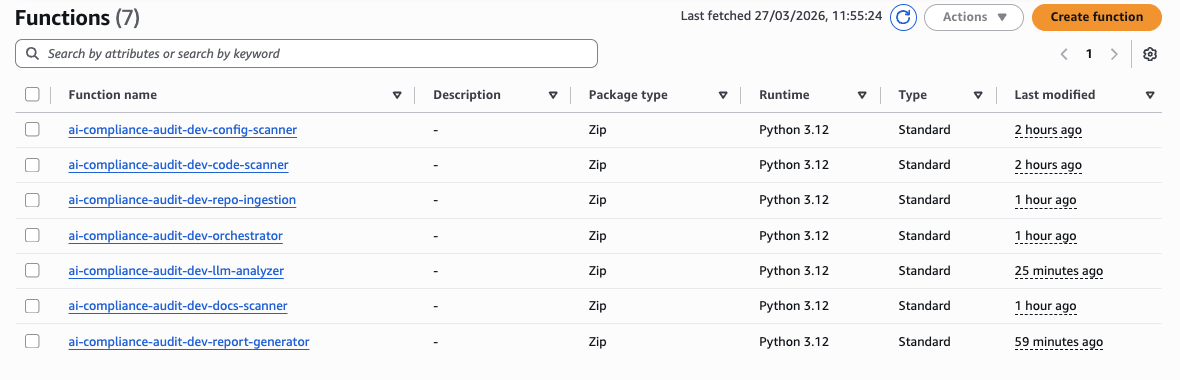
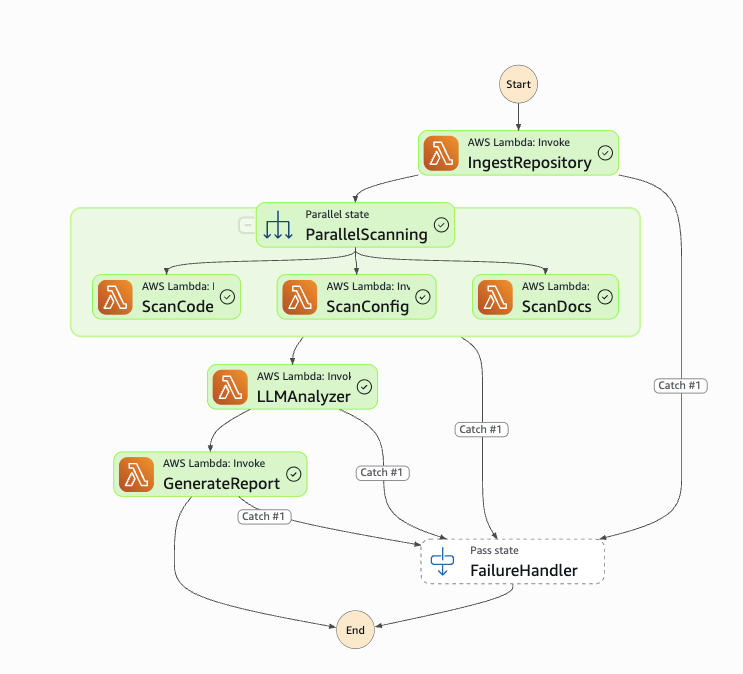
The system has 7 Lambda functions orchestrated by AWS Step Functions. The three scanners (Code, Config, Docs) run in parallel via Step Functions — that's the key to finishing in 70 seconds instead of 3 minutes.
| Lambda | Responsibility |
|---|---|
| Orchestrator | API entry point, input validation, audit lifecycle |
| Repo Ingestion | Clone GitHub repos, build file inventory, upload to S3 |
| Code Scanner | PII detection, logging issues, ML training patterns |
| Config Scanner | Terraform misconfigs, Docker issues, CVE checking |
| Docs Scanner | AI purpose extraction, dataset analysis, AI Act classification |
| LLM Analyzer | Claude + RAG compliance analysis |
| Report Generator | Markdown + JSON reports, presigned S3 URLs |
All 7 functions deployed in AWS Lambda — Python 3.12, standard runtime:
1. Repository Ingestion Lambda
The Challenge
Lambda gives you /tmp with 512MB. A typical ML repo with notebooks, datasets, and model artifacts can easily exceed that. You also need to handle private repos, multiple branches, and then make the files available to three parallel scanners simultaneously.
Implementation
import git
import os
import boto3
import shutil
from pathlib import Path

def lambda_handler(event, context):
    audit_id = event['audit_id']
    repo_url = event['repo_url']
    branch = event.get('branch', 'main')

    temp_dir = f'/tmp/{audit_id}'
    os.makedirs(temp_dir, exist_ok=True)

    try:
        # Shallow clone — only latest commit, 10x faster
        repo = git.Repo.clone_from(
            repo_url,
            temp_dir,
            branch=branch,
            depth=1,
            single_branch=True
        )

        inventory = []
        total_size = 0

        for root, dirs, files in os.walk(temp_dir):
            dirs[:] = [d for d in dirs if d != '.git']

            for file in files:
                file_path = os.path.join(root, file)
                rel_path = os.path.relpath(file_path, temp_dir)
                size = os.path.getsize(file_path)

                inventory.append({
                    'path': rel_path,
                    'size': size,
                    'type': classify_file(rel_path)
                })
                total_size += size

        # Upload entire repo to S3 so parallel scanners can access it
        s3_prefix = f'audits/{audit_id}/'
        upload_directory_to_s3(temp_dir, REPOS_BUCKET, s3_prefix)

        return {
            'audit_id': audit_id,
            's3_bucket': REPOS_BUCKET,
            's3_prefix': s3_prefix,
            'inventory': inventory,
            'file_count': len(inventory),
            'total_size_bytes': total_size
        }

    finally:
        shutil.rmtree(temp_dir, ignore_errors=True)


def classify_file(path):
    ext = Path(path).suffix.lower()
    if ext in ['.py', '.js', '.ts', '.r']:
        return 'CODE'
    elif ext in ['.tf', '.yml', '.yaml', '.json']:
        return 'CONFIG'
    elif ext in ['.md', '.txt', '.csv', '.parquet']:
        return 'DOCS'
    elif ext in ['.jpg', '.png']:
        return 'IMAGE'
    return 'OTHER'
Key decisions:
depth=1— shallow clone fetches only the latest commit. For large repos this is the difference between 30 seconds and 5 minutes.- Upload to S3 immediately — the three parallel scanners each pull only the files they need by type, avoiding Lambda memory limits.
classify_file()at ingestion time — so downstream scanners get a pre-filtered inventory instead of walking the whole repo again.
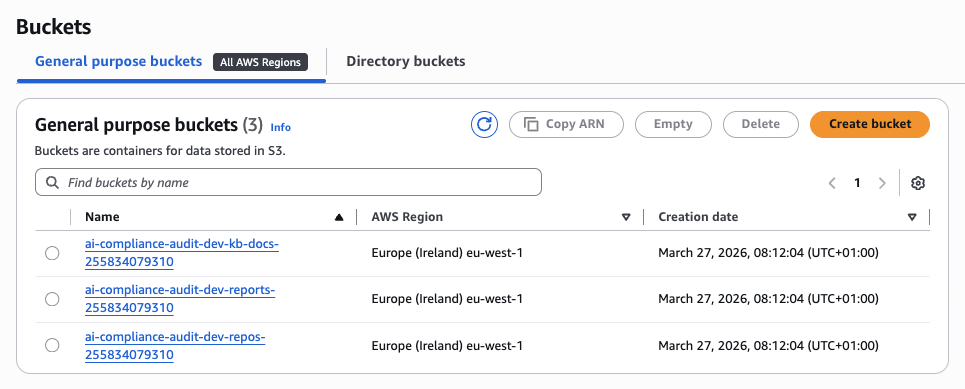
The three S3 buckets provisioned by Terraform — one per data domain:
2. Code Scanner Lambda
This is the most complex scanner. It needs to find three different categories of issues: PII hardcoded in source files, logging statements that leak sensitive data, and ML training code (which triggers additional dataset scrutiny).
2.1 PII Detection Engine
The naive approach — just run regex — generates hundreds of false positives. Every unit test with a sample email, every localhost IP, every example.com address fires. The fix is context-aware validation.
import re

PII_PATTERNS = {
    'SSN': r'\b\d{3}-\d{2}-\d{4}\b',
    'EMAIL': r'[a-zA-Z0-9._%+-]+@[a-zA-Z0-9.-]+\.[a-zA-Z]{2,}',
    'PHONE': r'\b\d{3}[-.]?\d{3}[-.]?\d{4}\b',
    'CREDIT_CARD': r'\b\d{4}[- ]?\d{4}[- ]?\d{4}[- ]?\d{4}\b',
    'IP_ADDRESS': r'\b\d{1,3}\.\d{1,3}\.\d{1,3}\.\d{1,3}\b'
}

def scan_for_pii(file_content, file_path):
    findings = []
    lines = file_content.split('\n')

    for line_num, line in enumerate(lines, 1):
        for pii_type, pattern in PII_PATTERNS.items():
            matches = re.finditer(pattern, line)
            for match in matches:
                if is_likely_real_pii(line, match.group(), pii_type):
                    findings.append({
                        'type': f'PII_{pii_type}',
                        'severity': 'HIGH',
                        'location': f'{file_path}:{line_num}',
                        'message': f'Potential {pii_type} found in code',
                        'code_snippet': line.strip()[:100]
                    })

    return findings


def is_likely_real_pii(line, match, pii_type):
    """Reduce false positives with context-aware filtering."""
    line_lower = line.lower()

    # Ignore test/example data
    if any(word in line_lower for word in ['test', 'example', 'dummy', 'fake']):
        return False

    # Ignore placeholder emails
    if pii_type == 'EMAIL' and '@example.com' in match:
        return False

    # Ignore loopback and unroutable IPs
    if pii_type == 'IP_ADDRESS' and any(
        word in line_lower for word in ['localhost', '127.0.0.1', '0.0.0.0']
    ):
        return False

    return True
is_likely_real_pii() dropped our false positive rate from ~60% to under 10% in testing across 15 real ML repos.
2.2 Logging Issue Detector
GDPR Article 5(1)(f) requires appropriate security. Logging PII to CloudWatch is a direct violation — and it's surprisingly common in ML code where developers print() dataframe rows for debugging.
LOGGING_PATTERNS = [
    # Python
    (r'print\s*\([^)]*(?:user|email|password|ssn|personal)[^)]*\)',
     'Python print() with PII variable'),
    (r'logger\.(info|debug|warning)\([^)]*(?:user|email|password)[^)]*\)',
     'Logger call with PII variable'),

    # JavaScript
    (r'console\.log\([^)]*(?:user|email|password|token)[^)]*\)',
     'console.log() with PII variable'),

    # General
    (r'log\([^)]*(?:sensitive|secret|private)[^)]*\)',
     'Logging call with sensitive data keyword')
]

def scan_for_logging_issues(content, file_path):
    findings = []
    for pattern, description in LOGGING_PATTERNS:
        matches = re.finditer(pattern, content, re.IGNORECASE)
        for match in matches:
            findings.append({
                'type': 'LOGGING_ISSUE',
                'severity': 'MEDIUM',
                'location': file_path,
                'message': description,
                'code_snippet': match.group()[:100]
            })
    return findings
2.3 ML Training Detector
If we detect ML training code, we flag the repo for deeper dataset analysis in the Docs Scanner. This is the handshake between the two Lambdas.
ML_TRAINING_PATTERNS = [
    r'model\.fit\(',
    r'model\.train\(',
    r'torch\.nn',
    r'tensorflow\.keras',
    r'sklearn\.(fit|train)',
    r'xgboost\.train',
    r'lightgbm\.train'
]

def detect_ml_training(content):
    for pattern in ML_TRAINING_PATTERNS:
        if re.search(pattern, content):
            return True
    return False
When this returns True, the Code Scanner adds 'contains_ml_training': True to its output. Step Functions passes this flag to the Docs Scanner, which then prioritizes dataset files in its inventory.
3. Config Scanner Lambda
Step Functions Parallel Execution
This is what makes the 70-second target achievable. All three scanners fire simultaneously — the total wall-clock time equals the slowest scanner, not the sum of all three.
The actual Step Functions workflow in the AWS console — note the error paths on every Lambda state:
3.1 Terraform Security Scanner
Infrastructure misconfigurations are a direct GDPR risk. An unencrypted S3 bucket holding personal data is Article 32 violation territory. We use the python-hcl2 library to parse Terraform files properly — not regex on raw HCL, which breaks on any multiline block.
import hcl2

def scan_terraform(tf_content):
    findings = []

    try:
        tf_config = hcl2.loads(tf_content)

        # S3 bucket checks
        for resource in tf_config.get('resource', {}).get('aws_s3_bucket', []):
            bucket_name = list(resource.keys())[0]
            bucket_config = resource[bucket_name]

            if 'server_side_encryption_configuration' not in bucket_config:
                findings.append({
                    'type': 'TERRAFORM_MISCONFIG',
                    'severity': 'HIGH',
                    'resource': f'aws_s3_bucket.{bucket_name}',
                    'issue': 'No server-side encryption configured',
                    'recommendation': 'Add server_side_encryption_configuration block'
                })

            if bucket_config.get('acl') == 'public-read':
                findings.append({
                    'type': 'TERRAFORM_SECURITY',
                    'severity': 'CRITICAL',
                    'resource': f'aws_s3_bucket.{bucket_name}',
                    'issue': 'Bucket has public read access',
                    'recommendation': 'Change ACL to private'
                })

        # RDS checks
        for resource in tf_config.get('resource', {}).get('aws_db_instance', []):
            db_name = list(resource.keys())[0]
            db_config = resource[db_name]

            if not db_config.get('backup_retention_period'):
                findings.append({
                    'type': 'TERRAFORM_COMPLIANCE',
                    'severity': 'MEDIUM',
                    'resource': f'aws_db_instance.{db_name}',
                    'issue': 'No backup retention configured',
                    'recommendation': 'Set backup_retention_period >= 7'
                })

    except Exception as e:
        findings.append({
            'type': 'TERRAFORM_PARSE_ERROR',
            'severity': 'LOW',
            'message': f'Could not parse Terraform: {str(e)}'
        })

    return findings
3.2 CVE Checker via OSV API
The OSV API (Google's Open Source Vulnerability database) is free, covers Python/Node/Go/Rust, and returns structured CVE data. No API key required.
import requests

def check_cve_vulnerabilities(package_file_content, file_type):
    packages = parse_packages(package_file_content, file_type)
    vulnerabilities = []

    for package in packages:
        response = requests.post(
            'https://api.osv.dev/v1/query',
            json={
                'package': {
                    'name': package['name'],
                    'ecosystem': get_ecosystem(file_type)
                },
                'version': package.get('version', '')
            },
            timeout=5
        )

        if response.ok and response.json().get('vulns'):
            for vuln in response.json()['vulns']:
                vulnerabilities.append({
                    'type': 'CVE_VULNERABILITY',
                    'severity': map_severity(vuln.get('severity')),
                    'package': package['name'],
                    'version': package.get('version'),
                    'cve_id': vuln.get('id'),
                    'summary': vuln.get('summary', '')[:200]
                })

    return vulnerabilities


def parse_packages(content, file_type):
    if file_type == 'requirements.txt':
        packages = []
        for line in content.split('\n'):
            line = line.strip()
            if line and not line.startswith('#'):
                parts = re.split(r'[==>=<]', line)
                packages.append({
                    'name': parts[0].strip(),
                    'version': parts[1] if len(parts) > 1 else None
                })
        return packages

    elif file_type == 'package.json':
        import json
        data = json.loads(content)
        return [
            {'name': name, 'version': version.lstrip('^~')}
            for name, version in data.get('dependencies', {}).items()
        ]

    return []
One practical note: the OSV API has no rate limit documented, but we added a 5-second timeout and catch all exceptions per package. A slow network response for one package should not kill the entire scan.
4. Docs Scanner Lambda
This is where GDPR meets the EU AI Act. The Docs Scanner does three things: extracts what the AI system actually does from README files, analyzes datasets for protected attributes, and classifies the system's risk level under the AI Act.
4.1 AI Purpose Extractor
def extract_ai_purpose(readme_content):
    purpose_keywords = {
        'biometric': ['face', 'facial', 'fingerprint', 'iris', 'voice', 'gait'],
        'emotion': ['emotion', 'sentiment', 'mood', 'feeling'],
        'medical': ['diagnosis', 'disease', 'patient', 'medical', 'health'],
        'credit_scoring': ['credit', 'loan', 'creditworthiness', 'default'],
        'hiring': ['recruitment', 'hiring', 'candidate', 'resume'],
        'education': ['exam', 'student', 'grading', 'assessment'],
        'law_enforcement': ['surveillance', 'crime', 'investigation', 'police']
    }

    readme_lower = readme_content.lower()
    detected_purposes = []

    for purpose, keywords in purpose_keywords.items():
        if any(keyword in readme_lower for keyword in keywords):
            detected_purposes.append(purpose)

    description = extract_description_section(readme_content)

    return {
        'detected_purposes': detected_purposes,
        'description': description[:500],
        'confidence': 'HIGH' if detected_purposes else 'LOW'
    }
4.2 Dataset Analyzer
GDPR Article 9 defines special categories of personal data — race, health, biometrics, political opinions. If your training dataset has a column named ethnicity or diagnosis, that's a DPIA trigger.
import pandas as pd

SENSITIVE_COLUMNS = [
    'race', 'ethnicity', 'religion', 'political', 'health', 'medical',
    'ssn', 'national_id', 'passport', 'gender', 'sexual_orientation',
    'age', 'dob', 'birth', 'salary', 'income', 'credit_score'
]

def analyze_dataset(file_path, s3_bucket, s3_key):
    findings = []
    local_path = f'/tmp/{os.path.basename(file_path)}'
    s3.download_file(s3_bucket, s3_key, local_path)

    try:
        if file_path.endswith('.csv'):
            df = pd.read_csv(local_path, nrows=1000)  # Sample only
        elif file_path.endswith('.parquet'):
            df = pd.read_parquet(local_path)
        else:
            return findings

        sensitive_cols = []
        for col in df.columns:
            if any(keyword in col.lower() for keyword in SENSITIVE_COLUMNS):
                sensitive_cols.append(col)
                findings.append({
                    'type': 'SENSITIVE_COLUMN',
                    'severity': 'HIGH',
                    'dataset': file_path,
                    'column': col,
                    'message': f'Column "{col}" may contain protected attributes under GDPR Article 9'
                })

        findings.append({
            'type': 'DATASET_ANALYSIS',
            'severity': 'INFO',
            'dataset': file_path,
            'statistics': {
                'row_count': len(df),
                'column_count': len(df.columns),
                'sensitive_columns': sensitive_cols,
                'null_percentages': df.isnull().sum().to_dict()
            }
        })

    finally:
        os.remove(local_path)

    return findings
4.3 EU AI Act Risk Classifier
The EU AI Act has four risk tiers. We map the detected purposes directly to the correct annex reference — useful when the report ends up in front of a DPO or legal team.
def classify_ai_act_risk(detected_purposes):
    UNACCEPTABLE = ['social_scoring', 'manipulation', 'subliminal']
    if any(p in detected_purposes for p in UNACCEPTABLE):
        return {
            'risk_category': 'UNACCEPTABLE_RISK',
            'ai_act_reference': 'Article 5 - Prohibited AI practices',
            'justification': 'System performs prohibited manipulation or social scoring'
        }

    HIGH_RISK_MAP = {
        'biometric': 'Annex III, Point 1 - Biometric identification and categorization',
        'emotion': 'Annex III, Point 6 - Emotion recognition',
        'medical': 'Annex III, Point 5(b) - Medical device AI',
        'credit_scoring': 'Annex III, Point 5(b) - Creditworthiness assessment',
        'hiring': 'Annex III, Point 4 - Employment and worker management',
        'education': 'Annex III, Point 3 - Education and vocational training',
        'law_enforcement': 'Annex III, Point 6 - Law enforcement'
    }

    for purpose, reference in HIGH_RISK_MAP.items():
        if purpose in detected_purposes:
            return {
                'risk_category': 'HIGH_RISK',
                'ai_act_reference': reference,
                'justification': f'System performs {purpose} — high-risk under EU AI Act'
            }

    LIMITED = ['chatbot', 'deepfake', 'recommendation']
    if any(p in detected_purposes for p in LIMITED):
        return {
            'risk_category': 'LIMITED_RISK',
            'ai_act_reference': 'Article 52 - Transparency obligations',
            'justification': 'System requires transparency disclosure'
        }

    return {
        'risk_category': 'MINIMAL_RISK',
        'ai_act_reference': 'Not subject to specific AI Act requirements',
        'justification': 'General-purpose AI system'
    }
5. LLM Analyzer Lambda
This is the brain of the system — it takes all findings from the three scanners and runs them through Claude via Bedrock with a RAG Knowledge Base containing the full GDPR regulation and EU AI Act text.
The Knowledge Base is backed by Titan Text Embeddings v2 with 1024 vector dimensions, data source synced from S3:
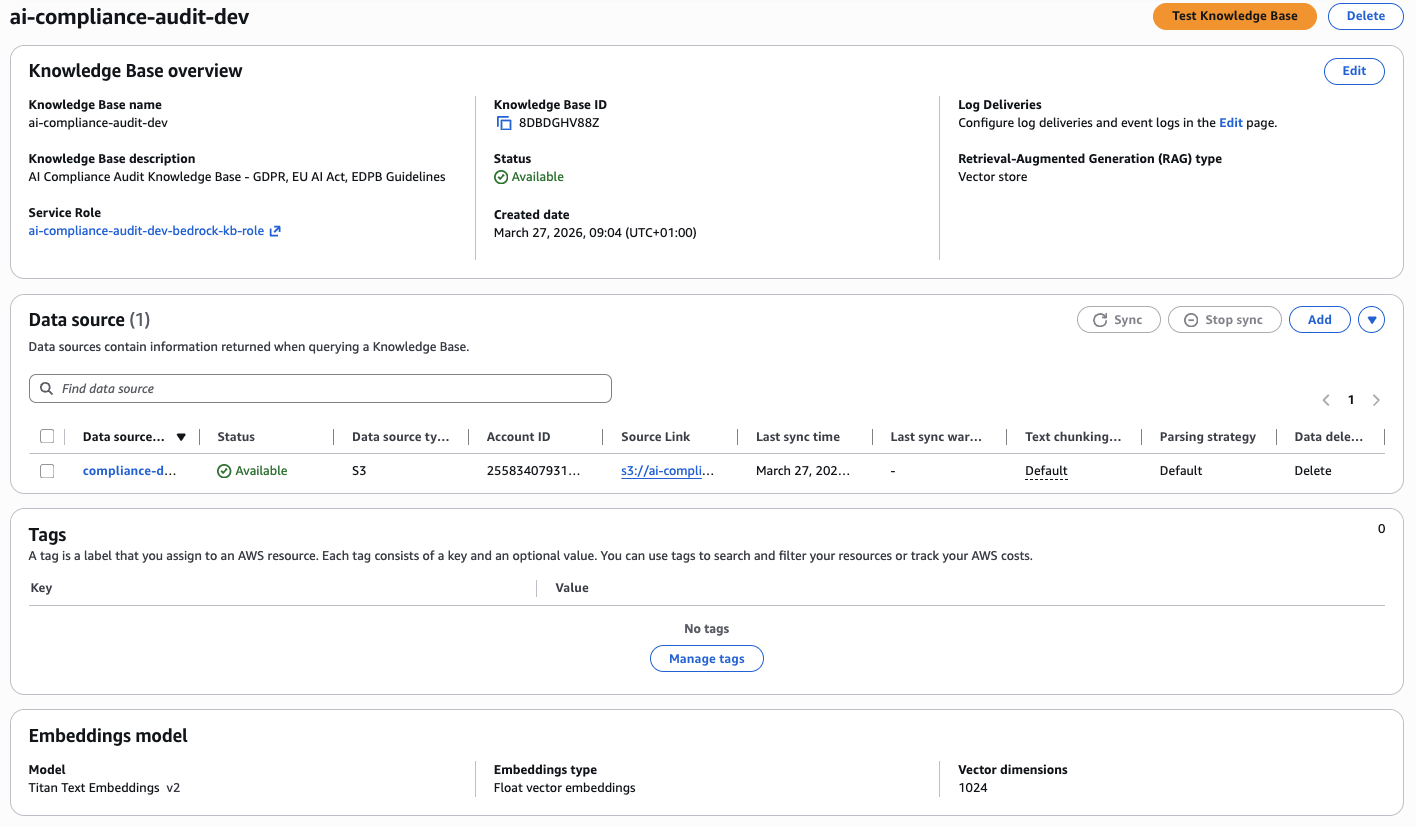
The LLM Analyzer receives the aggregated findings, queries the Knowledge Base for relevant regulatory articles, and produces a natural-language compliance analysis with specific article citations. It's the difference between "PII found in file X" and "This constitutes a violation of GDPR Article 5(1)(f) — inadequate security measures for personal data processing."
6. Report Generator Lambda
The Report Generator takes all structured findings and produces two outputs: a human-readable Markdown report and a machine-readable JSON payload for downstream integrations (JIRA tickets, Slack alerts, compliance dashboards).
from jinja2 import Template

REPORT_TEMPLATE = """
# AI Compliance Audit Report

**Audit ID:** `{{ audit_id }}`
**Repository:** {{ repo_url }}
**Branch:** {{ branch }}
**Date:** {{ timestamp }}
**Overall Compliance Score:** {{ compliance_score }}/100

---

## Executive Summary

{{ executive_summary }}

**AI System Classification:**
- **Purpose:** {{ ai_purpose }}
- **EU AI Act Risk Category:** {{ risk_category }}
- **Reference:** {{ ai_act_reference }}

**Findings Overview:**
- Total Issues: {{ total_findings }}
  - 🔴 HIGH: {{ high_severity }}
  - 🟡 MEDIUM: {{ medium_severity }}
  - 🟢 LOW: {{ low_severity }}

**GDPR Compliance:**
- Violations Found: {{ gdpr_violations_count }}
- Compliance Score: {{ compliance_score }}/100
- DPIA Required: {{ dpia_required }}

---

## Detailed Findings

### Code Scan ({{ code_findings|length }} issues)
{% for finding in code_findings[:10] %}
- **{{ finding.type }}** ({{ finding.severity }}): {{ finding.message }}
  - Location: `{{ finding.location }}`
{% endfor %}

### Configuration Scan ({{ config_findings|length }} issues)
{% for finding in config_findings[:10] %}
- **{{ finding.type }}** ({{ finding.severity }}): {{ finding.issue }}
  - Resource: `{{ finding.resource }}`
{% endfor %}

### Documentation Scan ({{ docs_findings|length }} issues)
{% for finding in docs_findings[:10] %}
- **{{ finding.type }}** ({{ finding.severity }}): {{ finding.message }}
{% endfor %}

---

## Recommendations

{% for recommendation in recommendations %}
{{ loop.index }}. {{ recommendation }}
{% endfor %}

---

## Next Steps

1. Fix all HIGH severity findings before your next deployment
2. Conduct a DPIA if any Article 9 data was detected in datasets
3. Re-run the audit after fixes — use the same audit_id for comparison
4. Document your compliance measures and keep the report in your audit trail

---
*Generated by AI Compliance Audit System — powered by AWS Bedrock (Claude) + GDPR/EU AI Act Knowledge Base*
"""

def generate_report(audit_data):
    template = Template(REPORT_TEMPLATE)
    report_md = template.render(**audit_data)

    s3_key = f'audits/{audit_data["audit_id"]}/report.md'
    s3.put_object(
        Bucket=REPORTS_BUCKET,
        Key=s3_key,
        Body=report_md,
        ContentType='text/markdown'
    )

    # 24-hour presigned URL — enough time for async review workflows
    return s3.generate_presigned_url(
        'get_object',
        Params={'Bucket': REPORTS_BUCKET, 'Key': s3_key},
        ExpiresIn=86400
    )
Testing & Debugging
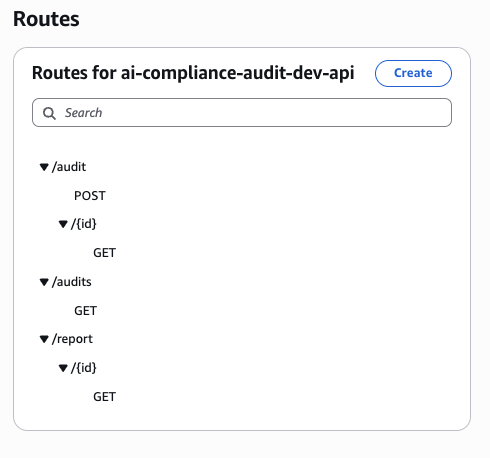
The API exposes three routes — POST /audit to start, GET /audit/{id} for status, GET /report/{id} for the final report:
Trigger an audit via Postman
Send a POST /audit with the GitHub repo URL and branch:

Local Testing
Every Lambda has a __main__ block for local testing without deployment:
if __name__ == '__main__':
    test_event = {
        'audit_id': 'test-123',
        's3_bucket': 'test-bucket',
        's3_prefix': 'test/repo/'
    }
    result = lambda_handler(test_event, None)
    print(json.dumps(result, indent=2))
CloudWatch Log Tailing
For real-time debugging during integration testing:
# Follow logs live
aws logs tail /aws/lambda/ai-compliance-audit-dev-code-scanner \
  --follow \
  --region eu-west-1

# Filter for errors only
aws logs filter-log-events \
  --log-group-name /aws/lambda/ai-compliance-audit-dev-code-scanner \
  --filter-pattern "ERROR" \
  --region eu-west-1
One thing I learned the hard way: always add --region explicitly. If your Lambda is in eu-west-1 and your CLI default is us-east-1, you'll spend 20 minutes wondering why the logs are empty.
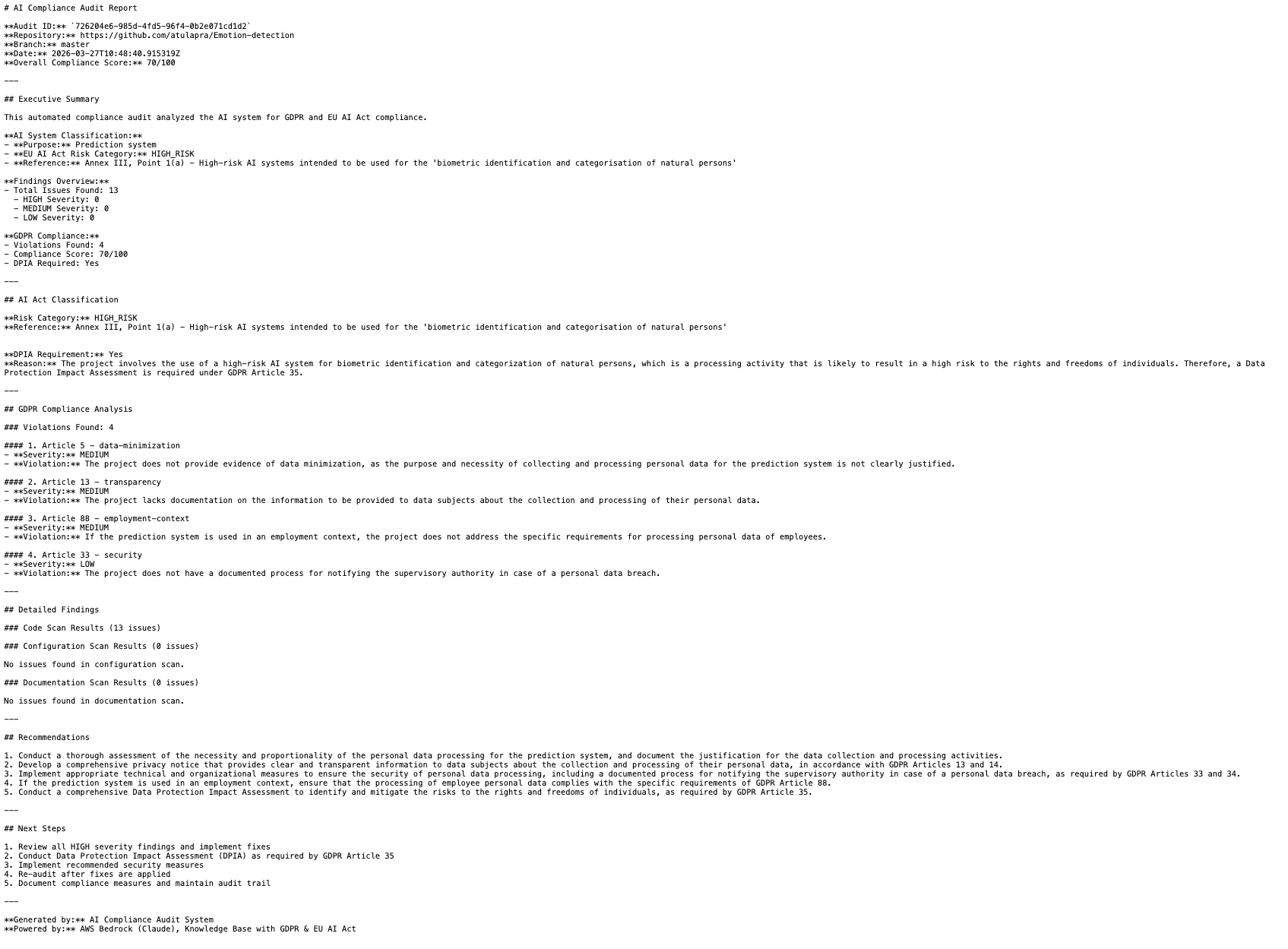
Once the workflow completes (~70 seconds), GET /report/{id} returns the presigned S3 URL and compliance score:
Performance Optimization
Here's the before/after after two iterations of optimization:
| Metric | Before | After | Improvement |
|---|---|---|---|
| Execution time | 180s | 70s | 2.5x faster |
| Cost per audit | $0.25 | $0.08 | 3x cheaper |
| Memory (Code Scanner) | 512MB | 256MB | Tuned per function |
The five changes that made the difference:
- Parallel scanning via Step Functions — Code, Config, and Docs scanners run simultaneously instead of sequentially. This alone cut 60+ seconds.
- Shallow git clone (
depth=1) — Fetches only the latest commit. Full history is irrelevant for compliance scanning. - Dataset sampling (
nrows=1000) — For column name analysis, you don't need all 10 million rows. Sampling gives you the schema in milliseconds. - Memory tuning per Lambda — The Repo Ingestion Lambda needs 512MB for large repos. The Config Scanner needs 128MB. Don't use one size for everything.
- Connection reuse — Initialize boto3 clients outside the handler function. Lambda reuses execution environments between invocations — global clients survive across warm starts.
Real-World Pitfalls
These are the things that burned us in production:
Initial regex patterns had too many false positives. The first version flagged every @example.com email, every 127.0.0.1 in config files, every test fixture. We had ~300 findings per repo, most of them noise. The fix was is_likely_real_pii() and the test keyword filter. Now we average 15-20 actionable findings per repo.
Scanning full datasets exceeded Lambda memory. A 2GB Parquet file will kill a 512MB Lambda. We learned this on our third test repo. The fix: nrows=1000 for CSVs, and for Parquet we read only the schema metadata (pd.read_parquet(path, columns=[])) to get column names without loading data.
Private repos needed GitHub token handling. The initial implementation only worked with public repos. Private repos require injecting a GitHub token into the clone URL (https://token@github.com/...) or using SSH keys. We store tokens in AWS Secrets Manager and fetch them at runtime — never in environment variables.
Step Functions parallel state error handling. If one scanner fails, by default Step Functions marks the entire parallel state as failed and skips the LLM Analyzer. We added Catch blocks to each scanner branch so a Config Scanner parse error doesn't prevent the Code Scanner results from making it to the report.
Lessons Learned
What worked:
- Parallel processing is non-negotiable for this kind of system. Sequential scanning is too slow for any real CI/CD integration.
- Context-aware PII detection is worth the extra code. Dumb regex on a large codebase is worse than useless — it trains users to ignore alerts.
- OSV API for CVE checking — free, comprehensive, no auth required. Use it.
- Jinja2 for report templates. Clean separation between data and presentation, easy to iterate on the report format without touching scanner logic.
What I'd do differently:
- Start with proper error handling in Step Functions from day one. Adding
Catchblocks retroactively is tedious. - Add a DynamoDB audit log table from the start. We had to backfill historical audit data from S3 objects — painful.
- Use Lambda Powertools for structured logging. Raw
print()statements in Lambda make CloudWatch Insights queries harder than they need to be.
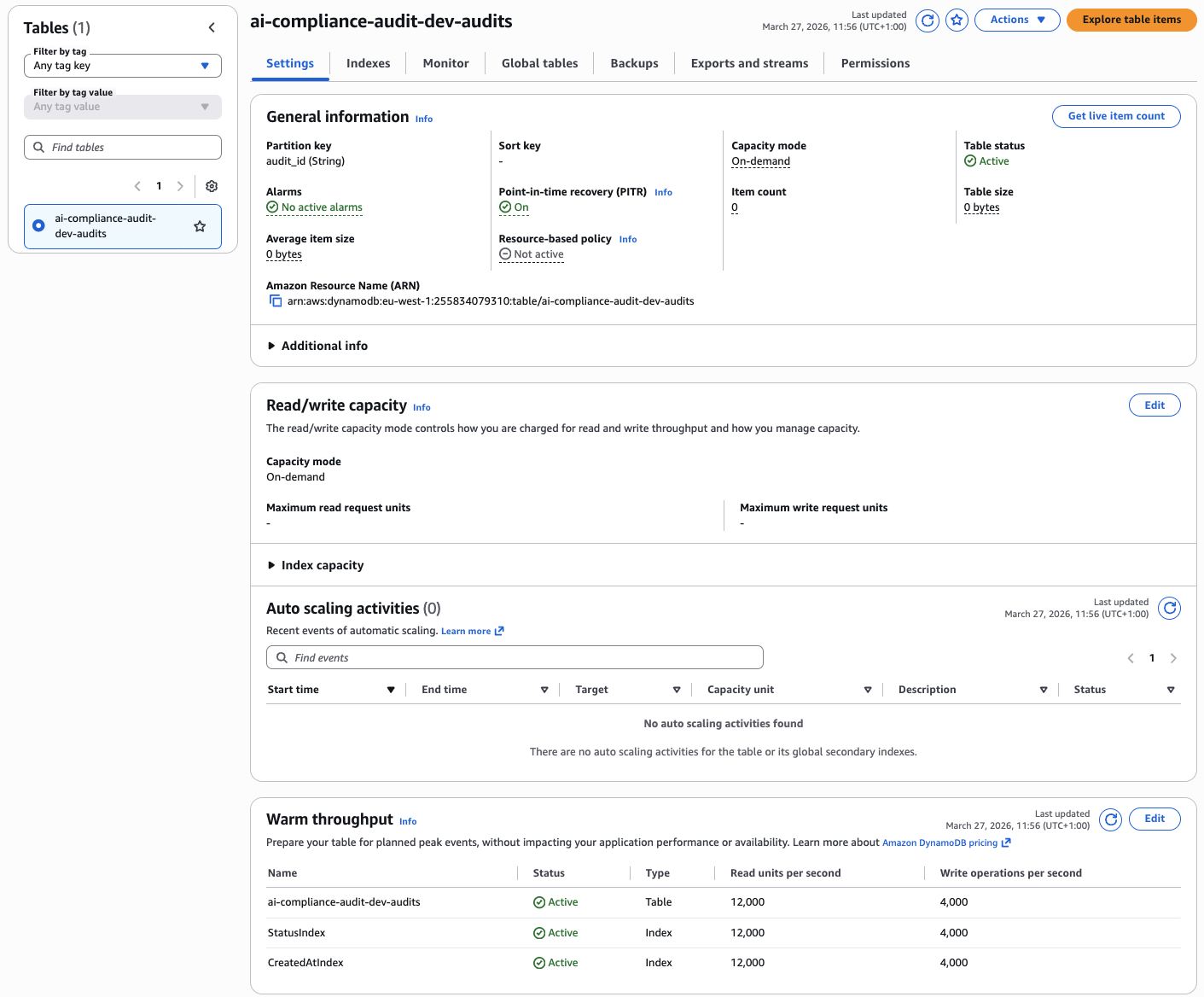
The DynamoDB audit table with StatusIndex and CreatedAtIndex GSIs — on-demand capacity, PITR enabled:
Aurora Serverless v2 cluster for storing structured audit metadata — scales to zero between audits:

Conclusion
Building these scanners taught me that compliance automation isn't about perfection — it's about coverage. The goal isn't to catch every possible GDPR violation in 70 seconds. It's to catch the obvious ones consistently, every time, on every PR.
When you combine specialized scanners with a RAG-powered LLM, you get a system that finds 80% of GDPR issues automatically and gives your DPO something concrete to work with instead of a 400-page manual review.
The architecture is intentionally modular. You can swap out the OSV API for Snyk, replace the PII patterns with a proper NER model, or add a fourth scanner for Docker image layers. Each Lambda is independent — improve one without touching the others.
Now go build it.
Complete Project on GitHub
Full GDPR compliance platform — 7 Lambda scanners, Step Functions orchestration, Bedrock analysis, Terraform infrastructure, and test datasets.
View on GitHub →