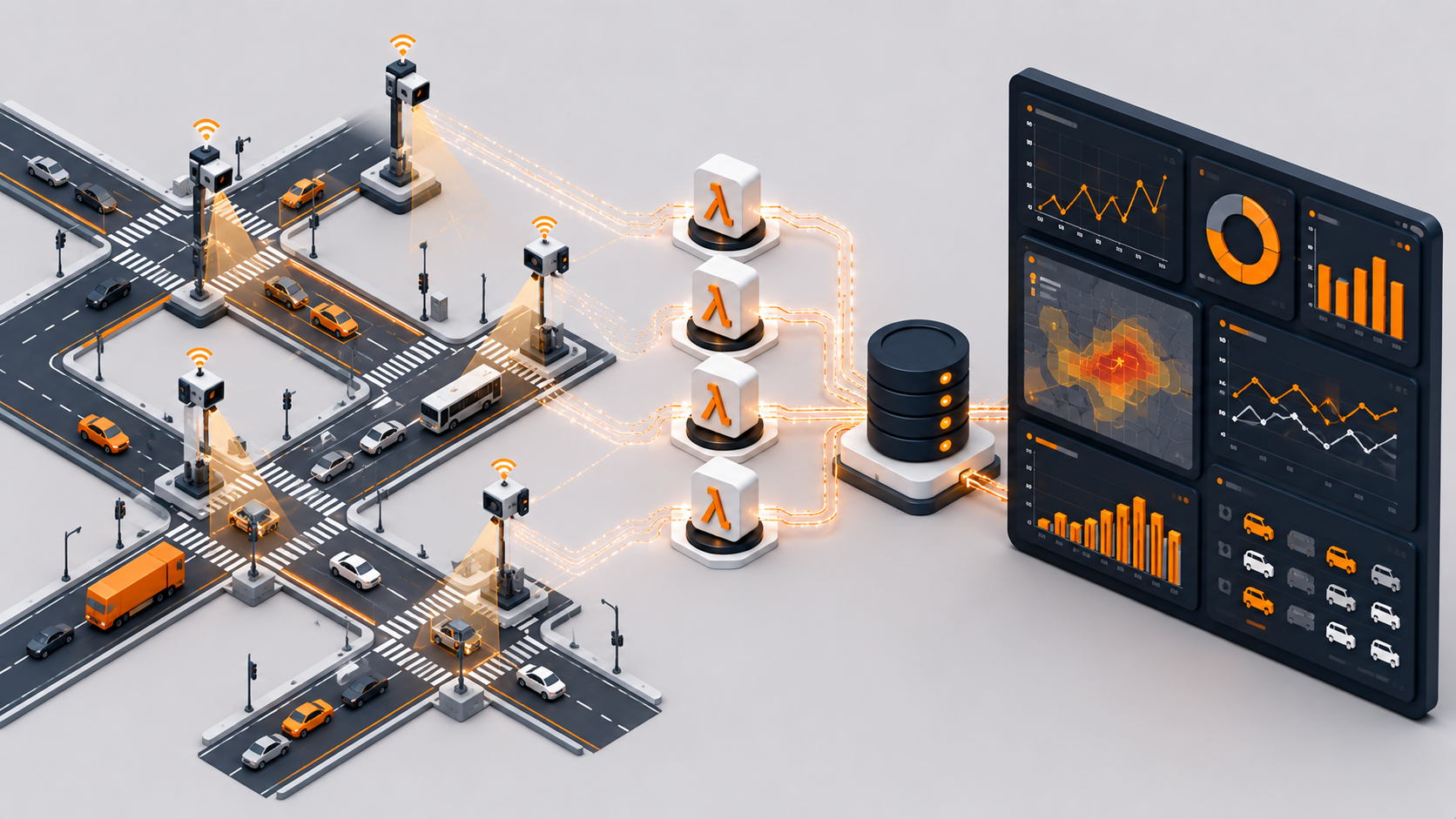
Serverless AI Traffic Analyzer: From Vehicle Detection to Real-time Dashboard for $0.40/month
Imagine a system that can process video from traffic cameras, detect vehicles, estimate their speed, and display everything on a modern dashboard — all without a single server.
The Challenge
When looking for an interesting project to demonstrate AWS serverless architecture capabilities, I discovered the BrnoCompSpeed dataset — a publicly available dataset for vehicle detection and speed estimation from traffic cameras. This was the perfect opportunity to combine cloud computing with a real-world use case.
Project Goals:
- ✅ Fully serverless architecture (no EC2, no containers)
- ✅ Infrastructure as Code using Terraform
- ✅ One-command automated deployment
- ✅ Modern dashboard with neumorphism design
- ✅ Minimal costs (under $1/month for demo)
Architecture Overview
The system is built on 6 core AWS services that together form an event-driven pipeline. When a video is uploaded to S3, it automatically triggers Lambda processing, stores results in DynamoDB, and makes them available through API Gateway to a React dashboard hosted on CloudFront.

Event-driven architecture: traffic cameras trigger S3 uploads, Lambda processes videos, DynamoDB stores results, API Gateway exposes data to the React dashboard
The beauty of this architecture is its simplicity and cost-effectiveness. Each component scales independently, you only pay for what you use, and there's zero infrastructure to maintain. No servers to patch, no clusters to manage, no auto-scaling groups to configure.
Key Components
Storage Layer: Three S3 buckets handle different types of data. The videos bucket stores uploaded MP4 files with a 30-day lifecycle policy to automatically clean up old content. The dashboard bucket hosts the static React application, while the heatmaps bucket stores generated visualizations with public read access for the dashboard.
Compute Layer: Two Lambda functions do the heavy lifting. The video-processor function runs with 3GB of RAM and a 15-minute timeout to handle video processing. The api-handler function is much lighter at 512MB RAM, serving API requests from the dashboard in milliseconds.
Database Layer: DynamoDB provides fast, scalable storage for detection results. The schema uses videoId as the partition key and timestamp as the sort key, allowing efficient queries for all detections from a specific video. A Global Secondary Index on location enables fast filtering by camera location without scanning the entire table.
Why This Architecture?
Event-driven serverless is perfect for video processing workloads. Videos arrive sporadically, processing is CPU-intensive but short-lived, and you don't need results instantly. With Lambda, you pay only for the 30 seconds of processing time per video, not for idle servers waiting for uploads.
Implementation Journey
The Lambda Size Challenge
My initial plan was to use OpenCV for real vehicle detection using computer vision. I spent hours building a deployment package with OpenCV and its dependencies, only to hit AWS Lambda's 70 MB deployment limit. The OpenCV package alone was 33 MB, and with all required dependencies, I was well over 100 MB.
This taught me an important lesson: Lambda has constraints, and you need to design around them. For real ML workloads in production, you have several better options:
- Lambda Container Images: Support up to 10 GB, perfect for ML models
- AWS Rekognition: Managed computer vision service, no model deployment needed
- SageMaker Serverless: Purpose-built for ML inference at scale
For this demo, I implemented mock vehicle detection that generates realistic traffic patterns. The Lambda function simulates detection with a 70/15/15 split: 70% normal traffic (50-80 km/h), 15% slower vehicles, and 15% speed violations. This gives us realistic demo data without the deployment complexity.
DynamoDB Schema Design
The schema needed to support two main access patterns: retrieving all detections for a specific video, and filtering detections by camera location. The primary key (videoId + timestamp) handles the first pattern efficiently. For location-based queries, I added a Global Secondary Index with location as the partition key.
Each record also includes a TTL (Time To Live) field set to 30 days in the future. DynamoDB automatically deletes expired records at no cost, keeping the database lean without manual cleanup scripts. This is a serverless best practice — use managed features instead of building your own maintenance tasks.
{
  "videoId": "session-001.mp4",
  "timestamp": 1710512345000,
  "frameNumber": 150,
  "vehicleType": "car",
  "speed": 78,
  "confidence": 0.92,
  "location": "brno-location-1",
  "ttl": 1713104345
}
Terraform Infrastructure as Code
I organized the infrastructure into five focused Terraform modules, each with a single responsibility. The s3 module creates buckets with lifecycle policies and versioning. The dynamodb module defines tables with GSI and TTL configuration. The lambda module handles function deployment, IAM roles, and S3 event triggers. The api-gateway module sets up the REST API with CORS, and the cloudfront module configures the CDN for global distribution.
This modular approach makes the code reusable and maintainable. Need to add another Lambda function? Just update the lambda module. Want to deploy to a new region? Copy the modules and change a few variables. It's Infrastructure as Code at its best.
The Dashboard Experience
I built the dashboard with React and designed it using neumorphism — a modern design style that creates soft, 3D-looking elements with subtle shadows. The interface shows real-time statistics with animated counters that count up from zero when the page loads, giving a satisfying visual feedback.
The dashboard features four main stat cards: Total Vehicles, Average Speed, Max Speed, and Violations. Each card has a tooltip explaining what the metric means. Below the stats, users can filter results by location or video ID, and see detailed breakdowns in charts.
The entire dashboard is a static React application — just HTML, CSS, and JavaScript files. No backend server needed. CloudFront serves it globally with low latency, and the React app calls API Gateway directly to fetch data from DynamoDB. This is the serverless pattern in action: static frontend + API backend + managed database.

The dashboard displays real-time vehicle detection statistics with a clean, modern neumorphism design
Automated Deployment
Deployment is fully automated through a bash script that orchestrates the entire process. It builds the Lambda deployment packages, runs terraform apply to create infrastructure, seeds the database with 200 demo records, builds the React dashboard, syncs it to S3, and invalidates the CloudFront cache. The entire process takes 7-10 minutes from start to finish.
bash scripts/deploy-auto.shOne command, and you have a complete traffic analysis system running in production. This is the power of Infrastructure as Code combined with serverless — no manual steps, no configuration drift, fully reproducible deployments.
Cost Breakdown
For a demo processing 10 videos per month, the total cost is approximately $0.38/month. S3 storage costs $0.12 for 5GB, Lambda compute is $0.08 for 10 executions at 30 seconds each, and data transfer is $0.18. DynamoDB, API Gateway, and CloudFront stay within free tier limits.
Scale this up to 100 videos per month in production, and costs rise to around $14/month. The majority of that cost is Lambda compute ($4) and data transfer ($5.40). Compare this to running even a small EC2 instance 24/7, which would cost $10-15/month just for compute, plus operational overhead.
| Service | Demo (10 videos/mo) | Production (100 videos/mo) |
|---|---|---|
| S3 Storage | $0.12 | $1.15 |
| Lambda Compute | $0.08 | $4.00 |
| DynamoDB | $0.00 (free tier) | $2.50 |
| Data Transfer | $0.18 | $5.40 |
| TOTAL | $0.38/month | $14.27/month |
Cost Optimization Tips
- S3 Lifecycle policies automatically delete old videos (saves storage)
- DynamoDB TTL removes old records without manual cleanup
- CloudFront caching reduces API Gateway calls
- Lambda memory tuning (you only need 3GB for real OpenCV processing)
Key Learnings
1. Lambda Limits Are Real
The 70 MB deployment limit forced me to rethink my approach. In production, I'd use Lambda Container Images (10 GB limit) or AWS Rekognition for video analysis. Understanding service limits before you build saves a lot of refactoring time.
2. DynamoDB GSI Is a Game-Changer
Without the LocationIndex GSI, I'd have to scan the entire table to filter by location — slow and expensive. The GSI lets me query directly on the location field, returning results in milliseconds. Design your DynamoDB schema based on access patterns, not on how you'd design a relational database.
3. CloudFront Cache Invalidation Matters
After deploying a dashboard update, users saw the old version for hours because of CloudFront caching. Now my deployment script automatically creates a cache invalidation for /*, ensuring users always see the latest version within 2-3 minutes.
4. Terraform Modules = Clean Code
Breaking infrastructure into modules dramatically improved readability and reusability. Each module has a clear interface (variables in, outputs out), can be tested independently, and works across projects. The S3 module I wrote here is now in three other projects.
Production Roadmap
For a production-ready system, here's what I'd add:
Real ML Processing: Replace mock detection with AWS Rekognition's video analysis API. It handles object detection, tracking, and classification natively, with built-in support for video files in S3. No model training or deployment needed.
Stream Processing: Add Kinesis Data Streams for real-time ingestion from live camera feeds. Lambda functions consume the stream, process frames in real-time, and write results to DynamoDB. This enables live dashboards updating every second.
Alerting: Use SNS to send notifications when speed violations are detected. Configure CloudWatch alarms to monitor violation rates and alert when they exceed thresholds. Integrate with PagerDuty or Slack for on-call teams.
Long-term Storage: Archive raw detection data to S3 in Parquet format, partitioned by date and location. Use AWS Glue to create a data catalog, then query historical data with Athena for trend analysis and reporting.
Multi-region Deployment: Deploy the same infrastructure to multiple regions using Terraform workspaces. Use Route 53 with latency-based routing to direct users to the nearest deployment for lower latency.
Final Thoughts
Building this traffic analyzer taught me that serverless isn't just about removing servers — it's about rethinking how we approach infrastructure entirely. When I started this project, my instinct was to spin up an EC2 instance, install OpenCV, and process videos the traditional way. But hitting that Lambda deployment limit forced me to step back and ask: do I really need to manage the infrastructure myself?
The answer was no. By embracing serverless constraints rather than fighting them, I ended up with a system that costs $0.40 per month in demo mode and scales to production workloads for under $15. More importantly, it's maintainable. There's no server to patch at 2 AM, no capacity planning meetings, no autoscaling group tuning. The infrastructure code lives in Git, deployments are reproducible, and the entire system can be torn down and rebuilt in under 10 minutes.
That said, serverless isn't a silver bullet. If you're processing 1000 videos per hour with tight latency requirements, Lambda might not be the right choice. If you need persistent WebSocket connections or stateful processing that runs for hours, look elsewhere. The key is matching the tool to the problem, not forcing every problem to fit the tool you want to use.
For event-driven workloads with variable traffic patterns — like this traffic analysis system — serverless is hard to beat. You get instant scaling, pay-per-use pricing, and zero operational overhead. The trade-off is less control and more constraints, but for many use cases, that's a trade worth making.
The full code is on GitHub if you want to deploy this yourself or use parts of it in your own projects. The Terraform modules are deliberately generic — I've already reused the S3 and DynamoDB modules in three other projects. That's the beauty of Infrastructure as Code done right.
Complete Serverless Project on GitHub
Full traffic analyzer — Lambda vehicle detection, DynamoDB storage, CloudWatch dashboard, Rekognition integration, and Terraform infrastructure.
View on GitHub →