
I Replaced My Custom Agent Orchestration with AWS Strands SDK — Here's What Happened
I had 422 lines of custom ReAct loop. Tool schemas written by hand, an XML parser that broke when the model was creative, and a dispatcher that grew with every new capability. Here's what happened when I deleted all of it.
Table of Contents
- The Problem with Custom Orchestration
- What is AWS Strands Agents SDK
- Before: 422 Lines of Boilerplate
- After: The Strands Way
- Architecture: What We Built
- The Model-Driven Loop In Practice
- 9 Tools Across 3 Domains
- Human-in-the-Loop: waitForTaskToken Pattern
- Session Memory with DynamoDB
- Observability Out of the Box
- What I Gained (and What I Lost)
- Summary
The Problem with Custom Orchestration
Building an LLM agent from scratch sounds straightforward. You send a prompt, get a response, parse tool calls from it, execute them, feed results back. Repeat until done. It takes a weekend to get working and three months to maintain in production.
The pattern is always the same. You start with a clean ReAct loop — Reason, Act, Observe. The LLM thinks, calls a tool, sees the result, thinks again. Then the edge cases arrive. The model returns malformed XML. It tries to call a tool with missing arguments. It hallucinates a tool name that doesn't exist. It enters a reasoning loop where it keeps calling the same tool with slightly different parameters waiting for a different result. Each failure mode requires a new patch in the loop. The dispatcher grows. The schema definitions drift from the actual tool implementations. You add retry logic. Then backoff. Then circuit breakers.
By the time you have a production-grade custom orchestration layer, you have effectively written a small framework. A framework you now own, support, and extend forever.
⚠ The Hidden Cost of Custom Orchestration
The real cost isn't the initial implementation — it's the maintenance overhead when the model changes behavior, when you add new tools, or when you need to support a different model provider. Every customization hardens into a dependency.
This is the context in which AWS released Strands Agents SDK in May 2025. Open-source, model-driven, built for Bedrock. I decided to migrate a DevOps automation agent I had been running on custom orchestration for several months.
What is AWS Strands Agents SDK
AWS Strands Agents SDK is an open-source Python framework for building AI agents on Amazon Bedrock. The fundamental design choice that separates it from frameworks like LangChain or LlamaIndex is the model-driven loop: instead of the orchestration code deciding when to call tools, the LLM itself decides. The SDK passes tool definitions to the model in the Anthropic message format, and the model emits structured tool_use blocks. The SDK routes those blocks to the right Python function, collects the result, and sends it back. You write tools. The model handles orchestration.
The core programming model has three parts: the @tool decorator that turns a Python function into a tool, the BedrockModel wrapper that handles Bedrock API calls, and the Agent class that manages the loop.
from strands import Agent
from strands.models import BedrockModel

model = BedrockModel(model_id="us.anthropic.claude-sonnet-4-5-20251001")
agent = Agent(model=model, tools=[my_tool_1, my_tool_2])
result = agent("What's the CPU utilization on my production instances?")
ℹ Model-Driven vs Orchestration-Driven
In a traditional ReAct loop, your code decides when to stop, when to retry, which tool to call next. In a model-driven loop, the LLM makes those decisions. The SDK is a thin routing layer between the model's decisions and your tool implementations. This means the agent's reasoning quality scales directly with the model — you don't need to update orchestration logic when the model improves.
Strands also ships with built-in support for streaming responses, multi-turn conversation history, token usage tracking, and hooks for observability. These are the things you end up building yourself on every custom implementation — usually after the first time a production agent burns through your Bedrock quota without anyone noticing.
Before: 422 Lines of Boilerplate
The previous implementation lived in a single custom_agent.py file. Here is what it contained, section by section:
Tool Schemas — 80 Lines Written by Hand
Every tool had to be described twice — once as the Python function that actually did the work, and once as a JSON schema that told the model what the function expected. The schema block for a single tool looked like this:
TOOL_SCHEMAS = [
    {
        "name": "list_ec2_instances",
        "description": "List EC2 instances with their current state and instance type",
        "input_schema": {
            "type": "object",
            "properties": {
                "region": {
                    "type": "string",
                    "description": "AWS region (default: us-east-1)"
                },
                "state_filter": {
                    "type": "string",
                    "description": "Filter by state: running, stopped, all",
                    "default": "running"
                }
            },
            "required": []
        }
    },
    # ... 7 more tools, each 15–20 lines
]
Adding a new parameter to a tool meant updating both the Python function signature and the JSON schema. They drifted constantly. The model would pass an argument the schema allowed but the function didn't expect, and the code would silently ignore it or crash.
The Dispatcher — 25 Lines of if/elif
def dispatch_tool(tool_name: str, tool_input: dict) -> str:
    """Route tool calls from the LLM to the correct function."""
    if tool_name == "list_ec2_instances":
        return list_ec2_instances(**tool_input)
    elif tool_name == "describe_instance":
        return describe_instance(**tool_input)
    elif tool_name == "get_cloudwatch_metrics":
        return get_cloudwatch_metrics(**tool_input)
    elif tool_name == "list_active_alarms":
        return list_active_alarms(**tool_input)
    elif tool_name == "get_log_insights":
        return get_log_insights(**tool_input)
    elif tool_name == "get_cost_summary":
        return get_cost_summary(**tool_input)
    elif tool_name == "get_cost_forecast":
        return get_cost_forecast(**tool_input)
    elif tool_name == "get_top_cost_services":
        return get_top_cost_services(**tool_input)
    elif tool_name == "escalate_for_approval":
        return escalate_for_approval(**tool_input)
    else:
        raise ValueError(f"Unknown tool: {tool_name}")
Every new tool required a new elif branch. Forget to add it and the agent silently fails with an unknown tool error at runtime, never at import time.
The ReAct Loop — 110 Lines
def run_agent(message: str, session_history: list) -> dict:
    messages = session_history + [{"role": "user", "content": message}]
    iterations = 0
    max_iterations = 10

    while iterations < max_iterations:
        iterations += 1

        response = bedrock.invoke_model(
            modelId=BEDROCK_MODEL_ID,
            body=json.dumps({
                "anthropic_version": "bedrock-2023-05-31",
                "max_tokens": 4096,
                "system": SYSTEM_PROMPT,
                "tools": TOOL_SCHEMAS,
                "messages": messages,
            })
        )
        result = json.loads(response["body"].read())
        stop_reason = result.get("stop_reason")
        content     = result.get("content", [])

        messages.append({"role": "assistant", "content": content})

        if stop_reason == "end_turn":
            text = next((b["text"] for b in content if b["type"] == "text"), "")
            return {"response": text, "iterations": iterations, "messages": messages}

        if stop_reason == "tool_use":
            tool_results = []
            for block in content:
                if block["type"] != "tool_use":
                    continue
                try:
                    tool_output = dispatch_tool(block["name"], block["input"])
                    tool_results.append({
                        "type": "tool_result",
                        "tool_use_id": block["id"],
                        "content": str(tool_output),
                    })
                except Exception as e:
                    tool_results.append({
                        "type": "tool_result",
                        "tool_use_id": block["id"],
                        "content": f"Error: {str(e)}",
                        "is_error": True,
                    })
            messages.append({"role": "user", "content": tool_results})
            continue

    return {"response": "Max iterations reached.", "iterations": iterations, "messages": messages}
This is 110 lines that do what agent(message) does in Strands. Plus you need to maintain it. Plus it doesn't handle streaming. Plus when you want to add hooks for observability you have to wire them in manually.
⚠ What Custom Orchestration Really Costs
The 422 lines break down as: 80 lines of tool schemas, 25 lines of dispatcher, 110 lines of ReAct loop, 15 lines of retry/backoff logic, 50 lines of context management, and ~142 lines of Lambda handler, error handling, and session state management. Every line is your responsibility. The SDK replaces the first four categories entirely.
After: The Strands Way
With Strands, tool schemas are not written — they are generated. The @tool decorator reads the function's docstring and type annotations and produces the JSON schema automatically. The dispatcher disappears. The loop is internal to Agent.__call__().
The @tool Decorator
from strands import tool

@tool
def list_ec2_instances(region: str = "us-east-1", state_filter: str = "running") -> str:
    """
    List EC2 instances with their current state and instance type.

    Args:
        region: AWS region to query (default: us-east-1)
        state_filter: Filter instances by state — 'running', 'stopped', or 'all'

    Returns:
        JSON string with instance ID, type, state, name tag, and private IP
    """
    ec2 = boto3.client("ec2", region_name=region)
    filters = [] if state_filter == "all" else [
        {"Name": "instance-state-name", "Values": [state_filter]}
    ]
    response = ec2.describe_instances(Filters=filters)

    instances = []
    for reservation in response["Reservations"]:
        for instance in reservation["Instances"]:
            name = next(
                (t["Value"] for t in instance.get("Tags", []) if t["Key"] == "Name"), "—"
            )
            instances.append({
                "instance_id":   instance["InstanceId"],
                "instance_type": instance["InstanceType"],
                "state":         instance["State"]["Name"],
                "name":          name,
                "private_ip":    instance.get("PrivateIpAddress", "—"),
            })
    return json.dumps(instances, indent=2)
The docstring is the schema. The type annotations define the parameter types. There is nothing else to maintain. When you rename a parameter or change its type, the schema updates automatically on the next deploy.
Agent Initialization
from strands import Agent
from strands.models import BedrockModel

def build_agent() -> Agent:
    model = BedrockModel(
        model_id=BEDROCK_MODEL_ID,
        region_name=AWS_REGION,
        streaming=True,
        max_tokens=4096,
        temperature=0,
    )
    return Agent(
        model=model,
        system_prompt=SYSTEM_PROMPT,
        tools=[
            list_ec2_instances, describe_instance, get_instance_metrics,
            get_cloudwatch_metrics, list_active_alarms, get_log_insights,
            get_cost_summary, get_cost_forecast, get_top_cost_services,
            escalate_for_approval,
        ],
    )

_agent = build_agent()  # initialized once, reused across Lambda warm invocations
The tools list is the only place you register tools. Add a function with @tool, put it in this list. That's the entire integration. No schema to write, no dispatcher branch to add, no loop modification required.
✓ The Dispatcher is Gone
Strands introspects the tools list at initialization time. When the model emits a tool_use block with "name": "list_ec2_instances", the SDK calls list_ec2_instances(**tool_input) directly. There is no routing table you maintain.
Invoking the Agent
response = _agent(message)   # that's it
text_output = str(response)
The loop, the tool routing, the iteration management, the stop reason handling — all internal. If the model calls three tools in sequence and then produces a final answer, you see the final answer. If a tool errors, the SDK captures the error and feeds it back to the model as a tool_result with is_error: true. The model can then decide to retry with different arguments, try a different tool, or explain to the user that the operation failed.
Architecture: What We Built
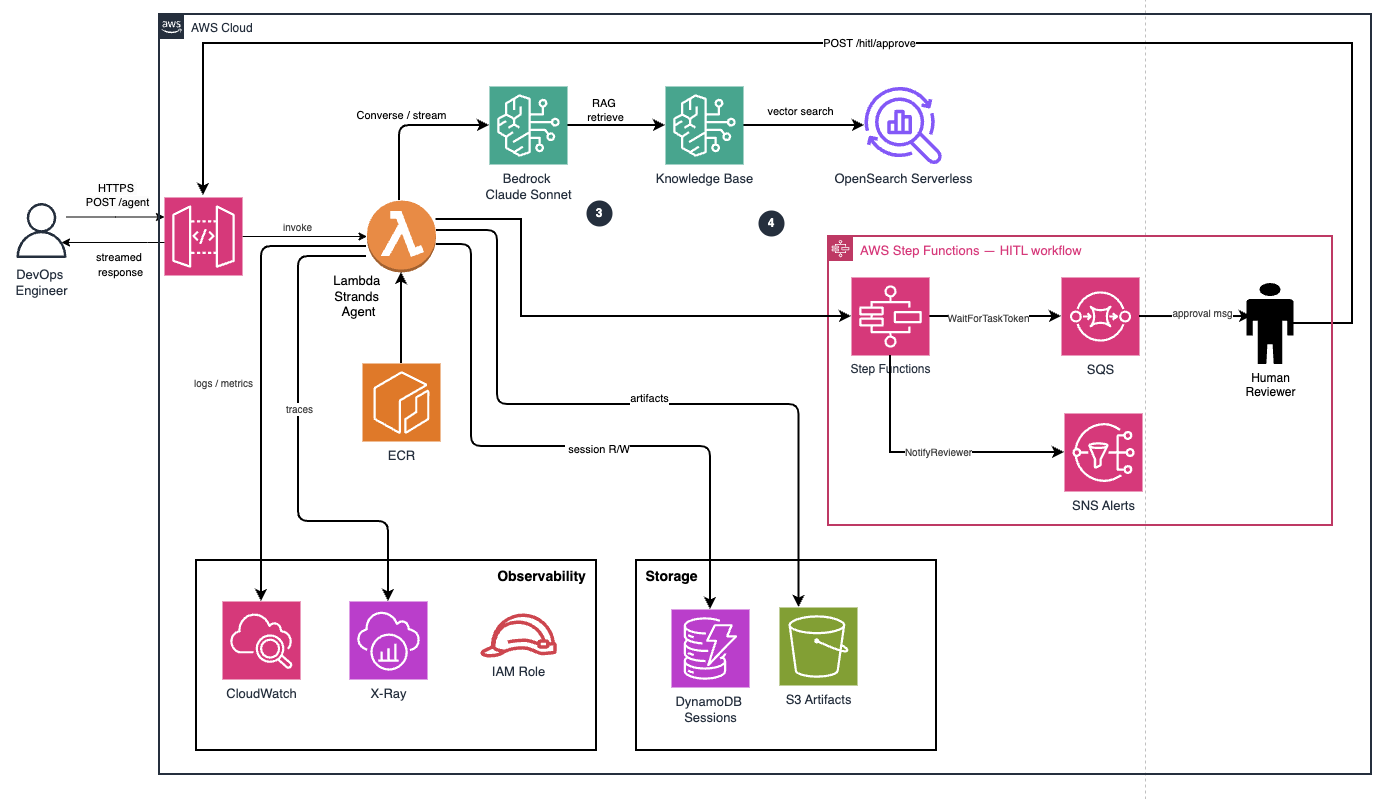
High-Level Architecture — The full deployment: API Gateway → Lambda (Strands Agent) → Bedrock (Claude Sonnet 4.5), with DynamoDB for session state, Step Functions for HITL, S3 + OpenSearch Serverless for the Knowledge Base, and CloudWatch + X-Ray for observability. Six Terraform modules, one deployable stack.
The infrastructure is organized into six Terraform modules, each owning a distinct concern. This makes it possible to enable or disable components independently — the Knowledge Base, HITL workflow, and X-Ray tracing all have feature flags.
| Module | Responsibility | Key Resources |
|---|---|---|
| session-state | Multi-turn conversation memory | DynamoDB sessions table + hitl-tokens table, TTL on both |
| knowledge-base | Document retrieval for the agent | S3 bucket, OpenSearch Serverless collection, Bedrock Knowledge Base |
| hitl | Human-in-the-loop approvals | Step Functions state machine, SQS approval queue, SNS notification topic |
| strands-agent | Core agent runtime | Lambda (container image), ECR repository, IAM role with 12 policy statements |
| api-gateway | Public HTTP interface | API Gateway v2 HTTP API, 3 routes, JSON access logging, throttling |
| monitoring | Visibility into agent behavior | 6 CloudWatch metric filters, 3 alarms, 1 dashboard, X-Ray group + sampling rule |
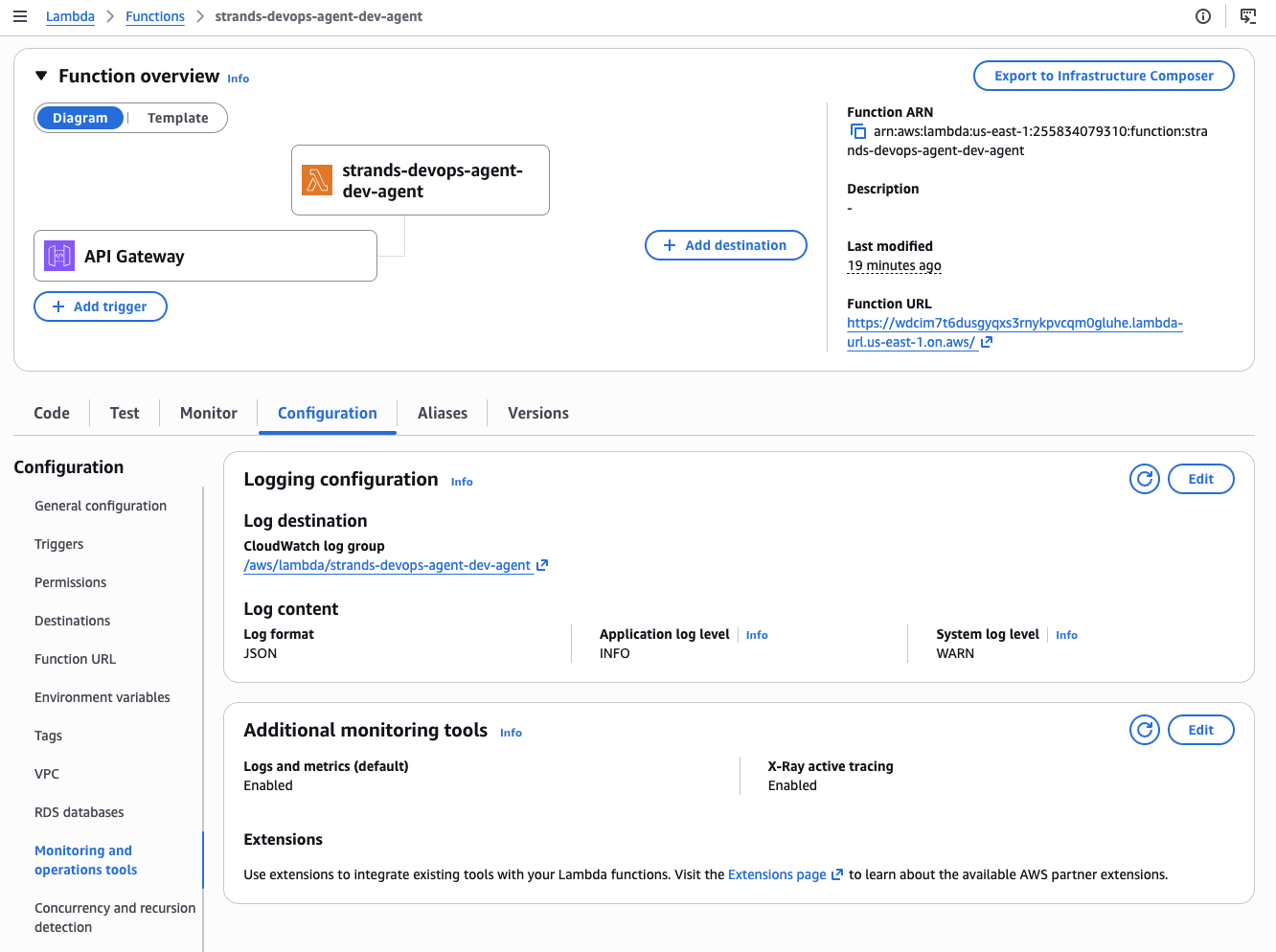
Lambda Configuration — JSON structured logs with log level INFO, X-Ray active tracing enabled, and API Gateway as the trigger. The function runs a container image from ECR with 1024 MB memory and a 300-second timeout to accommodate multi-step agent reasoning.
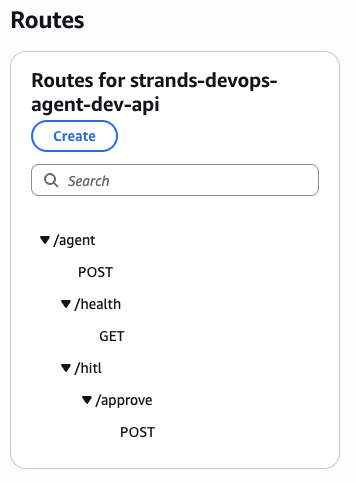
API Gateway HTTP API routes for strands-devops-agent-dev-api. Three routes: the main agent invocation endpoint, a health check, and the HITL approval callback. All backed by the same Lambda function with route-based dispatch in the handler.
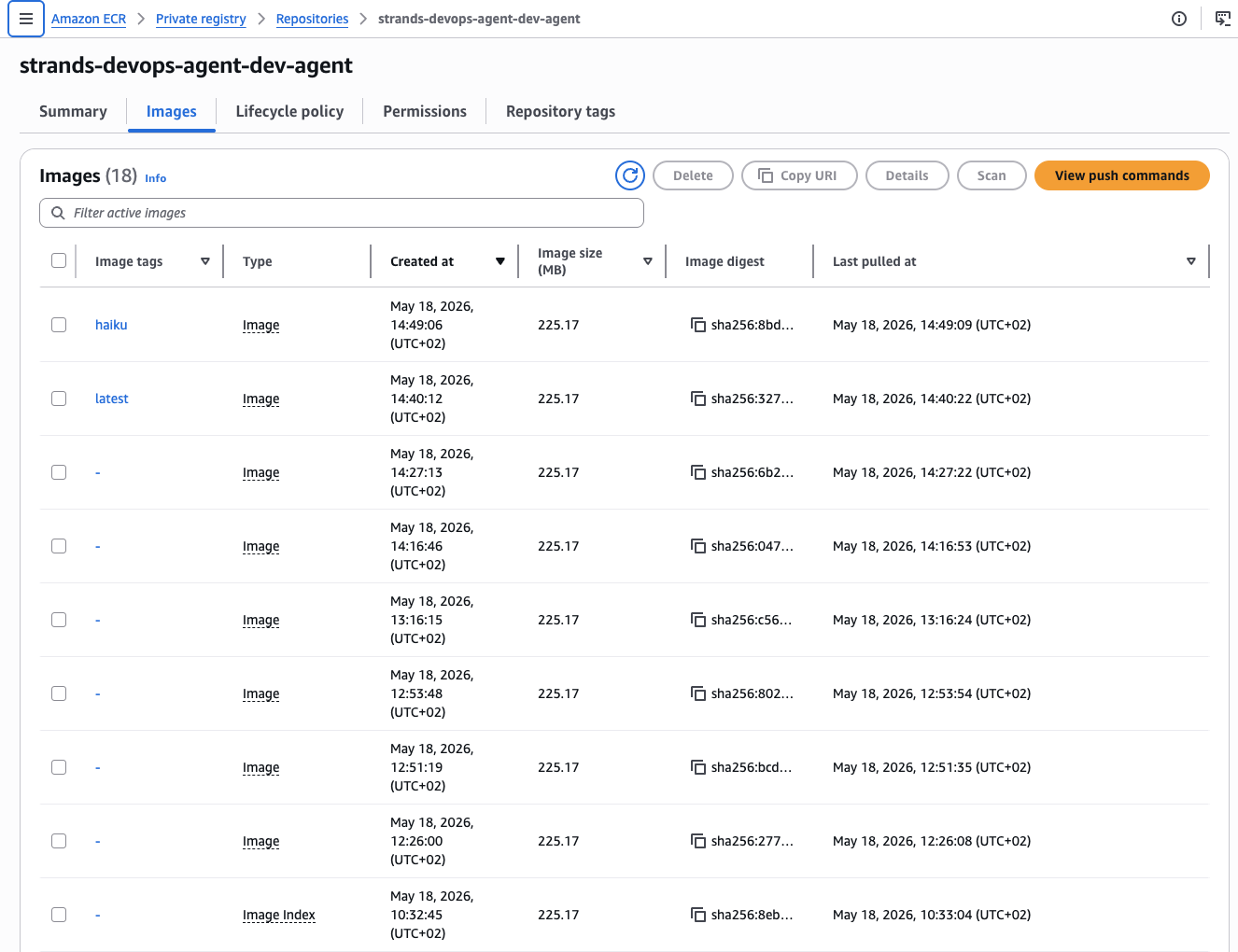
ECR repository holding the Lambda container image. The build script handles multi-arch build for linux/amd64, ECR authentication, push, and Lambda function code update in a single invocation.
The Model-Driven Loop In Practice
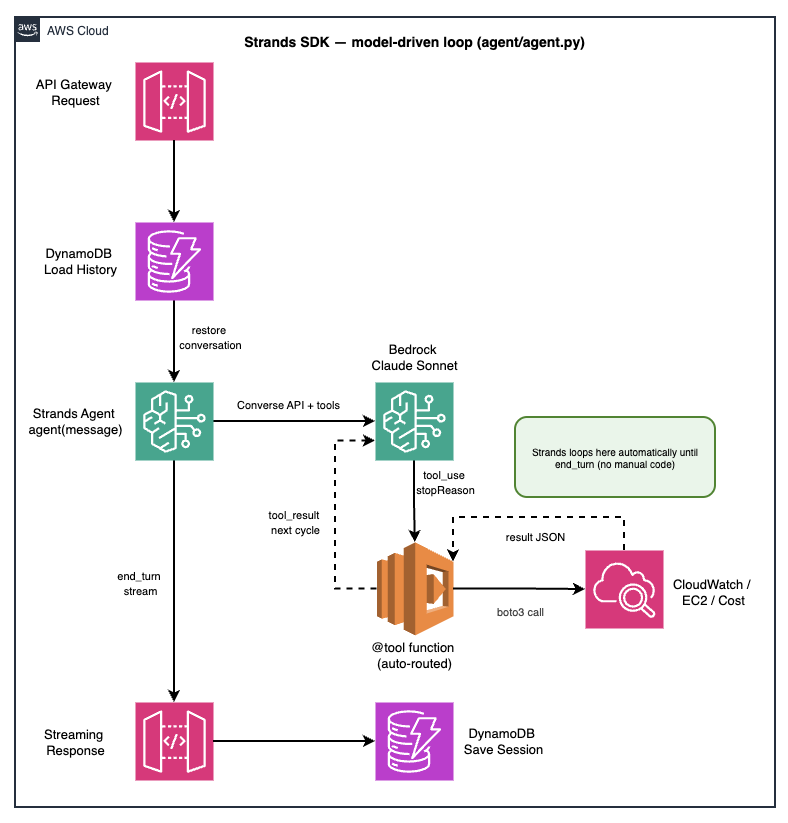
The Strands model-driven loop. The user message enters the Agent. The SDK sends it to Bedrock (Claude Sonnet 4.5) with the full tool schema. If the model emits a tool_use block, the SDK routes it to the Python function, captures the result, and sends a tool_result back. The loop continues until the model emits stop_reason: end_turn.
The key difference from a manual ReAct loop is not just fewer lines of code — it's who makes the decisions. In the custom implementation, the orchestration code had explicit logic for when to stop, when to retry, and how to handle tool errors. In the Strands model-driven loop, the LLM makes those decisions. When a tool errors, the model sees the error message as a tool_result and decides whether to retry with different parameters, call a different tool, or explain the failure to the user.
What Happens Inside agent(message)
# What you write:
response = _agent("List all EC2 instances in us-east-1 and identify any with high CPU")

# What happens internally:
# 1. SDK sends: system_prompt + session_history + user_message + tool_schemas → Bedrock
# 2. Model responds: stop_reason=tool_use, content=[tool_use{list_ec2_instances}]
# 3. SDK calls: list_ec2_instances(region="us-east-1", state_filter="running")
# 4. SDK sends: tool_result{instances: [...]} → Bedrock
# 5. Model responds: stop_reason=tool_use, content=[tool_use{get_instance_metrics}]
# 6. SDK calls: get_instance_metrics(instance_id="i-xxx", metric="CPUUtilization")
# 7. SDK sends: tool_result{cpu: 87.3%} → Bedrock
# 8. Model responds: stop_reason=end_turn → final text answer returned
✓ Warm Lambda Reuse
The agent is initialized once at module level with _agent = build_agent(). Lambda keeps function instances warm between invocations within the same execution environment. Tool schemas are parsed from docstrings at initialization — not on every request. Cold start adds ~2 seconds for the container init; subsequent warm invocations start immediately.
Session History Integration
def handle_agent_request(event: dict) -> dict:
    body       = json.loads(event.get("body", "{}"))
    message    = body["message"]
    session_id = body.get("session_id", str(uuid.uuid4()))

    # Restore conversation history from DynamoDB
    memory  = SessionMemory(session_id)
    history = memory.load()

    # Inject history into agent
    _agent.messages = history

    # Run agent — loop is fully managed by SDK
    response = _agent(message)

    # Persist updated history for next turn
    memory.append(role="user",      content=message)
    memory.append(role="assistant", content=str(response))

    return _response(200, {"response": str(response), "session_id": session_id})
9 Tools Across 3 Domains
The DevOps agent has nine tools organized into three operational domains. Each tool is a plain Python function decorated with @tool. No registration, no schema files, no separate tool definition objects.
| Domain | Tool | What it does |
|---|---|---|
| EC2 | list_ec2_instances |
List instances by region and state filter. Returns ID, type, state, name, private IP. |
describe_instance |
Full detail for a specific instance: AMI, IAM role, security groups, launch time, volumes. | |
get_instance_metrics |
CloudWatch metrics for a specific instance — CPUUtilization, NetworkIn/Out, DiskReadOps. | |
| CloudWatch | get_cloudwatch_metrics |
Query any CloudWatch metric by namespace, metric name, and dimension. |
list_active_alarms |
Return all alarms in ALARM state with their reason and affected resource. | |
get_log_insights |
Run a CloudWatch Logs Insights query against any log group. Polls until results are ready. | |
| Cost Explorer | get_cost_summary |
Total AWS spend for a date range, grouped by service. |
get_cost_forecast |
Cost Explorer forecast for the next N days based on historical trend. | |
get_top_cost_services |
Top N services by cost for a given period. Useful for cost anomaly triage. | |
| HITL | escalate_for_approval |
Starts a Step Functions execution for human approval before proceeding with a high-risk operation. |
Adding a new tool to this agent takes three steps: write the Python function with @tool, add it to the tools=[] list in build_agent(), redeploy. The docstring becomes the schema automatically.
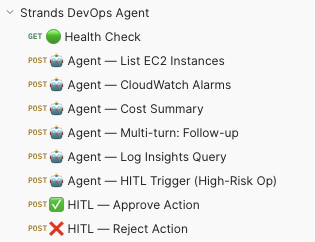
Postman collection with all agent endpoints: health check, EC2 listing, CloudWatch alarms, cost summary, multi-turn follow-up, Log Insights query, HITL trigger, and approval/rejection flows.
Human-in-the-Loop: waitForTaskToken Pattern
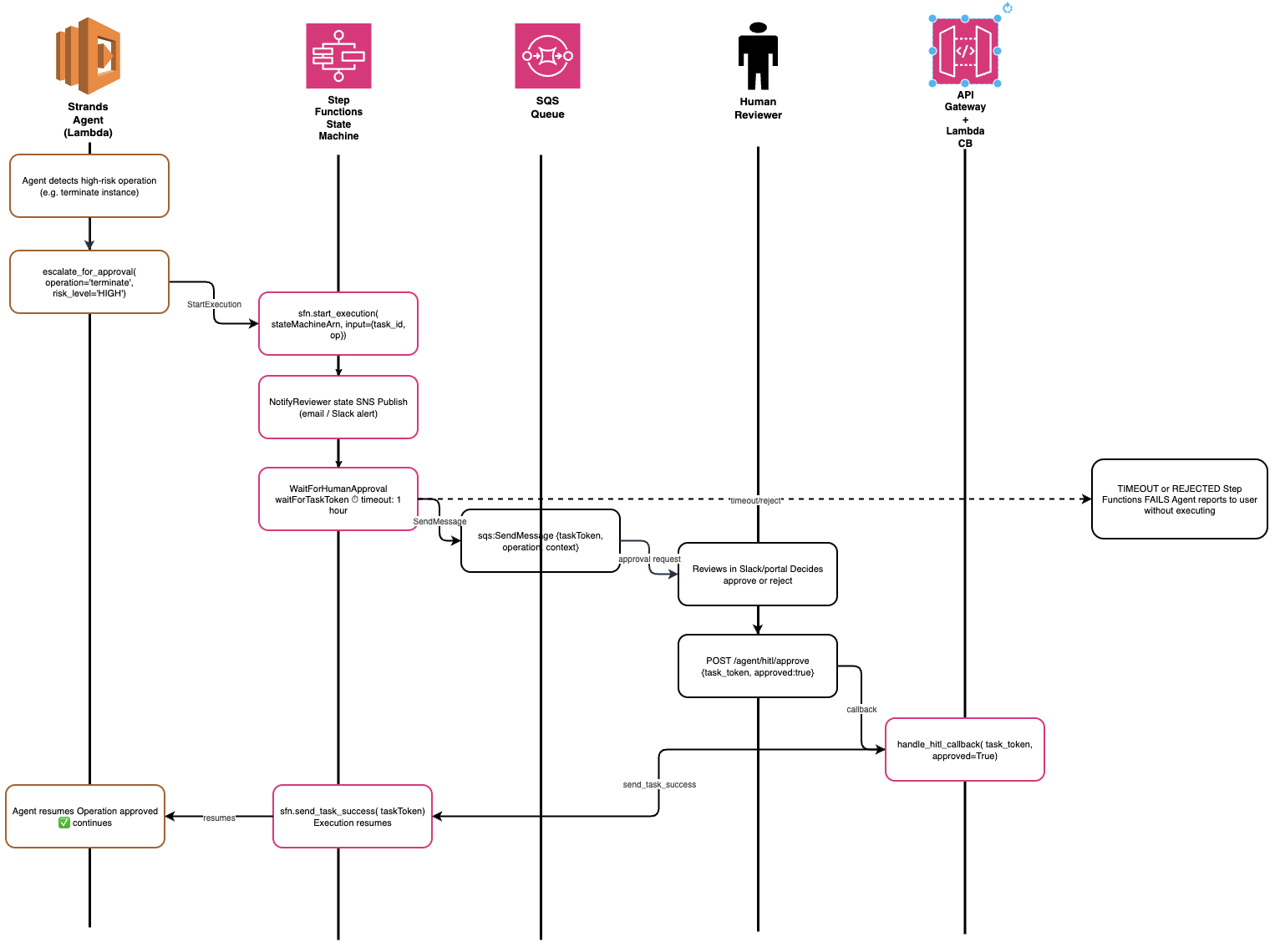
The HITL flow. When the agent calls escalate_for_approval, it starts a Step Functions execution with a taskToken. The execution pauses at the WaitForHumanApproval state. A reviewer sends a decision to POST /agent/hitl/approve. Step Functions resumes and the agent receives the result.
Some operations shouldn't be autonomous. Terminating an EC2 instance, modifying a security group, deleting an S3 bucket — these carry enough risk that a human should review the intent before execution. The escalate_for_approval tool implements the Step Functions waitForTaskToken pattern to pause the agent and wait for a human decision.
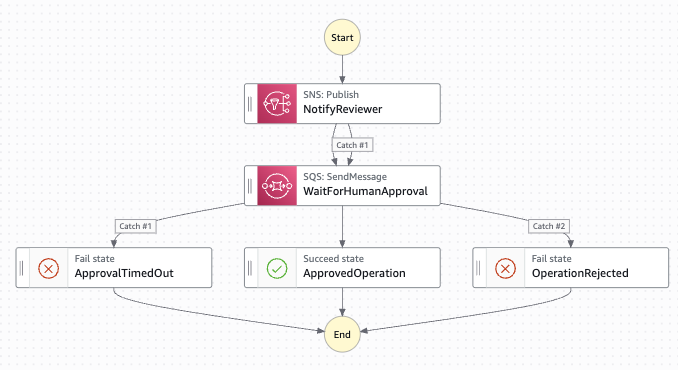
The Step Functions state machine. NotifyReviewer sends an SNS notification. WaitForHumanApproval pauses execution indefinitely using waitForTaskToken. The reviewer calls POST /agent/hitl/approve which routes to ApprovedOperation, ApprovalTimedOut, or OperationRejected.
HIGH_RISK_OPERATIONS = {
    "terminate_instance", "delete_bucket", "modify_security_group",
    "stop_service", "scale_to_zero", "delete_stack"
}

@tool
def escalate_for_approval(
    operation: str,
    resource_id: str,
    justification: str,
    risk_level: str = "HIGH"
) -> str:
    """
    Escalate a high-risk operation for human review before proceeding.

    Use this tool whenever the requested action involves: terminating or stopping
    compute resources, deleting data, modifying security policies, or any
    irreversible infrastructure change.

    Args:
        operation:     The operation being requested (e.g., 'terminate_instance')
        resource_id:   The AWS resource ID the operation targets
        justification: Why the operation is being requested
        risk_level:    Risk assessment — HIGH, CRITICAL

    Returns:
        Approval status and execution ARN for tracking
    """
    sfn = boto3.client("stepfunctions")
    execution = sfn.start_execution(
        stateMachineArn=HITL_STATE_MACHINE_ARN,
        input=json.dumps({
            "operation":     operation,
            "resource_id":   resource_id,
            "justification": justification,
            "risk_level":    risk_level,
            "requested_at":  datetime.utcnow().isoformat(),
        })
    )
    return json.dumps({
        "status":        "pending_approval",
        "execution_arn": execution["executionArn"],
        "message":       f"Escalated {operation} on {resource_id}. Awaiting reviewer decision."
    })
✓ The Agent Explains Itself
Because the model decides when to call escalate_for_approval, it also composes the justification argument based on the full conversation context. The reviewer sees not just "someone wants to terminate an instance" but the model's full reasoning from the conversation — who asked, why, and what was found.
Session Memory with DynamoDB

Two DynamoDB tables. sessions stores conversation history per session with composite key session_id + message_index, a GSI on user_id + created_at, and TTL for automatic expiry. hitl-tokens maps Step Functions task tokens to pending operations.
class SessionMemory:
    def __init__(self, session_id: str, user_id: str = "default"):
        self.session_id = session_id
        self.table      = boto3.resource("dynamodb").Table(SESSION_TABLE_NAME)

    def load(self) -> list[dict]:
        """Load full conversation history, ordered by message_index."""
        response = self.table.query(
            KeyConditionExpression=Key("session_id").eq(self.session_id),
            ScanIndexForward=True,
        )
        return [
            {"role": item["role"], "content": item["content"]}
            for item in response.get("Items", [])
        ]

    def append(self, role: str, content: str) -> None:
        """Append a new message with auto-incrementing index and TTL."""
        count = self.get_message_count()
        self.table.put_item(Item={
            "session_id":    self.session_id,
            "message_index": count,
            "role":          role,
            "content":       content,
            "created_at":    datetime.utcnow().isoformat(),
            "ttl":           int((datetime.utcnow() + timedelta(days=7)).timestamp()),
        })
TTL is set to 7 days per session. Expired sessions are removed by DynamoDB automatically — no maintenance Lambda required. The HITL tokens table uses the same TTL pattern: tokens older than 24 hours expire automatically, ensuring the workflow doesn't leave orphaned state machine executions waiting indefinitely.
Observability Out of the Box
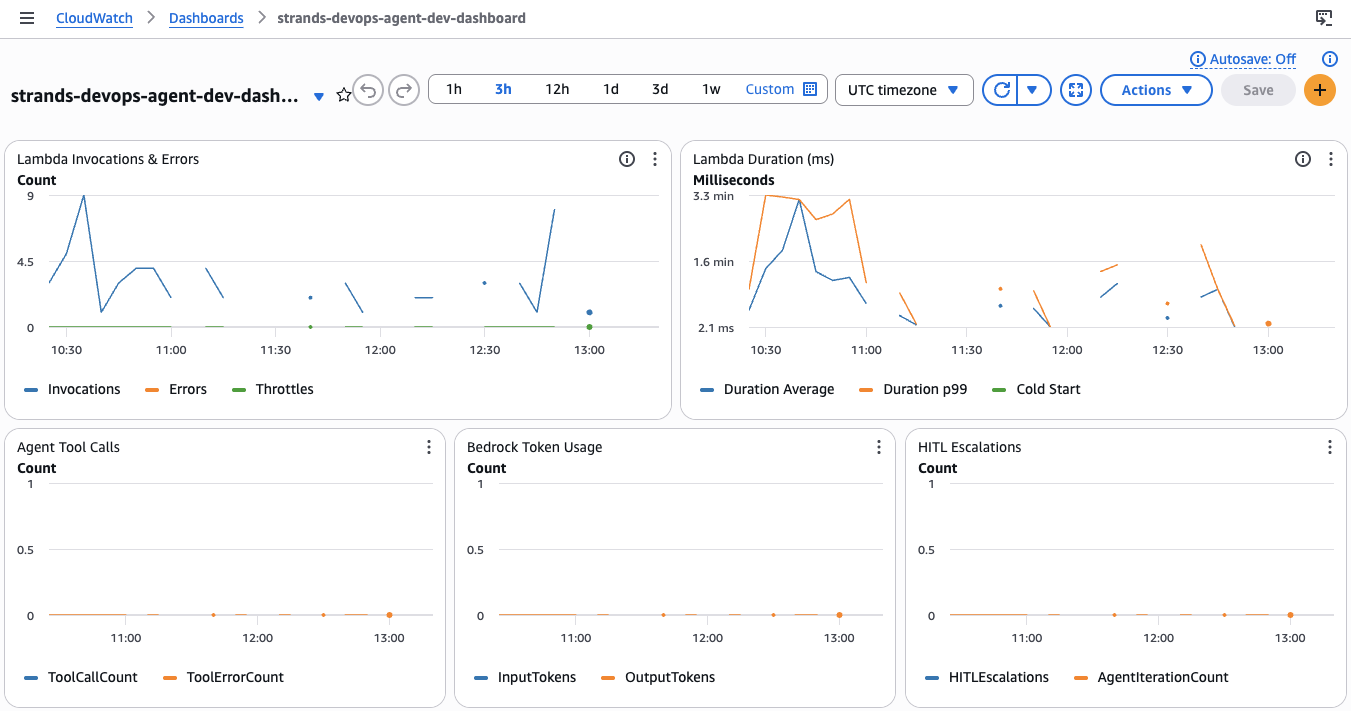
The strands-devops-agent-dev-dashboard: Lambda Invocations & Errors (top left), Lambda Duration with p99 and cold start (top right), Agent Tool Calls with error rate (middle left), Bedrock Token Usage by input/output (middle center), and HITL Escalation count with Agent Iterations (middle right). All metrics populate via CloudWatch metric filters on structured JSON Lambda logs.
The monitoring module deploys six CloudWatch metric filters against the Lambda log group. The Lambda function emits structured JSON logs for each observable event. The metric filters extract custom metrics from those log events without any additional instrumentation library.
# Structured logging — these events feed the CloudWatch metric filters
log.info("tool_call",       event_type="tool_call",   tool_name=tool_name)
log.error("tool_error",     event_type="tool_error",  tool_name=tool_name, error=str(e))
log.info("model_response",  event_type="model_response",
         usage={"input_tokens": usage.input_tokens, "output_tokens": usage.output_tokens})
log.info("hitl_escalation", event_type="hitl_escalation", operation=operation)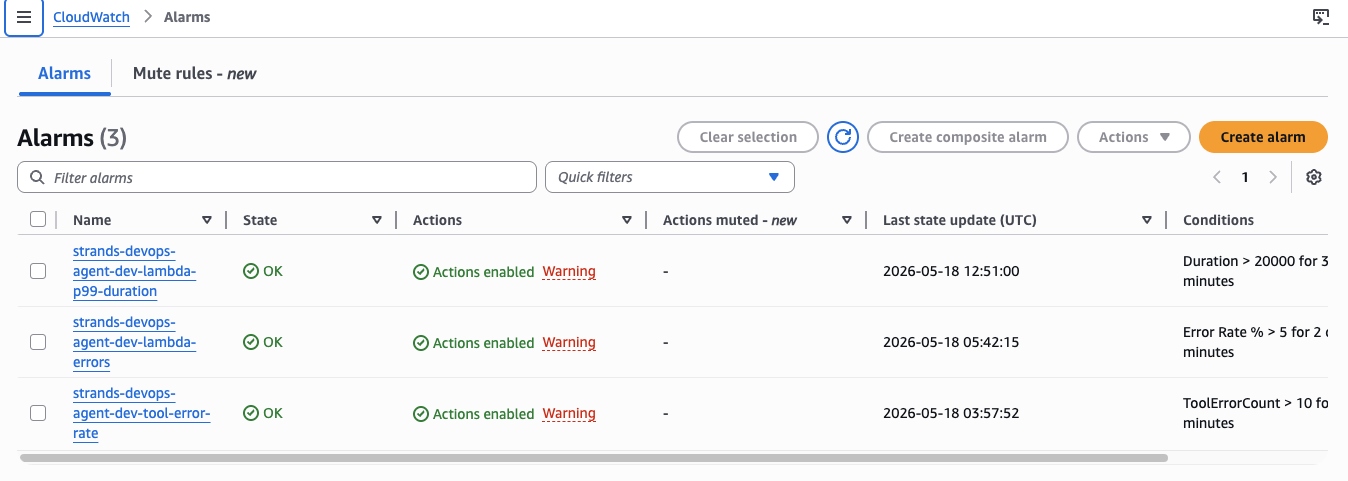
Three CloudWatch alarms: lambda-errors fires when the error rate exceeds 5% over two 5-minute periods. lambda-p99-duration fires when p99 execution time exceeds 20 seconds. tool-error-rate fires when tool errors exceed 10 in a 5-minute window.
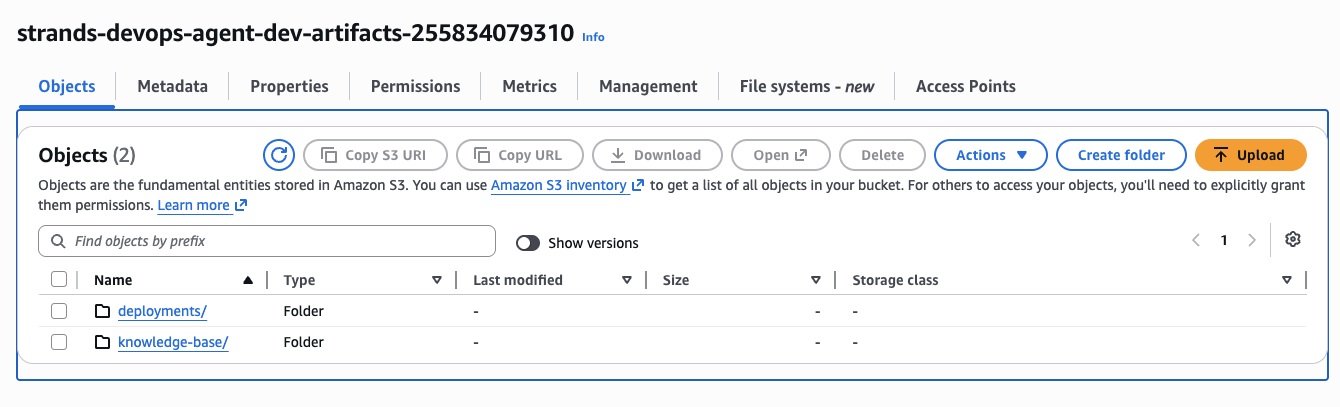
S3 artifacts bucket with knowledge-base/ and deployments/ prefixes. Versioning enabled, AES-256 default encryption, all public access blocked, and a 30-day lifecycle policy on non-current object versions.
What I Gained (and What I Lost)
What I Gained
No more schema maintenance. The @tool decorator generates the schema from the docstring. When I changed the list_ec2_instances function to accept a max_results parameter, the schema updated automatically. In the custom implementation, I would have edited the schema JSON, the function signature, and tested that they matched.
Better error recovery. When a tool fails in Strands, the model decides what to do. In practice, Claude Sonnet will often try a slightly different approach — a different time range, a different instance ID format, a clarifying question. The custom loop had hardcoded retry logic that retried the same call with the same arguments.
Model improvements are free. When Anthropic improved Claude Sonnet's tool-calling behavior in a model update, the agent's performance improved without any code changes. In the custom loop, model behavior changes sometimes broke the XML parser or the stop-reason handling.
Streaming without extra work. Strands supports streaming responses via the streaming=True flag on BedrockModel. Implementing streaming in a custom loop requires restructuring the entire response handling pipeline.
| Component | Custom Orchestration | Strands SDK |
|---|---|---|
| Tool schemas | ~80 lines (hand-written JSON) | 0 lines (auto-generated from docstrings) |
| Tool dispatcher | ~25 lines (if/elif chain) | 0 lines (SDK introspects tools list) |
| ReAct / agent loop | ~110 lines | 1 line: response = agent(message) |
| Retry & backoff | ~15 lines | 0 lines (model-driven recovery) |
| Streaming support | Not implemented (refactor required) | 1 flag: streaming=True |
| Total orchestration boilerplate | ~230 lines | ~5 lines |
What I Lost
Full visibility into the loop internals. With a custom loop, every iteration is explicit in your code. With Strands, the loop is opaque unless you add hooks. During debugging, "why did the agent call this tool three times" requires reading trace logs rather than stepping through code.
Fine-grained loop control. If you need to enforce strict step budgets, inject custom context between iterations, or implement custom stop conditions, you need to use the Strands hooks API rather than just modifying a loop. This is a more structured approach, but it requires learning the hooks model.
Portability to non-Bedrock providers. Strands is built for Bedrock. If you need to run the same agent against OpenAI or a local model, you need to implement a custom model provider.
ℹ When to Stay with Custom Orchestration
If you need to run the same agent logic across multiple model providers, have highly specialized loop behavior that doesn't fit Strands' extension model, or are building something where the orchestration layer is the core differentiator of your product — custom orchestration gives you more control. For most production DevOps and automation agents on AWS, Strands removes a substantial maintenance burden without meaningful trade-offs.
Summary
The migration from custom orchestration to AWS Strands SDK eliminated ~230 lines of boilerplate that I was maintaining, testing, and debugging. The agent's functionality didn't change. Its resilience to tool errors improved because the model handles recovery. Adding new tools went from a four-file edit to a single decorated function.
- Use @tool with docstrings — the decorator generates the JSON schema automatically from your function's type annotations and docstring. You stop maintaining schemas separately from implementations.
- The dispatcher is gone — Strands introspects the
tools=[]list at initialization. The SDK routes tool calls by name. Noif/elifchain to maintain. - Model-driven means model-improved — when Claude Sonnet gets better at tool-calling, your agent gets better. You don't update orchestration code to benefit from model improvements.
- Initialize once, reuse across Lambda warm invocations —
_agent = build_agent()at module level. Tool schema parsing happens at cold start, not on every request. - Combine with DynamoDB for multi-turn memory — load session history before the agent call, persist after. Set TTL to avoid unbounded table growth.
- Use waitForTaskToken for HITL — Step Functions pauses execution indefinitely, costs nothing while waiting, and the model composes the justification from conversation context automatically.
- Structured JSON logs → CloudWatch metric filters — emit
event_typefields in every log statement. Six metric filters give you tool calls, token usage, HITL escalations, and error rates without any additional instrumentation library. - 10% X-Ray sampling in production — enough for performance analysis. Flip to 100% via AppConfig when debugging without a redeployment.
- The full stack is six Terraform modules — session-state, knowledge-base, hitl, strands-agent, api-gateway, monitoring. Each has an
enabledflag. Deploy the core agent without KB or HITL and add them incrementally.
The full Terraform modules, Strands agent code, HITL implementation, and deployment scripts are all in the repository below.
Complete Terraform Project on GitHub
All 6 Terraform modules, Strands agent with 9 tools, HITL Step Functions workflow, DynamoDB session memory, CloudWatch monitoring, and deployment scripts — deployed and ready to use.
View on GitHub →