
AI-Powered Terraform Plan Review: Automated Security Validation with AWS Bedrock and Claude
Every Terraform plan automatically analyzed by Claude Sonnet 4.5 AI model. Detect security risks, cost anomalies, and best practice violations before deployment — for less than $6 per month.
Introduction
In modern DevOps environments, Infrastructure as Code (IaC) is the standard for managing cloud infrastructure. Terraform is one of the most popular tools, but with increasing infrastructure complexity comes growing risk of security misconfigurations and sub-optimal configurations. Traditional manual code review is time-consuming, inconsistent, and prone to human error.
The Problem
- Manual review is slow: Senior engineers must review every Terraform plan before deployment
- Inconsistent standards: Different reviewers may have different requirements
- Human errors: Fatigue and routine lead to critical issues being overlooked
- Scalability: As teams and infrastructure grow, manual review becomes a bottleneck
The Solution
We built a fully automated system that uses AWS Bedrock with Claude Sonnet 4.5 model to analyze every Terraform plan before deployment. The system automatically detects security risks, cost anomalies, and best practice violations.
Solution Architecture
Technologies Used
- AWS CodeCommit: Git repository for Terraform code
- AWS CodePipeline: CI/CD process orchestration
- AWS CodeBuild: Build environment for Terraform and AI analysis
- AWS Bedrock: Managed AI service with access to Claude models
- Claude Sonnet 4.5: Latest AI model from Anthropic
- Terraform: Infrastructure as Code tool
- Python 3.11: Runtime for AI reviewer script
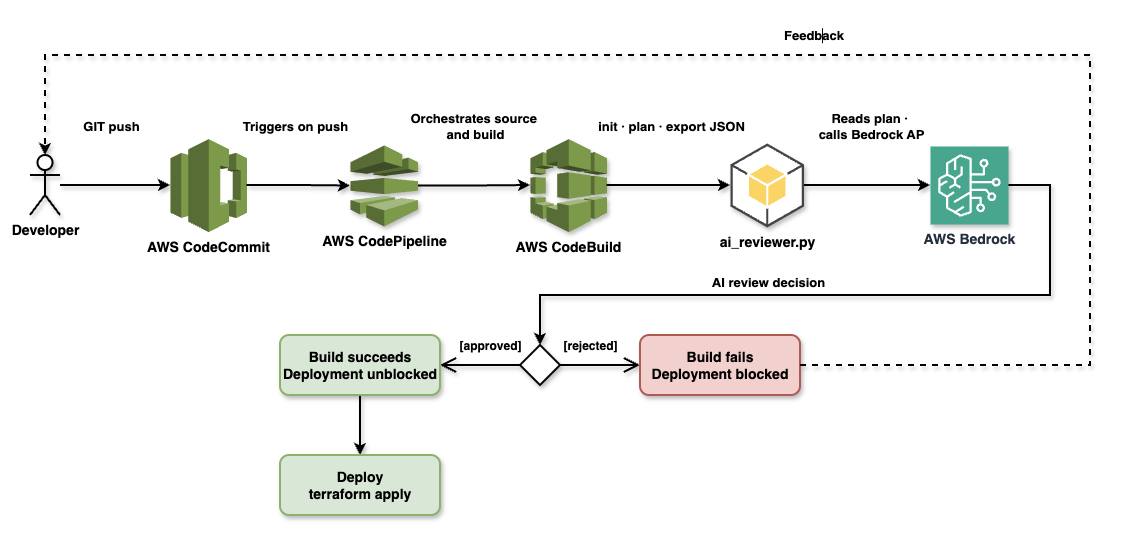
Architecture: Git push → CodePipeline → CodeBuild → Terraform Plan → AI Review → Deployment Decision
Implementation
1. CI/CD Infrastructure (Terraform)
First, we create the CI/CD infrastructure using Terraform:
terraform/cicd/main.tf
# CodeCommit Repository
resource "aws_codecommit_repository" "repo" {
  repository_name = "terraform-infra"
  description     = "Terraform infrastructure code to be reviewed by AI"
}

# S3 Bucket for Pipeline Artifacts
resource "aws_s3_bucket" "artifacts" {
  bucket        = "ai-tf-reviewer-artifacts-${data.aws_caller_identity.current.account_id}"
  force_destroy = true
}

# CodeBuild Project
resource "aws_codebuild_project" "plan_review" {
  name          = "ai-tf-reviewer-plan-review"
  description   = "Runs terraform plan and AI review"
  build_timeout = "15"
  service_role  = aws_iam_role.codebuild_role.arn

  artifacts {
    type = "CODEPIPELINE"
  }

  environment {
    compute_type                = "BUILD_GENERAL1_SMALL"
    image                       = "aws/codebuild/amazonlinux2-x86_64-standard:5.0"
    type                        = "LINUX_CONTAINER"
    image_pull_credentials_type = "CODEBUILD"
  }

  source {
    type      = "CODEPIPELINE"
    buildspec = "buildspec.yml"
  }
}

# CodePipeline
resource "aws_codepipeline" "pipeline" {
  name     = "ai-tf-reviewer-pipeline"
  role_arn = aws_iam_role.codepipeline_role.arn

  artifact_store {
    location = aws_s3_bucket.artifacts.bucket
    type     = "S3"
  }

  stage {
    name = "Source"
    action {
      name             = "Source"
      category         = "Source"
      owner            = "AWS"
      provider         = "CodeCommit"
      version          = "1"
      output_artifacts = ["source_output"]

      configuration = {
        RepositoryName = aws_codecommit_repository.repo.repository_name
        BranchName     = "main"
      }
    }
  }

  stage {
    name = "Plan-And-Review"
    action {
      name             = "Terraform-AI-Review"
      category         = "Build"
      owner            = "AWS"
      provider         = "CodeBuild"
      input_artifacts  = ["source_output"]
      output_artifacts = ["build_output"]
      version          = "1"

      configuration = {
        ProjectName = aws_codebuild_project.plan_review.name
      }
    }
  }
}
2. IAM Permissions
CodeBuild needs permissions to access Bedrock:
terraform/cicd/iam.tf
resource "aws_iam_role" "codebuild_role" {
  name = "ai-tf-reviewer-codebuild-role"

  assume_role_policy = jsonencode({
    Version = "2012-10-17"
    Statement = [{
      Action = "sts:AssumeRole"
      Effect = "Allow"
      Principal = {
        Service = "codebuild.amazonaws.com"
      }
    }]
  })
}

resource "aws_iam_role_policy" "codebuild_policy" {
  role = aws_iam_role.codebuild_role.name

  policy = jsonencode({
    Version = "2012-10-17"
    Statement = [
      {
        Effect = "Allow"
        Action = [
          "logs:CreateLogGroup",
          "logs:CreateLogStream",
          "logs:PutLogEvents"
        ]
        Resource = "*"
      },
      {
        Effect = "Allow"
        Action = [
          "s3:GetObject",
          "s3:PutObject"
        ]
        Resource = "*"
      },
      {
        Effect = "Allow"
        Action = ["codecommit:GitPull"]
        Resource = "*"
      },
      {
        Effect = "Allow"
        Action = ["bedrock:InvokeModel"]
        Resource = "*"
      }
    ]
  })
}
3. Build Specification
buildspec.yml
version: 0.2

phases:
  install:
    runtime-versions:
      python: 3.11
    commands:
      - echo Installing Terraform...
      - yum install -y yum-utils
      - yum-config-manager --add-repo https://rpm.releases.hashicorp.com/AmazonLinux/hashicorp.repo
      - yum -y install terraform
      - echo Installing Python dependencies...
      - pip install -r scripts/requirements.txt

  build:
    commands:
      - echo Running Terraform Plan...
      - cd terraform/infrastructure
      - terraform init
      - terraform plan -out=tfplan
      - terraform show -json tfplan > ../../tfplan.json
      - cd ../..
      - echo Running AI Review...
      - python scripts/ai_reviewer.py tfplan.json

artifacts:
  files:
    - '**/*'
4. AI Reviewer Script
scripts/ai_reviewer.py
import json
import sys
import boto3
import os

def get_bedrock_client():
    return boto3.client(
        service_name='bedrock-runtime',
        region_name=os.environ.get('AWS_REGION', 'us-east-1')
    )

def analyze_plan(plan_json):
    client = get_bedrock_client()

    # Extract resource changes
    resource_changes = plan_json.get('resource_changes', [])
    summary = []

    for change in resource_changes:
        address = change.get('address')
        actions = change.get('change', {}).get('actions', [])
        summary.append(f"Resource: {address}, Actions: {actions}")

    # Prepare prompt for Claude
    prompt = f"""
    You are a Senior Cloud Security and DevOps Engineer. Your task is to review a Terraform plan and decide if it should be APPROVED or REJECTED.

    Focus on:
    1. Security risks (e.g., public S3 buckets, open security groups, lack of encryption).
    2. Cost anomalies (e.g., accidental deletion of expensive resources, provisioning of high-cost instances).
    3. Best practices (e.g., missing tags, non-compliant naming).

    Terraform Plan Summary:
    {json.dumps(summary, indent=2)}

    Full Plan Details (partial):
    {json.dumps(resource_changes, indent=2)[:10000]}

    Provide your review in the following format:
    DECISION: [APPROVED or REJECTED]
    REASON: [Short explanation of your decision]
    SUGGESTIONS: [Any improvements]
    """

    # Call Bedrock API
    body = json.dumps({
        "anthropic_version": "bedrock-2023-05-31",
        "max_tokens": 2048,
        "messages": [
            {
                "role": "user",
                "content": [{"type": "text", "text": prompt}]
            }
        ]
    })

    model_id = 'us.anthropic.claude-sonnet-4-5-20250929-v1:0'

    try:
        response = client.invoke_model(
            body=body,
            modelId=model_id,
            accept='application/json',
            contentType='application/json'
        )

        response_body = json.loads(response.get('body').read())
        review_text = response_body['content'][0]['text']
        return review_text
    except Exception as e:
        print(f"Error calling Bedrock: {e}")
        sys.exit(1)

def main():
    if len(sys.argv) < 2:
        print("Usage: python ai_reviewer.py ")
        sys.exit(1)

    file_path = sys.argv[1]
    with open(file_path, 'r') as f:
        plan_json = json.load(f)

    print("--- Starting AI Review of Terraform Plan ---")
    review = analyze_plan(plan_json)
    print(review)
    print("--- End of AI Review ---")

    # Exit with error if rejected
    if "DECISION: REJECTED" in review:
        print("AI Review failed. Deployment blocked.")
        sys.exit(1)
    else:
        print("AI Review passed. Deployment can proceed.")
        sys.exit(0)

if __name__ == "__main__":
    main()
scripts/requirements.txt
boto3>=1.34.0Real-World Examples
Example 1: REJECTED - Insecure S3 Bucket
Terraform code (bad example):
resource "aws_s3_bucket" "example" {
  bucket = "my-ai-reviewed-bucket-${data.aws_caller_identity.current.account_id}"
}

resource "aws_s3_bucket_versioning" "example" {
  bucket = aws_s3_bucket.example.id
  versioning_configuration {
    status = "Enabled"
  }
}
AI Review output:
DECISION: REJECTED

REASON: This Terraform plan has critical security vulnerabilities that must be addressed before deployment:

1. **Missing Encryption**: The S3 bucket does not have server-side encryption configured.
   All S3 buckets should have encryption at rest enabled by default.

2. **Missing Tags**: The bucket has "tags": null, which violates tagging best practices.
   Tags are essential for cost allocation, resource management, and compliance tracking.

3. **No Public Access Block**: The plan doesn't include aws_s3_bucket_public_access_block
   resource, which is critical to prevent accidental public exposure of data.

4. **Missing Logging**: S3 bucket access logging is not configured, which is important
   for security auditing and compliance.

SUGGESTIONS:
1. Add aws_s3_bucket_server_side_encryption_configuration resource with AES256 or KMS encryption
2. Add required tags (e.g., Environment, Owner, Project, CostCenter) to the bucket
3. Add aws_s3_bucket_public_access_block resource with all public access blocked
4. Consider adding aws_s3_bucket_logging for access logging
5. Enable MFA Delete for the versioning configuration for additional protection
Result: Build failed, deployment blocked.
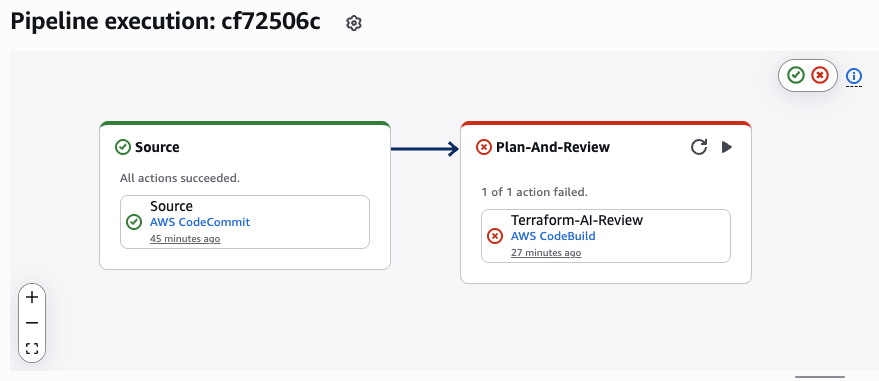
CodePipeline execution: AI review rejected insecure S3 bucket configuration
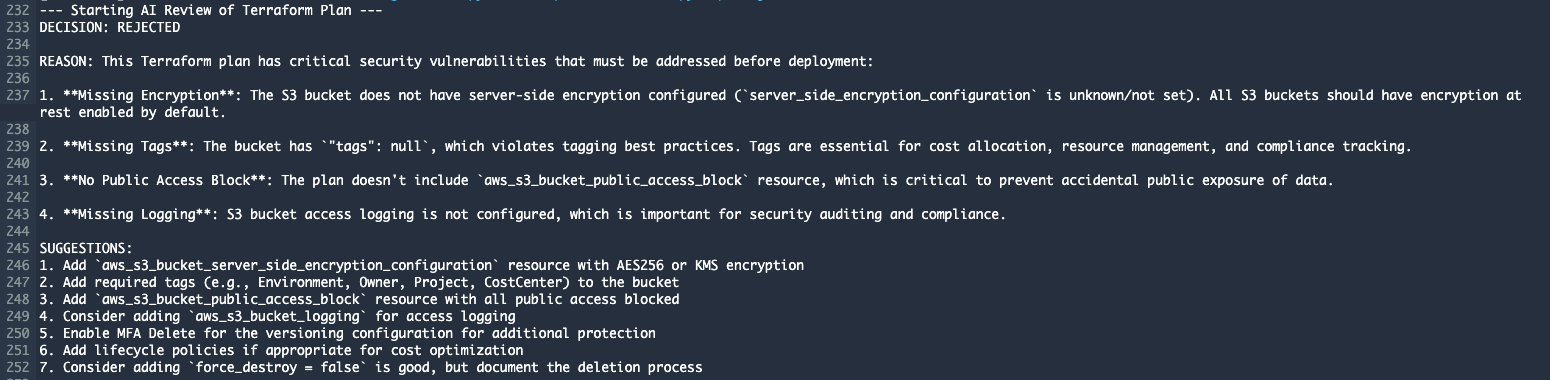
CodeBuild output: AI identified 4 critical security issues and provided specific fix suggestions
Example 2: APPROVED - Secure S3 Bucket
Terraform code (good example):
resource "aws_s3_bucket" "example" {
  bucket = "my-ai-reviewed-bucket-${data.aws_caller_identity.current.account_id}"

  tags = {
    Name        = "AI Reviewed Bucket"
    Environment = "Production"
    Project     = "Terraform AI Review Demo"
    ManagedBy   = "Terraform"
    Owner       = "DevOps Team"
  }
}

resource "aws_s3_bucket_versioning" "example" {
  bucket = aws_s3_bucket.example.id
  versioning_configuration {
    status = "Enabled"
  }
}

resource "aws_s3_bucket_server_side_encryption_configuration" "example" {
  bucket = aws_s3_bucket.example.id

  rule {
    apply_server_side_encryption_by_default {
      sse_algorithm = "AES256"
    }
  }
}

resource "aws_s3_bucket_public_access_block" "example" {
  bucket = aws_s3_bucket.example.id

  block_public_acls       = true
  block_public_policy     = true
  ignore_public_acls      = true
  restrict_public_buckets = true
}

resource "aws_s3_bucket_logging" "example" {
  bucket = aws_s3_bucket.example.id

  target_bucket = aws_s3_bucket.logs.id
  target_prefix = "access-logs/"
}

resource "aws_s3_bucket" "logs" {
  bucket = "my-ai-reviewed-bucket-logs-${data.aws_caller_identity.current.account_id}"

  tags = {
    Name        = "AI Reviewed Bucket Logs"
    Environment = "Production"
    Project     = "Terraform AI Review Demo"
    ManagedBy   = "Terraform"
    Owner       = "DevOps Team"
  }
}
AI Review output:
DECISION: APPROVED

REASON: This Terraform plan demonstrates excellent security practices and compliance with AWS best practices.
All critical security controls are properly implemented:

- **Public Access Protection**: Both S3 buckets have public access blocks enabled
  (block_public_acls, block_public_policy, ignore_public_acls, restrict_public_buckets all set to true)

- **Encryption**: Server-side encryption is configured using AES256 for the example bucket

- **Versioning**: Bucket versioning is enabled, providing data protection and recovery capabilities

- **Logging**: Access logging is configured with a dedicated logs bucket

- **Tagging**: Comprehensive tags are present (Environment, ManagedBy, Owner, Project, Name)
  for governance and cost tracking

- **Cost**: Only creating S3 buckets with standard configurations - no high-cost resources or risky deletions

SUGGESTIONS:

1. **Encryption for Logs Bucket**: Consider adding server-side encryption configuration for the
   logs bucket (aws_s3_bucket.logs) similar to the example bucket for consistency.

2. **Lifecycle Policies**: Implement lifecycle policies to transition older logs to cheaper storage
   classes (e.g., S3 Glacier) or delete them after a retention period to optimize costs.

3. **Encryption with KMS**: For enhanced security and audit capabilities, consider using AWS KMS
   Customer Managed Keys (CMK) instead of AES256, especially for Production environments with
   compliance requirements.

4. **Versioning for Logs Bucket**: Enable versioning on the logs bucket as well for complete
   audit trail protection.

5. **MFA Delete**: Consider enabling MFA delete on versioned buckets for additional protection
   against accidental or malicious deletions in Production.

6. **Bucket Policies**: Add explicit bucket policies to enforce SSL/TLS for data in transit
   (aws:SecureTransport condition).

**Overall Assessment**: This is a well-structured, security-conscious deployment that can be safely applied.
Result: Build succeeded, deployment can proceed.
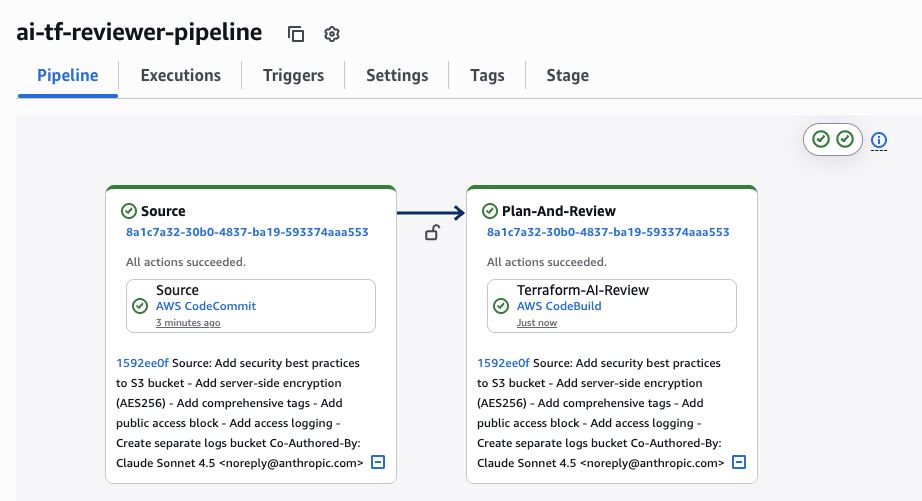
CodePipeline execution: AI review approved secure S3 bucket configuration with best practices
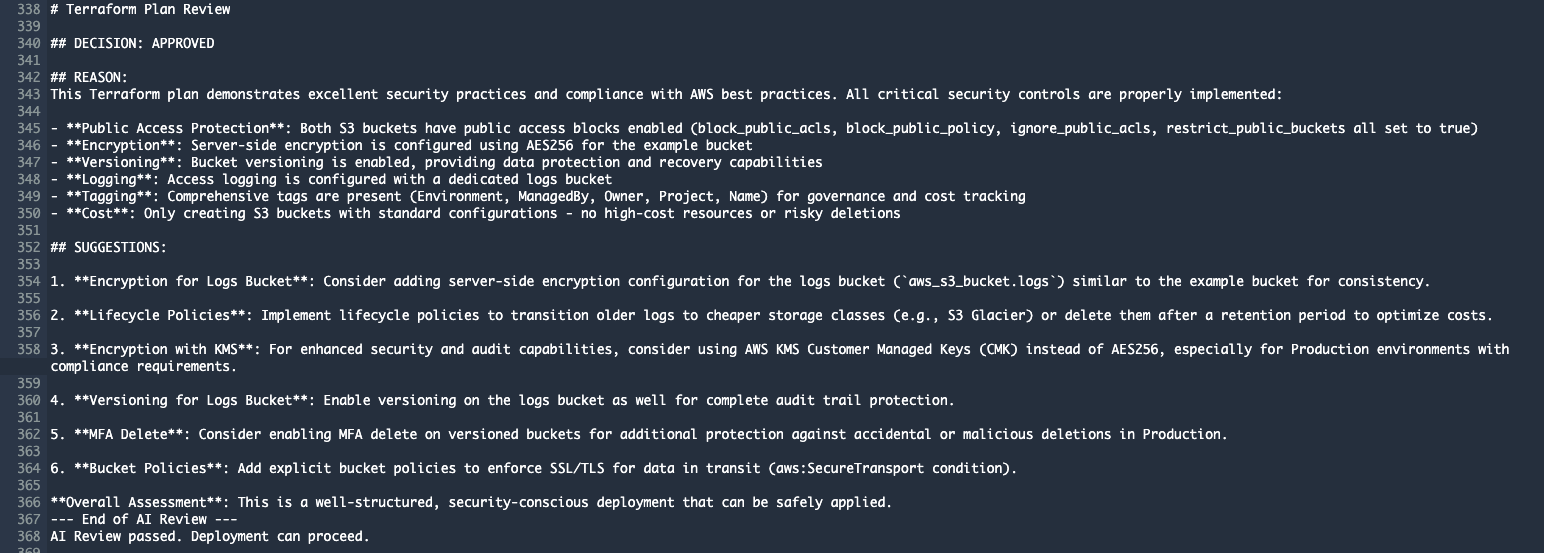
CodeBuild output: AI confirmed security compliance and provided 6 suggestions for further improvements
What Does the AI Analyze?
1. Security Risks
Claude checks for:
- Encryption (at rest and in transit)
- Public access settings
- IAM roles and policies
- Security groups with open ports
- Access logging
- Network isolation (VPC, subnets)
- Secrets management (hardcoded credentials)
2. Cost Anomalies
- Large/expensive EC2 instances
- Unexpected resource deletions
- Suboptimal storage classes
- Missing lifecycle policies
- Duplicate resources
3. Best Practices
- Tagging strategy (Environment, Owner, Project, CostCenter)
- Naming conventions
- Resource organization
- Versioning
- Backup strategies
- High availability setup
- Disaster recovery
Benefits of This Solution
1. Automation
The system runs completely hands-free, integrating seamlessly into your existing CI/CD pipeline without requiring any manual oversight.
- Every push automatically triggers AI review
- No manual intervention needed
- Instant feedback
2. Consistency
Unlike human reviewers who may have different opinions or varying levels of attention, AI applies the exact same security and best practice standards to every single deployment.
- AI uses the same criteria for all reviews
- Eliminates subjective decisions
- Enforces company standards
3. Education
Every AI review becomes a learning opportunity, gradually elevating your team's infrastructure coding skills through actionable, context-specific feedback.
- Developers learn from AI feedback
- Code quality gradually improves
- Best practices spread across the team
4. Security
By catching misconfigurations before they reach production, the system acts as an automated security gate that never sleeps.
- Blocks dangerous deployments before production
- Detects security issues early
- Reduces risk of data breaches
5. Cost Savings
The financial benefits are twofold: preventing expensive production mistakes while freeing up senior engineers from repetitive review work.
- Detects expensive configurations
- Eliminates senior engineer manual review time
- Prevents costly mistakes in production
6. Scalability
Whether your team deploys once a day or a hundred times, the AI review system maintains the same speed and quality without becoming a bottleneck.
- System handles unlimited number of reviews
- Consistent speed regardless of team size
- No bottlenecks in deployment pipeline
Cost and Performance
AWS Bedrock Pricing (Claude Sonnet 4.5)
- Input tokens: ~$3 per 1M tokens
- Output tokens: ~$15 per 1M tokens
Typical Terraform plan review:
- Input: ~5,000 tokens (plan + prompt)
- Output: ~1,000 tokens (AI response)
- Cost per review: ~$0.03 (3 cents)
Monthly costs (100 deployments):
- 100 reviews × $0.03 = $3.00/month
CodeBuild Pricing
- Build.general1.small: $0.005 per minute
- Average build: 5 minutes
- Cost per build: ~$0.025
Monthly costs (100 builds):
- 100 builds × $0.025 = $2.50/month
Total Cost
| Service | Monthly Cost (100 deployments) |
|---|---|
| AWS Bedrock (Claude Sonnet 4.5) | $3.00 |
| AWS CodeBuild | $2.50 |
| AWS CodePipeline | $0.00 (free tier) |
| AWS CodeCommit | $0.00 (free tier) |
| S3 Storage | ~$0.50 |
| TOTAL | ~$6.00/month |
ROI Analysis
Senior DevOps Engineer: 1 hour of manual code review = $100-200
Break-even: After the first prevented security incident
Monthly savings: 10-20 hours of review time = $1,000-4,000
Implementation Steps
Step 1: Deploy CI/CD Infrastructure
cd terraform/cicd
terraform init
terraform apply
Step 2: Upload Code to CodeCommit
git remote add origin codecommit::us-east-1://terraform-infra
git push origin main
Step 3: Test
- Make a change in Terraform code
- Push to main branch
- Monitor CodePipeline execution
- Check AI review in CodeBuild logs
Future Enhancements
1. Slack/Teams Integration
Send AI review results to team channels:
def send_to_slack(review_result):
    webhook_url = os.environ.get('SLACK_WEBHOOK')
    requests.post(webhook_url, json={
        "text": f"Terraform Review: {review_result}"
    })
2. Custom Rules Engine
Add company-specific rules:
custom_rules = {
    "required_tags": ["Environment", "Owner", "CostCenter"],
    "allowed_regions": ["us-east-1", "eu-west-1"],
    "max_instance_size": "m5.2xlarge"
}
3. Historical Trend Analysis
Track security metrics over time:
- Number of REJECTED vs APPROVED
- Most common issues
- Team improvement metrics
4. Multi-Cloud Support
Extend to Azure (ARM templates) and GCP (Deployment Manager)
5. Automatic Fix Suggestions
AI not only identifies issues but proposes specific code fixes:
# AI Suggested Fix:
resource "aws_s3_bucket_server_side_encryption_configuration" "example" {
  bucket = aws_s3_bucket.example.id
  rule {
    apply_server_side_encryption_by_default {
      sse_algorithm = "AES256"
    }
  }
}
Conclusion
AI-powered Terraform review represents a significant evolution in DevOps practices. The combination of AWS managed services (CodePipeline, CodeBuild, Bedrock) with the advanced Claude Sonnet 4.5 AI model provides:
- Automated security validation for every Terraform plan
- Consistent standards across the entire team
- Instant feedback for developers
- Dramatic reduction in security incidents
- ROI from the first prevented issue
Implementation takes less than 1 day and monthly costs are negligible compared to the value the system provides.
Result: More secure infrastructure, faster deployments, more educated team.
Complete Project on GitHub
Full implementation — Terraform infrastructure, Lambda handler, Bedrock integration, GitHub Actions CI/CD pipeline, and test Terraform plans.
View on GitHub →