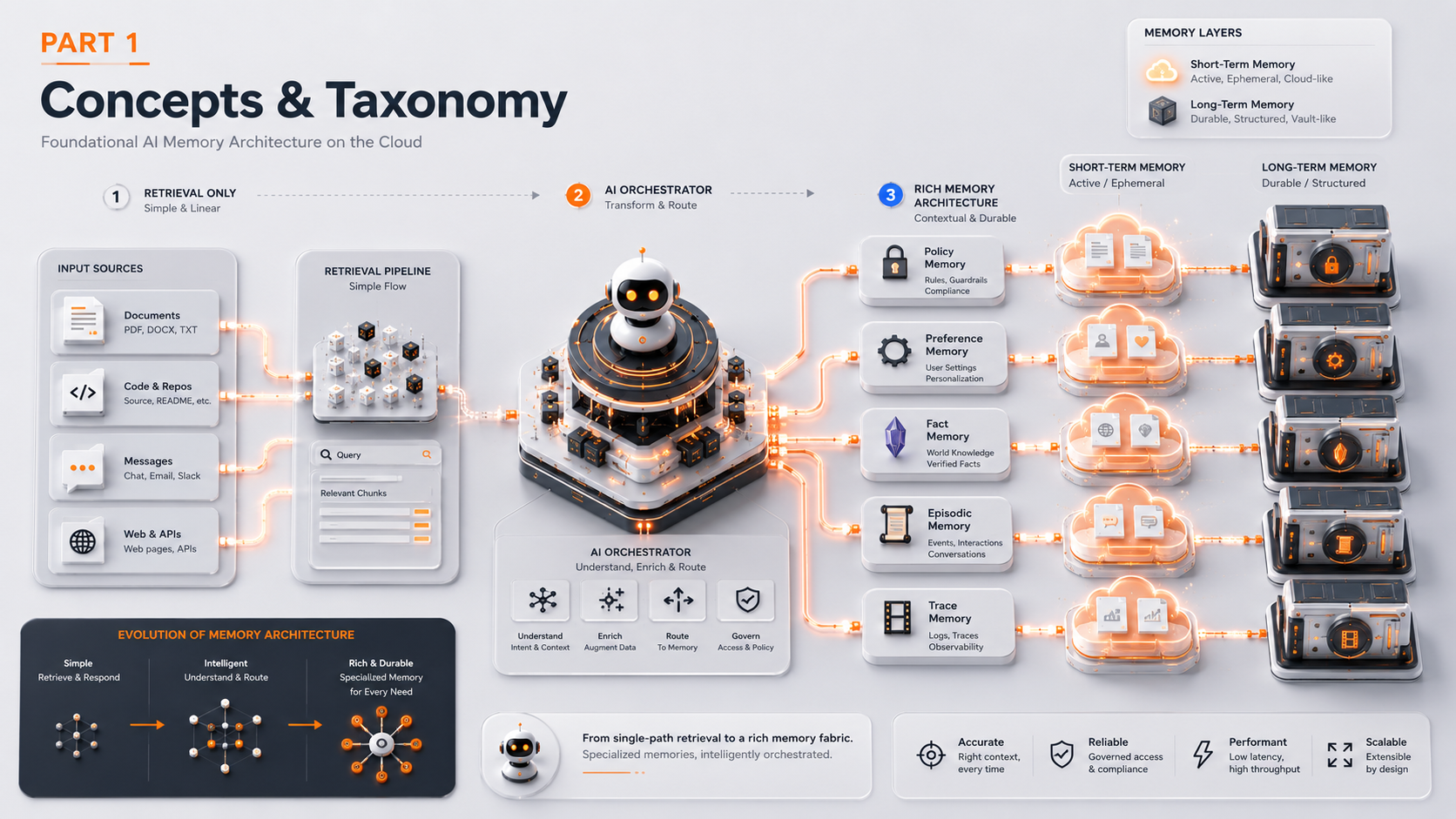
From RAG to Memory Systems — Part 1: Concepts & Taxonomy
Why basic RAG falls short of stateful AI, the five types of memory and the AWS service behind each one, short-term vs long-term storage, and single-store vs typed-table schema design.
In This Part
- RAG is retrieval, not memory — it has no write path back into the corpus.
- Five memory types, five AWS services: Policy (DynamoDB), Preference (DynamoDB + ElastiCache), Fact (Aurora pgvector + OpenSearch), Episodic (Aurora pgvector), Trace (S3 + Kinesis).
- Schema layout is a spectrum — single store, split by access pattern, one table per type — and the right point on it depends on tenancy and scale, not preference.
Table of Contents
1. How to evolve RAG into a memory system
The short version: keep your retrieval pipeline as one input to a larger loop, and add five things around it:
Type your memory
Separate policy, preference, fact, episodic, and trace memory into distinct schemas with distinct lifecycles. Each type behaves differently in storage and retrieval.
Scope every record
Add tenant_id, user_id, agent_id to every record and enforce scope as a hard predicate BEFORE ranking — never after.
Put a promotion gate between observations and durable writes
Prevents the store from poisoning itself with everything the model said. The gate decides what enters durable memory, how, and with what scope.
Reassemble the prompt on EVERY turn
Use typed memory instead of accumulating context across turns. The prompt is rebuilt from scratch every turn from durable store — it never accumulates.
Instrument the loop
Add a trace envelope so you can replay, audit, and improve. Without this you cannot debug or evaluate production behaviour.
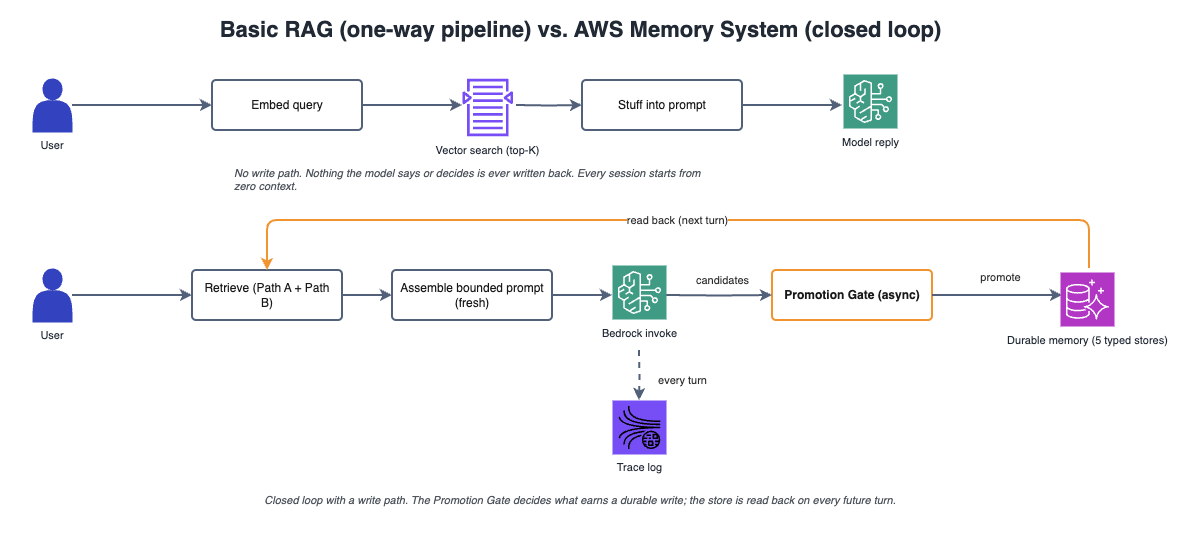
Diagram 1: Basic RAG (left) — one-way pipeline with no write path. AWS Memory System (right) — loop with write path back to durable store. The key difference is the existence of a write path and Promotion Gate.
2. Why basic RAG falls short of stateful AI
Pure retrieval architectures fail in five predictable places. These failure modes typically surface in production in a specific order — starting with multi-turn continuity problems and ending with unsustainable prompt growth. The diagram below maps each failure point and shows why retrieval alone cannot fix them.
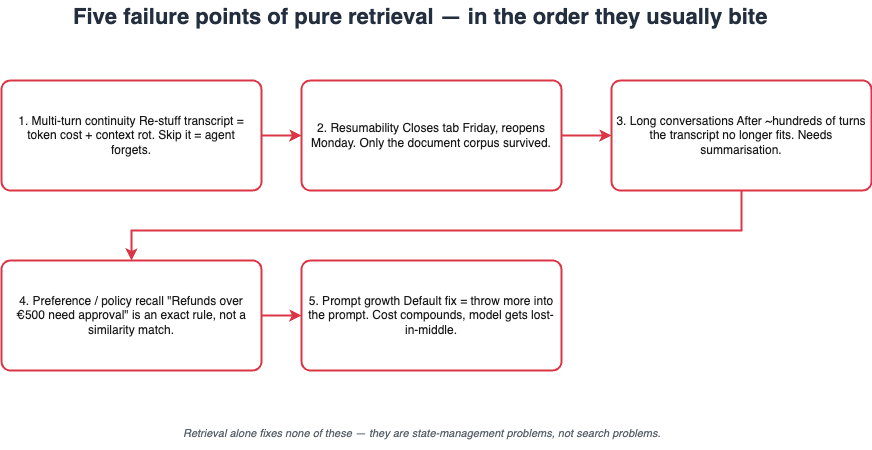
Figure 2: The five failure points of pure retrieval architectures. Each failure compounds the next — by the time you hit prompt growth, you're already fighting all four upstream problems.
Let's examine each failure point in detail:
Multi-turn continuity. The system has no memory of what was just said unless you re-stuff the transcript every turn. Stuff it and you pay tokens and lose model quality to context rot. Skip it and the agent forgets what the user asked three messages ago. Retrieval alone won't fix this.
Resumability. A user closes the tab on Friday and reopens on Monday. The agent should pick up where it left off. With RAG, the only thing that survives is the document corpus. Every preference the user expressed and every partial workflow they were in the middle of — gone.
Long conversations. After a few hundred turns you can't pack the transcript anymore. You need summarisation and structured extraction. None of that is retrieval.
User preferences and policy recall. "This user wants JSON." "This tenant formats dates DD/MM/YYYY." "Refunds over €500 require approval." You don't get these by semantic similarity to the user's last message. They are durable rules and parameters that need exact lookup with stable visibility on every turn, scoped to the right user or tenant.
Prompt growth. The default response to all of the above is to throw more into the prompt. The token bill compounds, the model gets lost-in-the-middle, and the system slows down precisely when it should feel more competent.
When RAG is enough — and when it isn't
If you only need semantic lookup over documents, basic RAG is sufficient. If the system must maintain continuity across sessions, precisely recall structured information, govern reuse across real privacy boundaries, and learn what to retain over time — you have a memory system design problem, not a RAG problem.
3. What changes when retrieval becomes memory
The shift from retrieval to memory isn't about bolting a database next to the vector store. It's a fundamental change in what the storage layer is for and how agents interact with it. Memory systems introduce five core capabilities that pure retrieval lacks — each solving a specific class of problems that RAG cannot address.

Figure 3: The five verbs that distinguish memory from retrieval. Each capability maps to a specific production requirement — from continuity (Store) to compliance (Govern).
Understanding these five capabilities is essential for designing the right architecture:
Retrieval is a query against a corpus you ingested once. The corpus is upstream and the query is downstream. Nothing the model says or does flows back into the corpus.
Memory is a write path. Anything the system observes during a run, or that a user explicitly confirms, can be promoted into a durable store. Each promoted record carries its own scope, its own provenance back to the run that created it, and a retention rule. The same record can later be read from a different turn, a different session, or by a different agent operating under the same access boundary.
A useful frame for the rest of this article:
- Retrieve when you need knowledge
- Store when you need continuity
- Structure when you need precision
- Summarize when you need compression
- Govern when you need production trust
The popular metaphor is second brain. Most implementations stop one step short — they give you searchable notes, which is closer to a better filing cabinet than to actual memory. A real second brain is accumulated, reusable memory: notes are distilled into facts attached to the entities they describe; completed work is summarised into reusable episodes; the same store serves a chat session for one user, an autonomous agent running on their behalf, and a human searching their own work later — without any of them needing their own copy. A vector store is not a memory system. The rest of this article is what lies underneath that distinction.
4. 5 types of memory and their AWS stack
"Add memory" sounds like a single feature. In practice it refers to five distinct systems — each with its own storage requirements, retrieval strategy, and lifecycle. Mixing them into one catch-all store is the most common architectural mistake, and it produces predictable failures: policies that drift because they're ranked by similarity, preferences that get lost in semantic noise, and facts that can't be audited because they're indistinguishable from conversation logs.
The diagram below shows the five memory types and the AWS services that back each one. The Memory Manager at the centre coordinates retrieval and writes across all types, enforcing scope boundaries and routing queries to the appropriate store.
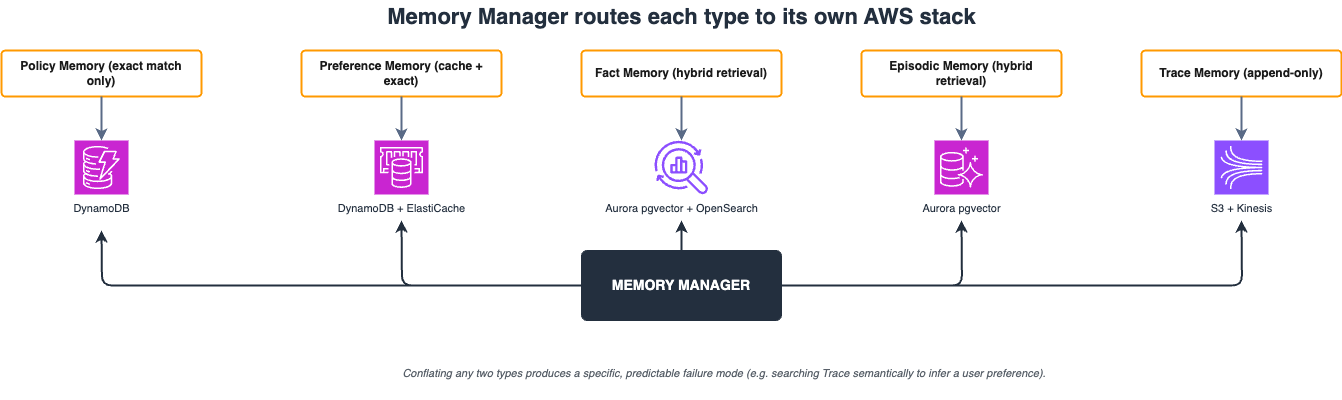
Figure 4: The five memory types and their AWS service stacks. Each type uses a different retrieval strategy — exact match for Policy/Preference, hybrid search for Fact/Episodic, append-only for Trace.
1. Policy Memory — DynamoDB
Procedural rules and constraints. Tenant-scoped or global, versioned, tightly controlled. Retrieved by exact match only — never similarity search.
Why it exists: the agent has to follow rules. Compliance constraints, brand guardrails, approval thresholds, security boundaries. These change rarely and deliberately. Policy retrieval via similarity is a bug — you silently drift away from the rule that is actually in force.
JSON Schema — policy_memory:
{
  "title": "policy_memory",
  "properties": {
    "policy_id":      { "type": "string", "maxLength": 64, "description": "UUID PK" },
    "tenant_id":      { "type": "string", "maxLength": 64, "description": "DynamoDB GSI-PK; NOT NULL" },
    "policy_type":    { "type": "string", "enum": ["compliance", "guardrail", "approval"] },
    "policy_key":     { "type": "string", "maxLength": 128, "description": "DynamoDB GSI-SK; NOT NULL" },
    "policy_value":   { "type": "object", "description": "structured rule payload" },
    "version":        { "type": "integer", "minimum": 1 },
    "effective_from":  { "type": "string", "format": "date-time" },
    "effective_until": { "type": ["string", "null"], "description": "null = currently active" },
    "created_by":     { "type": "string", "maxLength": 64, "description": "IAM principal" }
  }
}
Example records:
{ "policy_key": "refund_threshold",   "policy_value": { "max_auto_approve_eur": 500 } }
{ "policy_key": "data_residency",     "policy_value": { "allowed_regions": ["eu-west-1"] } }
{ "policy_key": "tone_guardrail",     "policy_value": { "forbidden_phrases": ["risk-free"] } }
Retrieval is always WHERE tenant_id = ? AND policy_key = ?. No vectors. No embeddings.
2. Preference Memory — DynamoDB + ElastiCache Redis
Stable personalisation parameters. User-scoped, predictable lookup, no ranking. "I want JSON." "Format dates DD/MM/YYYY." "Be terse."
Preferences feed the static prefix of the prompt — the part that should hit the Bedrock prompt cache and stay stable between turns. Skip preference retrieval once and the system feels generic.
JSON Schema — preference_memory:
{
  "title": "preference_memory",
  "properties": {
    "user_id":    { "type": "string", "maxLength": 64, "description": "DynamoDB PK; NOT NULL" },
    "tenant_id":  { "type": "string", "maxLength": 64, "description": "GSI; NOT NULL" },
    "pref_key":   { "type": "string", "maxLength": 64, "description": "DynamoDB SK; NOT NULL" },
    "pref_value": {},
    "source":     { "type": "string", "enum": ["user_stated", "inferred", "admin_set"] },
    "confidence": { "type": ["number", "null"], "minimum": 0, "maximum": 1 },
    "updated_at": { "type": "string", "format": "date-time" }
  }
}
ElastiCache Redis sits in front of DynamoDB for per-turn preference reads — after the first load in a session, preferences are cached with TTL 3600s. Cache miss → DynamoDB fallback.
3. Fact Memory — Aurora Serverless v2 + pgvector + OpenSearch Serverless
Durable assertions the agent may reuse, with provenance. "The customer Acme's production database is in eu-west-1, replica in eu-central-1." "Their fiscal year starts April 1."
Facts are what let the agent stop asking the same clarifying questions across sessions. They are also what poisons the system when promoted carelessly.
JSON Schema — fact_memory:
{
  "title": "fact_memory",
  "properties": {
    "fact_id":        { "type": "string", "description": "UUID PK" },
    "tenant_id":      { "type": "string", "maxLength": 64, "description": "NOT NULL; scope anchor" },
    "user_id":        { "type": ["string", "null"], "description": "NULL = tenant-scoped fact" },
    "agent_id":       { "type": ["string", "null"], "description": "NULL = shared fact" },
    "subject":        { "type": "string", "maxLength": 256, "description": "entity: customer:acme-corp" },
    "predicate":      { "type": "string", "maxLength": 64, "description": "type: infrastructure" },
    "content":        { "type": "string", "description": "prose assertion; NOT NULL" },
    "content_hash":   { "type": "string", "maxLength": 64, "description": "SHA-256; scoped dedup primitive" },
    "embedding":      { "type": ["array", "null"], "minItems": 1536, "maxItems": 1536 },
    "metadata":       { "type": ["object", "null"], "description": "JSONB" },
    "status":         { "type": "string", "enum": ["provisional", "active", "revoked"] },
    "source_run_id":  { "type": "string", "maxLength": 64, "description": "provenance; NOT NULL" },
    "confidence":     { "type": "number", "minimum": 0, "maximum": 1 },
    "superseded_by":  { "type": ["string", "null"] },
    "expires_at":     { "type": ["string", "null"], "format": "date-time" },
    "created_at":     { "type": "string", "format": "date-time" }
  }
}
4. Episodic Memory — Aurora Serverless v2 + pgvector
Structured summaries of completed work. Most production tasks are variations on tasks the agent has already completed. Episodic memory lets the system recognise "we've done this before" and retrieve the shape of the prior solution rather than re-deriving it from scratch.
Key distinction: the summary is a reusable artifact distilled from trace; the raw trace is kept separately in S3 for replay. Never search trace memory semantically to get episodic memory — the transcript tells you what the user did, not what the agent should remember.
5. Trace Memory — S3 + Kinesis Data Streams
Raw, append-only execution events. The flight recorder. What the agent retrieved, what it decided, which tools it called, what the model said. Trace memory is the source from which episodic and fact memory are distilled.
Trace memory is the wrong place to search when you want to know what a user is like. It tells you what a user did. Most teams conflate trace with fact and preference memory, ending up doing semantic search across execution logs to infer behaviour.
Kinesis Data Streams → Kinesis Data Firehose → S3 Parquet. Athena for SQL replay and forensics. S3 Lifecycle: 30d → Intelligent Tiering → 90d → Glacier IR → 365d expire.
5. Storage tradeoffs — STM vs LTM, filesystem vs database
Memory systems require two complementary storage tiers: short-term memory (STM) for ephemeral state during a single run, and long-term memory (LTM) for anything that should survive beyond the session. The choice between filesystem and database storage depends on your tenancy model, compliance requirements, and whether you need transactional semantics.
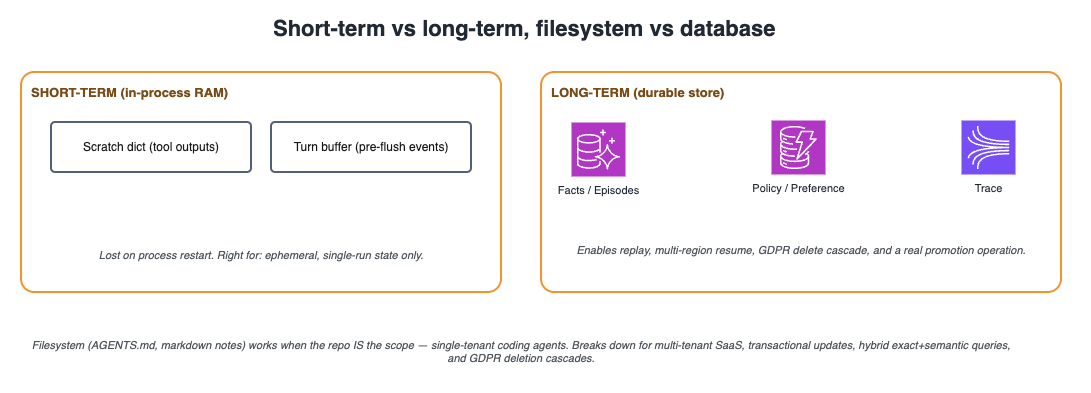
Figure 5: Storage tier decision matrix. Short-term memory lives in process RAM; long-term memory requires durable storage. Filesystem works for single-tenant local agents; multi-tenant SaaS requires a database.
Short-term vs long-term memory
Short-term memory means the agent process holds state in RAM (a Python dict, a Redis cache, a session object) and loses it when the process restarts. Fast, simple, zero friction — the right call for one specific case: ephemeral session state during a single run: tool outputs, scratch reasoning, intermediate retrieval results, anything that shouldn't outlive the turn.
For everything else it is the wrong call. State that lives only in RAM gives you no replay path when something goes wrong, no audit trail when a regulator asks, no way to enforce retention, and no scoping model to keep tenants apart.
A real system uses both. Working set in short-term memory during a run, long-term for anything that should survive the run:
Python — AgentSession class:

class AgentSession:
    def __init__(self, run_id: str, user_id: str,
                 tenant_id: str, memory_client):
        # Ephemeral — discarded at end of run
        self.scratch     = {}       # tool outputs, intermediate state
        self.turn_buffer = []       # current turn events before flush to Kinesis

        # Durable — read from / written to via memory manager
        self.run_id      = run_id
        self.user_id     = user_id
        self.tenant_id   = tenant_id
        self.memory      = memory_client   # AgentCore Memory SDK
What changes when you move durable state into a database:
- Replay becomes possible. Reproduce yesterday's session by replaying trace memory for the given
run_id. Without this, debugging is guesswork. - Multi-process and multi-region work correctly. A user starts a session on one server, comes back tomorrow on another — the agent picks up where it left off.
- Promotion becomes a real operation. You cannot promote a candidate fact to durable memory if there is no durable memory.
- Audit and deletion are tractable. GDPR right-to-forget is a DELETE cascading across stores. With short-term memory it is fiction.
Filesystem vs database
A class of memory storage lives on the filesystem: markdown files, AGENTS.md, project notes, structured directories. The pattern is everywhere in coding agents (Claude Code, Cursor, Codex) and works there for a specific reason: the filesystem is already the unit of work. The repo is the scope and the file path is the boundary.
| Situation | Filesystem | Database |
|---|---|---|
| Single-tenant local agent (coding, personal) | ✓ Yes | Overkill |
| Multi-tenant SaaS agent | ✗ No | Required |
| Transactional updates (fact supersession) | ✗ No | Required |
| Exact + semantic in one query | ✗ No | Required |
| Users want to edit memory by hand | ✓ Yes | Possible, harder |
| Replay and audit trails | Painful | Native |
| GDPR deletion cascade | ✗ No | Required |
6. Single table vs typed tables
Once you choose a database, the next decision is schema layout. How you organize memory types into tables determines what operations are easy, what indexes you need, and how cleanly you can enforce per-type rules. Three patterns appear in practice — each with distinct tradeoffs for simplicity, performance, and governance.
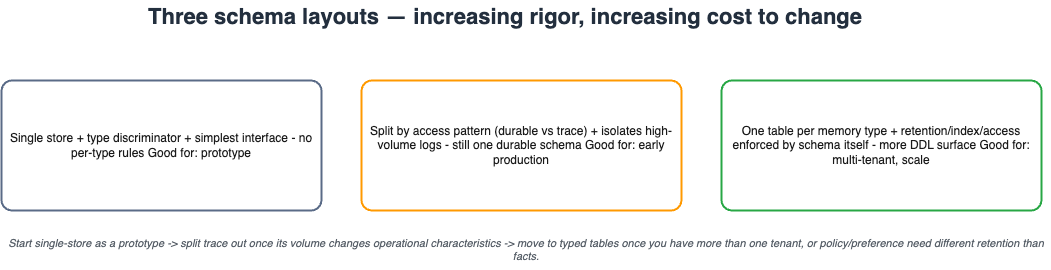
Figure 6: Schema layout options. Single store minimizes DDL but mixes access patterns. Split by access pattern separates high-volume traces. Typed tables enforce per-type rules at the schema level.
Let's examine each layout and when to use it:
Single store with type discriminator (a memory_type column or namespace prefix). Wins are real: schema simplicity, one storage interface, no joins, easy to add a new type. For a single-tenant prototype or low-volume internal tool, this is the right call.
Split by access pattern. The most common shape: one store for durable memory, a separate store for conversation history or traces. Logs are append-only, high-volume, and queried by run_id for replay. They share almost nothing at the storage layer with durable memory. Letting trace grow inside the same table as facts means heavy trace writes bloat the working set for every other query.
One table per memory type — the model this article describes. The cost is real: more DDL, more places to touch when something cross-cutting changes. The payoff: the rules each type follows live in the schema itself. Per-type retention, per-type indexes (no wasted vector index on policy or preference), and per-type access patterns are enforceable without application code having to remember them.
A reasonable working rule: start with a single store when the system is a prototype. Split trace out as soon as its volume changes the characteristics of the operational store. Move to the typed model when you have more than one tenant, or when policy and preference start needing different retention rules than fact memory.