From RAG to Memory Systems — Part 4: Implementation
The complete AWS architecture end to end, a working Terraform module that provisions every store, a six-phase migration path off an existing RAG pipeline, and the anti-patterns worth checking your own system against.
In This Part
- The full request path, write path, and observability stack fit into one architecture diagram — nothing here is exotic infrastructure.
- A working Terraform module provisions Aurora pgvector, DynamoDB, ElastiCache, OpenSearch Serverless, Kinesis, and the Step Functions extraction workflow.
- Migration from an existing RAG pipeline is six incremental, reversible phases — not a rewrite.
- Every anti-pattern in production memory systems maps to a specific, structural fix — not a hyperparameter tune.
Table of Contents
16. Complete AWS architecture
Everything described in the previous parts fits into a single architecture diagram. The request path flows synchronously through API Gateway → Lambda → Memory Manager → storage systems. The write path runs asynchronously: trace events stream via Kinesis to S3, and extraction runs off the request thread via SQS → Lambda → Step Functions.
None of this is exotic infrastructure — it's standard AWS services composed according to the patterns we've established. The table below maps each logical component to its AWS service and scaling characteristics.
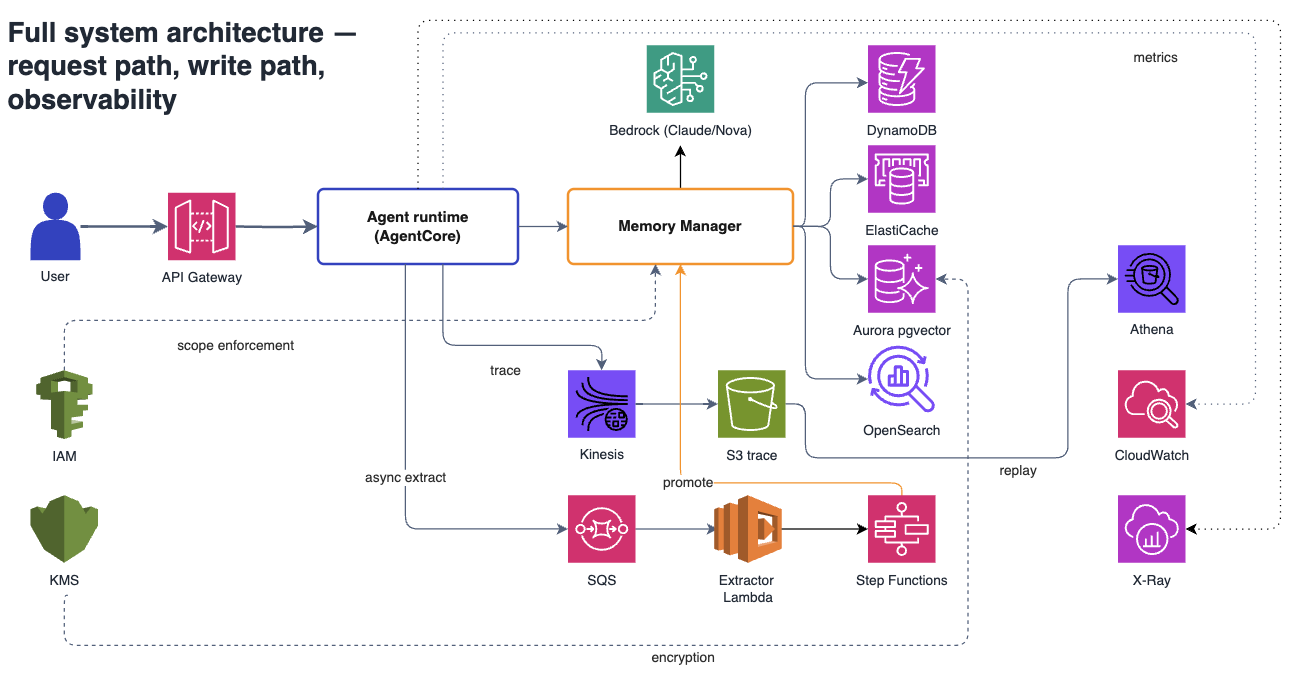
Figure 14: Full production architecture on AWS. Request flows top to bottom; trace events flow asynchronously to S3; extraction runs off the request thread via Step Functions.
| Component | AWS Service | Purpose | Scaling |
|---|---|---|---|
| API Layer | API Gateway REST + Lambda | Request routing, auth (Cognito) | Auto-scales with requests |
| Memory Manager | Lambda (Python 3.12) | Orchestrates retrieval + promotion | Concurrent executions = 1000 |
| Policy/Preference | DynamoDB + ElastiCache Redis | Exact-match lookup | On-demand DynamoDB, 5 GB Redis |
| Fact/Episode | Aurora Serverless v2 (pgvector) | Hybrid retrieval + ACID transactions | 0.5–8 ACU |
| Lexical Index | OpenSearch Serverless | BM25 full-text search | 4 OCU |
| Trace Log | Kinesis Data Streams → S3 | Append-only event log | 2 shards → Firehose → Parquet |
| Inference | Amazon Bedrock | Claude 3.5 Sonnet, Nova Micro | Managed, pay-per-token |
| Embedding | Bedrock Titan Embed v2 | 1536-dim vectors | Managed |
| Extraction | SQS → Lambda → Step Functions | Asynchronous summarisation | FIFO queue, standard Step Functions |
| Observability | CloudWatch + X-Ray | Metrics, logs, distributed traces | Standard retention |
How the components work together
The architecture separates concerns along two axes: synchronous vs asynchronous and read path vs write path. Understanding this separation is key to operating the system effectively.
Synchronous read path — every user request triggers this flow:
- API Gateway authenticates the request via Cognito and routes to the Memory Manager Lambda
- Memory Manager runs Path A (DynamoDB exact lookup) and Path B (Aurora hybrid search) in parallel
- Results are assembled into a token-budgeted prompt with static prefix for caching
- Bedrock generates a response using Claude 3.5 Sonnet with prompt caching enabled
- Response returns to the user — latency target is <2 seconds p95
Asynchronous write path — runs off the request thread:
- Every turn writes a trace event to Kinesis Data Streams (fire-and-forget, non-blocking)
- Kinesis Firehose batches events and writes to S3 in Parquet format for Athena queries
- After the response is sent, an SQS message triggers the extraction workflow
- Step Functions orchestrates: retrieve trace → extract facts with Nova Micro → promote to Aurora
- Failed extractions go to a dead-letter queue for manual review
Why this separation matters: The user never waits for extraction or trace persistence. Extraction uses a cheap model (Nova Micro at $0.15/MTok vs Sonnet at $3/MTok) because it runs asynchronously and can tolerate higher latency. If extraction fails, the system degrades gracefully — the user got their response, and the trace log ensures nothing is lost.
Scaling characteristics
Each component scales independently, which means you can optimize for your specific traffic pattern:
- Bursty traffic: Lambda and DynamoDB handle bursts automatically. Aurora Serverless v2 scales ACUs within seconds. The bottleneck is usually cold starts on Lambda — keep a provisioned concurrency pool for latency-sensitive paths.
- Sustained high throughput: Kinesis shards determine write throughput to trace logs (1 MB/s per shard). OpenSearch OCUs determine search throughput. Both can be increased without downtime.
- Large memory stores: Aurora pgvector handles millions of facts efficiently with proper indexing. The HNSW index configuration (m=16, ef_construction=64) balances recall and build time for stores up to 10M vectors.
17. Terraform — production deployment
The following Terraform configuration deploys the complete memory system on AWS. It provisions Aurora Serverless v2 with pgvector, DynamoDB tables, ElastiCache Redis, OpenSearch Serverless, Kinesis streams, S3 buckets, Lambda functions, and Step Functions. The module is designed for production use — it includes encryption at rest, VPC isolation, and proper IAM policies.
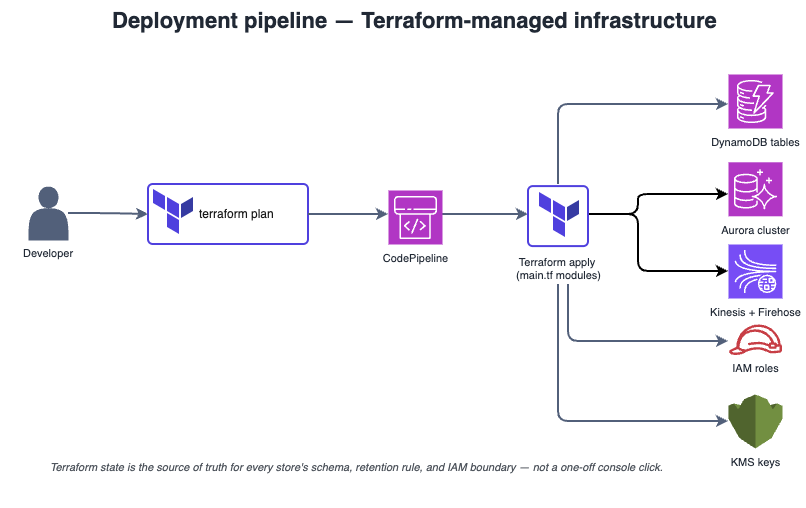
Figure 15: Terraform deployment pipeline. A single terraform apply provisions all infrastructure. State is stored in S3 with DynamoDB locking for team collaboration.
The complete module is shown below — copy this into your main.tf and customize the variables. I'll walk through each block and explain the key configuration decisions.
Infrastructure overview
The Terraform module provisions seven major components. Each component is configured for production use with sensible defaults, but you'll want to tune scaling parameters based on your traffic patterns:
- Aurora Serverless v2 — PostgreSQL 15.4 with pgvector extension. Scales from 0.5 to 8 ACUs automatically. The schema includes fact_memory and episodic_memory tables with proper indexes for hybrid retrieval.
- DynamoDB tables — Two tables for policy and preference memory. On-demand billing means you pay only for actual reads/writes. Global secondary indexes enable efficient tenant-scoped queries.
- ElastiCache Redis — Single-node t4g.small cluster for preference caching. Reduces DynamoDB read costs by 80% for frequently accessed preferences.
- OpenSearch Serverless — Managed search collection for BM25 lexical retrieval. The "SEARCH" collection type is optimized for full-text queries.
- Kinesis + Firehose — Streaming pipeline for trace events. Firehose converts JSON to Parquet and partitions by date for efficient Athena queries.
- Lambda functions — Memory Manager (synchronous) and extraction workers (asynchronous). Python 3.12 runtime with 1024 MB memory for fast cold starts.
- Step Functions — Orchestrates the three-step extraction workflow. Standard workflow type for durability; Express would be cheaper but loses execution history.
HCL — main.tf:

terraform {
  required_version = ">= 1.5"
  required_providers {
    aws = { source = "hashicorp/aws", version = "~> 5.0" }
  }
}

provider "aws" {
  region = var.aws_region
}

# ─────────────────────────────────────────────────────────────
# Aurora Serverless v2 with pgvector
# ─────────────────────────────────────────────────────────────
resource "aws_rds_cluster" "memory" {
  cluster_identifier      = "memory-cluster"
  engine                  = "aurora-postgresql"
  engine_mode             = "provisioned"
  engine_version          = "15.4"
  database_name           = "memory"
  master_username         = "postgres"
  master_password         = var.db_password
  serverlessv2_scaling_configuration {
    min_capacity = 0.5
    max_capacity = 8.0
  }
  skip_final_snapshot = true
}

resource "aws_rds_cluster_instance" "memory" {
  identifier         = "memory-instance-1"
  cluster_identifier = aws_rds_cluster.memory.id
  instance_class     = "db.serverless"
  engine             = aws_rds_cluster.memory.engine
}

# pgvector extension + schema init
resource "null_resource" "pgvector_init" {
  provisioner "local-exec" {
    command = <<-EOT
      psql postgresql://${aws_rds_cluster.memory.master_username}:${var.db_password}@${aws_rds_cluster.memory.endpoint}:5432/memory -c "
        CREATE EXTENSION IF NOT EXISTS vector;
        CREATE EXTENSION IF NOT EXISTS pgcrypto;

        CREATE TABLE IF NOT EXISTS fact_memory (
            fact_id          UUID PRIMARY KEY DEFAULT gen_random_uuid(),
            tenant_id        VARCHAR(64) NOT NULL,
            user_id          VARCHAR(64),
            agent_id         VARCHAR(64),
            subject          VARCHAR(256),
            predicate        VARCHAR(64),
            content          TEXT NOT NULL,
            content_hash     CHAR(64) NOT NULL,
            embedding        VECTOR(1536),
            metadata         JSONB,
            status           VARCHAR(20) DEFAULT 'active',
            source_run_id    VARCHAR(64) NOT NULL,
            confidence       NUMERIC(3,2),
            superseded_by    UUID REFERENCES fact_memory(fact_id),
            reconfirmed_count INT DEFAULT 0,
            expires_at       TIMESTAMP,
            created_at       TIMESTAMP DEFAULT NOW(),
            updated_at       TIMESTAMP,
            deleted_at       TIMESTAMP
        );

        CREATE INDEX idx_fact_tenant_scope ON fact_memory(tenant_id, user_id, status)
          WHERE superseded_by IS NULL AND status = 'active';
        CREATE INDEX idx_fact_embedding ON fact_memory USING hnsw (embedding vector_cosine_ops)
          WHERE status = 'active';
        CREATE INDEX idx_fact_fts ON fact_memory USING gin(to_tsvector('english', content));
        CREATE UNIQUE INDEX idx_fact_dedup ON fact_memory(tenant_id, content_hash)
          WHERE status = 'active';
      "
    EOT
  }
  depends_on = [aws_rds_cluster_instance.memory]
}

# ─────────────────────────────────────────────────────────────
# DynamoDB tables
# ─────────────────────────────────────────────────────────────
resource "aws_dynamodb_table" "policy_memory" {
  name           = "policy_memory"
  billing_mode   = "PAY_PER_REQUEST"
  hash_key       = "policy_id"

  attribute {
    name = "policy_id"
    type = "S"
  }
  attribute {
    name = "tenant_id"
    type = "S"
  }
  attribute {
    name = "policy_key"
    type = "S"
  }

  global_secondary_index {
    name            = "tenant_key_index"
    hash_key        = "tenant_id"
    range_key       = "policy_key"
    projection_type = "ALL"
  }
}

resource "aws_dynamodb_table" "preference_memory" {
  name           = "preference_memory"
  billing_mode   = "PAY_PER_REQUEST"
  hash_key       = "user_id"
  range_key      = "pref_key"

  attribute {
    name = "user_id"
    type = "S"
  }
  attribute {
    name = "pref_key"
    type = "S"
  }
  attribute {
    name = "tenant_id"
    type = "S"
  }

  global_secondary_index {
    name            = "tenant_index"
    hash_key        = "tenant_id"
    projection_type = "ALL"
  }
}

# ─────────────────────────────────────────────────────────────
# ElastiCache Redis for preference caching
# ─────────────────────────────────────────────────────────────
resource "aws_elasticache_cluster" "preference_cache" {
  cluster_id           = "preference-cache"
  engine               = "redis"
  node_type            = "cache.t4g.small"
  num_cache_nodes      = 1
  parameter_group_name = "default.redis7"
  engine_version       = "7.0"
  port                 = 6379
}

# ─────────────────────────────────────────────────────────────
# OpenSearch Serverless
# ─────────────────────────────────────────────────────────────
resource "aws_opensearchserverless_collection" "memory_lexical" {
  name = "memory-lexical"
  type = "SEARCH"
}

# ─────────────────────────────────────────────────────────────
# Kinesis Data Stream + Firehose → S3
# ─────────────────────────────────────────────────────────────
resource "aws_kinesis_stream" "trace_log" {
  name             = "memory-trace-log"
  shard_count      = 2
  retention_period = 24
}

resource "aws_s3_bucket" "trace_logs" {
  bucket = "memory-trace-logs-${var.account_id}"
}

resource "aws_kinesis_firehose_delivery_stream" "trace_to_s3" {
  name        = "memory-trace-firehose"
  destination = "extended_s3"

  extended_s3_configuration {
    role_arn   = aws_iam_role.firehose_role.arn
    bucket_arn = aws_s3_bucket.trace_logs.arn
    prefix     = "traces/year=!{timestamp:yyyy}/month=!{timestamp:MM}/day=!{timestamp:dd}/"

    data_format_conversion_configuration {
      input_format_configuration {
        deserializer { open_x_json_ser_de {} }
      }
      output_format_configuration {
        serializer { parquet_ser_de {} }
      }
      schema_configuration {
        database_name = aws_glue_catalog_database.traces.name
        table_name    = aws_glue_catalog_table.traces.name
        role_arn      = aws_iam_role.firehose_role.arn
      }
    }
  }

  kinesis_source_configuration {
    kinesis_stream_arn = aws_kinesis_stream.trace_log.arn
    role_arn           = aws_iam_role.firehose_role.arn
  }
}

# ─────────────────────────────────────────────────────────────
# Lambda — Memory Manager
# ─────────────────────────────────────────────────────────────
resource "aws_lambda_function" "memory_manager" {
  function_name = "memory-manager"
  runtime       = "python3.12"
  handler       = "main.lambda_handler"
  filename      = "memory_manager.zip"
  role          = aws_iam_role.lambda_exec_role.arn
  timeout       = 30
  memory_size   = 1024

  environment {
    variables = {
      AURORA_ENDPOINT       = aws_rds_cluster.memory.endpoint
      DYNAMO_POLICY_TABLE   = aws_dynamodb_table.policy_memory.name
      DYNAMO_PREF_TABLE     = aws_dynamodb_table.preference_memory.name
      REDIS_ENDPOINT        = aws_elasticache_cluster.preference_cache.cache_nodes[0].address
      OPENSEARCH_ENDPOINT   = aws_opensearchserverless_collection.memory_lexical.collection_endpoint
      KINESIS_STREAM        = aws_kinesis_stream.trace_log.name
    }
  }
}

# ─────────────────────────────────────────────────────────────
# Step Functions — Episodic extraction workflow
# ─────────────────────────────────────────────────────────────
resource "aws_sfn_state_machine" "episodic_extraction" {
  name     = "episodic-extraction"
  role_arn = aws_iam_role.step_functions_role.arn

  definition = jsonencode({
    Comment = "Extract episodic memory from completed task trace"
    StartAt = "RetrieveTrace"
    States = {
      RetrieveTrace = {
        Type     = "Task"
        Resource = aws_lambda_function.retrieve_trace.arn
        Next     = "ExtractSummary"
      }
      ExtractSummary = {
        Type     = "Task"
        Resource = aws_lambda_function.extract_summary.arn
        Next     = "PromoteEpisode"
      }
      PromoteEpisode = {
        Type     = "Task"
        Resource = aws_lambda_function.promote_episode.arn
        End      = true
      }
    }
  })
}
Deployment process
Deploy with standard Terraform commands. The entire infrastructure provisions in approximately 15-20 minutes, with Aurora cluster creation being the longest step:
bash
terraform init
terraform plan -var="aws_region=eu-west-1" -var="db_password=CHANGE_ME"
terraform apply
Post-deployment configuration
After Terraform completes, you'll need to perform a few manual steps:
- Enable pgvector extension — The
null_resourceprovisioner runs automatically, but verify withSELECT * FROM pg_extension WHERE extname = 'vector'; - Configure OpenSearch access policy — Add your Lambda execution role to the collection's data access policy
- Set up Glue catalog — Create the database and table schema for Athena queries against trace logs
- Deploy Lambda code — Package your Python code and upload to the Lambda functions (or use a CI/CD pipeline)
- Test the pipeline — Send a test event through the system and verify traces appear in S3 within 5 minutes
Production hardening
The module above is functional but needs additional configuration for production:
- VPC isolation — Add VPC, subnets, and security groups. Aurora, ElastiCache, and Lambda should be in private subnets with NAT Gateway for outbound access.
- Encryption — Enable KMS encryption on Aurora, DynamoDB, S3, and Kinesis. Use customer-managed keys for compliance.
- Secrets management — Store database credentials in Secrets Manager, not Terraform variables. Rotate credentials automatically.
- Backup and retention — Configure Aurora automated backups (7-day retention minimum) and S3 lifecycle policies.
- Monitoring alarms — Create CloudWatch alarms for Aurora CPU, Lambda errors, DLQ depth, and Kinesis iterator age.
18. Migrating from RAG to a memory system
You have a RAG pipeline in production. Users are asking for continuity across sessions. Here's how to migrate without rewriting everything. The migration is six incremental, reversible phases — each phase adds one capability while leaving the existing system operational.
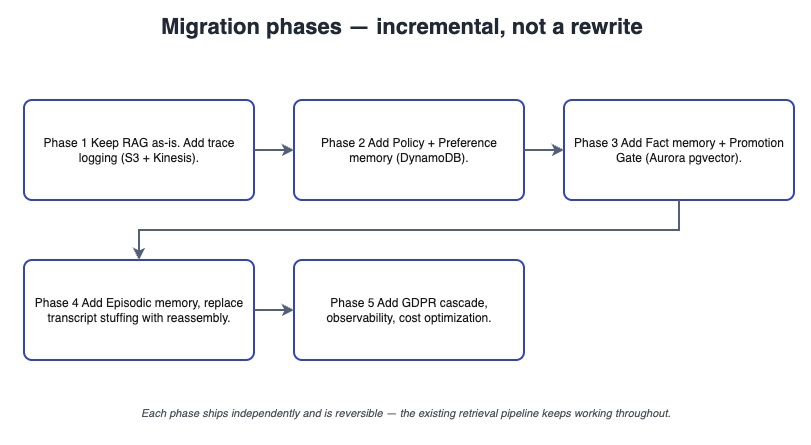
Figure 16: Six-phase migration from RAG to memory system. Each phase is reversible. Start with trace logging — without it, you cannot debug or evaluate anything that follows.
Follow these phases in order — each one builds on the previous:
Add trace logging — start here
Before changing anything else, add trace logging to your existing agent. Every user message, every model response, every retrieval query. Write to Kinesis → S3. This is the foundation for everything that follows. Without trace you cannot debug, replay, or evaluate.
Split policy and preference out of the vector store
If you have policy or preference data sitting in your vector index, move it to DynamoDB. Policy and preference should never be retrieved by similarity — they need exact lookup. Create a policy_memory table and a preference_memory table. Backfill from your existing data.
Add a Memory Manager layer
Create a new MemoryManager class that wraps your existing vector store and the new DynamoDB tables. The agent calls the memory manager instead of the vector store directly. Start by having the memory manager just forward retrieval queries to the existing store — this is a refactor, not a behaviour change.
Add the promotion gate — but don't use it yet
Implement the promotion gate logic, but configure it to log only — don't write to durable memory yet. Let it run for a week. Review the logs. See what would have been promoted. Tune the confidence thresholds. Only when the gate is stable should you flip the switch to actually promote facts.
Migrate to Aurora + pgvector
If you're using a standalone vector store (Pinecone, Weaviate, Qdrant), migrate to Aurora Serverless v2 with pgvector. Why? Because you need ACID transactions for the promotion gate, supersession, and GDPR deletion. Standalone vector stores don't give you this. The migration is a one-time backfill: read from old store, write to Aurora.
Add hybrid retrieval
Add lexical retrieval (PostgreSQL FTS or OpenSearch) alongside vector retrieval. Fuse the results. Measure recall@5 before and after. You should see a 15–30% improvement on queries with named entities or exact terms.
Why incremental migration works
The key insight is that each phase is independently valuable and fully reversible. You can stop at any phase and still have a better system than you started with:
- After Phase 1: You have trace logs. You can debug issues, replay sessions, and build evaluation datasets. This alone is worth the effort.
- After Phase 2: Policy and preference retrieval is faster and more reliable. You've eliminated a class of bugs where important rules were lost in semantic noise.
- After Phase 3: Your codebase is cleaner. The memory manager abstraction lets you swap storage backends without changing agent code.
- After Phase 4: You understand what your system would remember. The promotion logs are a goldmine for product insights — what do users actually care about?
- After Phase 5: You have ACID transactions and GDPR compliance. You can safely delete user data without worrying about orphaned vectors.
- After Phase 6: Full hybrid retrieval with measurable recall improvements. The system is complete.
Common migration pitfalls
Teams run into predictable problems during migration. Here's how to avoid them:
- Skipping Phase 1: Without trace logs, you cannot evaluate whether subsequent phases actually improved retrieval quality. You're flying blind.
- Enabling promotion too early: Phase 4 says "log only" for a reason. If you enable promotion immediately, you'll fill the store with garbage before you've tuned the thresholds.
- Big-bang Aurora migration: Don't try to migrate and add hybrid retrieval simultaneously. Migrate first, verify everything works, then add the lexical path.
- Ignoring the backfill: If you have valuable data in your existing vector store, plan the backfill carefully. Run it during low-traffic hours and monitor Aurora ACU scaling.
19. Anti-patterns and how to fix them
These are the failure modes that appear in production memory systems. Most are structural — they cannot be fixed by tuning hyperparameters or changing the prompt. Each anti-pattern has a specific architectural fix, and the diagram below maps them directly.
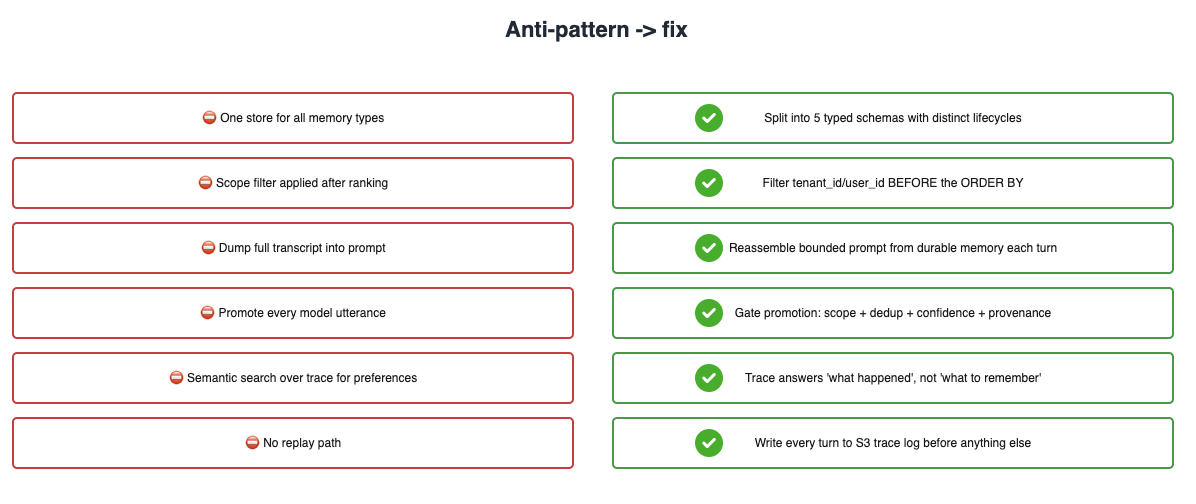
Figure 17: Anti-patterns mapped to fixes. Each failure mode on the left has a structural solution on the right. If you're seeing these symptoms in production, the fix is architecture, not tuning.
Check your system against these patterns:
Fix: Reassemble the prompt from durable memory on every turn. Keep a compressed tail of recent turns (last 3–5), but reconstruct the rest from policy, preference, and fact memory.
Fix: Separate by type. Policy → DynamoDB. Preference → DynamoDB + Redis. Fact → Aurora. Episode → Aurora. Trace → S3. Each has its own lifecycle and retrieval strategy.
Fix: Add a promotion gate with confidence thresholds and SHA-256 deduplication. Only promote facts with confidence >= 0.7 or source = 'user_confirmed'.
tenant_id after retrieval. The embedding neighbourhood was already shaped by data the user should not have seen.Fix: Scope filter BEFORE ranking. Add WHERE tenant_id = ? to every query before any ORDER BY embedding.
Fix: Write every turn to Kinesis → S3 as an append-only log. Replay from trace to reproduce issues.
Fix: Embed at write time. When a fact is promoted, compute the embedding once and store it in the embedding column. Query-time embedding is only for the user's current message.
Fix: Add superseded_by and status columns. When a new fact replaces an old fact, mark the old one superseded_by = new_fact_id and filter it out in reads with WHERE superseded_by IS NULL.
How to diagnose anti-patterns in production
These anti-patterns don't announce themselves. They appear as vague user complaints: "the agent forgot what I said" or "it keeps asking the same questions." Here's how to diagnose which anti-pattern you're hitting:
| Symptom | Likely anti-pattern | How to confirm |
|---|---|---|
| Token costs increasing over time | Accumulating context | Plot average tokens per turn over sessions |
| Agent ignores explicit user preferences | Single store / semantic retrieval for preferences | Query DynamoDB directly — is the preference there? |
| Memory store growing faster than expected | Promoting everything | Check gate rejection rate — if <30%, gate is too loose |
| Different users seeing each other's data | Scope as post-filter | Review SQL execution plans — is tenant_id in the index scan? |
| Cannot reproduce reported bugs | No trace | Try to replay the user's session from logs |
| High latency on retrieval | Query-time embedding | Profile retrieval — is embed() in the hot path? |
| Stale facts appearing in responses | No invalidation | Check superseded_by column — are old facts filtered? |
The meta-lesson
All seven anti-patterns share a common cause: treating memory as "just another feature" instead of a core architectural concern. Memory touches every part of the system — storage, retrieval, prompts, compliance, cost. When teams bolt memory onto an existing RAG pipeline without thinking through these interactions, they hit these anti-patterns within months.
The fix is not more code. It's stepping back and asking: what does each memory type need? Policy needs exact lookup. Facts need hybrid retrieval. Traces need append-only durability. Once you've answered these questions correctly, the architecture follows naturally — and the anti-patterns never appear.